
Legacy Bamboo CI Setup for AIQ Execution
TheLast morereviewed: naturalSeptember way29, to2026
This Appvance AI using Bamboopage is by setting local or remote agents however it is possible performing it with dockers, they are recommendedretained for isolatedteams testing.that Thisstill guiderun is oriented to configureAIQ execution planplans for AppvanceIQ using agents configuration it does not matter if they are local or remote.
Requeriments
The following requirements are the ones that are necessary to have AppvanceRestClient running test overfrom Atlassian Bamboo.
What changed in this article
JavaMarkedDevelopmentBambooKitCIJDK, please installsetup asitlegacy/environment-specificisbecauserequiredmanyincurrent CI workflows use Jenkins, GitHub, Azure DevOps, or another maintained runner.- Replaced the
relatedlong Bamboo installation walkthrough with targeted AIQ execution-plan guidance: agents, Ant tasks, repositories, credentials, and result handling. - Called out stale dependencies from the old article, including Ubuntu 16.04, Oracle
siteJDKdepending8,of the chosen platformhttps://www.oracle.com/technetwork/java/javase/downloads/index.html.
Validation workflow
Database driver,Confirm Bamboo isnatively prepared for H2, Oracle, PostgreSQL, MsSQL to storestill thebuildscustomer’sdataactivesoCI system before using thisrequirementpage.- Validate
willagentbeOS,necessaryJDK,onlyAnt,inbrowser, repository, and AIQ connectivity before creating thecaseexecutionofplan. - Run
MySQLonedatabase, it does not matter if the database is installed locally of remotely, it can be obtained inhttps://dev.mysql.com/downloads/connector/j/,the jar file will be copied to the lib folder of bamboo later.
Bamboo
Review installationnote:
TheKept packageas canlegacy beCI downloadedguidance fromand https://www.atlassian.com/software/bamboo/download chooseremoved the platformimpression youthat areold installing,Bamboo/JDK/Ubuntu follow the Bamboo installation guide located in https://confluence.atlassian.com/bamboo/bamboo-installation-guide-289276785.html, during the process you will asked for the location of the bamboo files, itsetup is highly suggested to located this folder in a place out of the user folders, so every user logged in the system can access the folder.
JUST IN THE CASE OF MYSQL. Once you have Completed the installation, you will need to copy the MySQL JDBC jar file in the sub folder lib of the Bamboo executables.
Once this has been completed please start Bamboo by issuing BambooConsole script file if you want to run it as desktop application or installAsService script file to run it as a service and then StartBamboo, at this time you will be able to log Bamboo at http://localhost:8085 or http://<dns>:8085 out of the machine, however the first time you will redirected to http://localhost:8085/setup/setupLicense.action where you will be asked for a license key, you can obtain it by clicking in contact Atlassian link under the text box, once you have the key, copy/paste it in the text box and then click Express Installation if you will use the H2current default database that is fine for tests or learning but if this is not the case please click in Custom Installation, in the first page you will be able of changing the instance name and some location file stuff, in the second page you will need to choose from the embedded database (H2) or an external, you will need to choose the database from the combo box as I have mentiones before PostgreSQL, Oracle, MsSQL or MySQL (it is required to have copied the jdbc jar file), the final task will be configuring the driver, this will depend of of the chosen database, please fill the information related to the connections string as per the database jdbc.practice.
There are more details for the installation, but since this document is oriented to how to set Appvance to work with Bamboo, feel free to look for more documentation in the Atlassian bamboo site.
One more thing to configure is install ant as an executable in Bamboo as below.
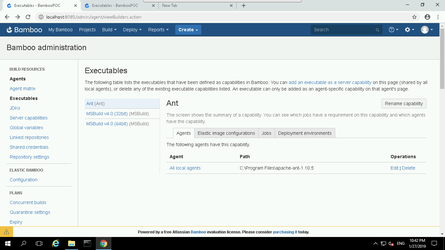
The path is the place where ant has been installed.
Plan Configuration
Native build configuration is based in agents, mainly by its performance and flexibility, Dockers configuration are not covered in the present document
Create Project
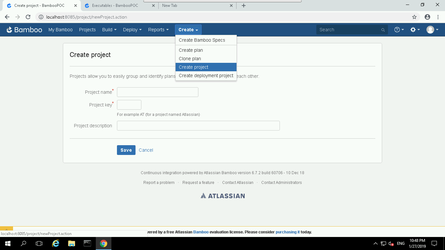
Give the project a name and a key as an acronym, optionally you can fill the description with some relevant info.
Create Plan
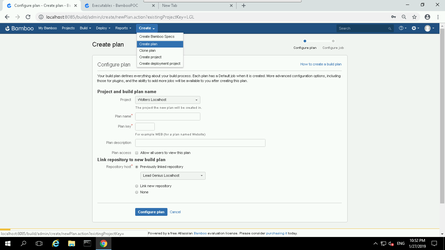
Give the plan a name and a key as a acronym , optionally you can fill the description with some relevant info.
Set the scenario repository
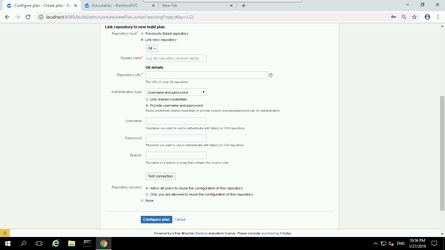
Fill the repository credentials fields and the correct branch and click in the Configure Plan button
Configuring plan
It will be redirected to this form
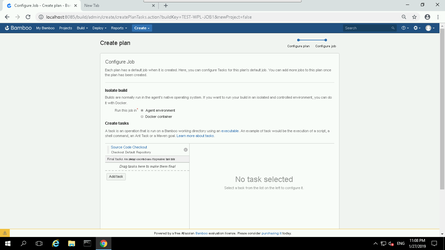
All the necessary jobs for the scenario execution have been created as ant tasks, please modify the paths as per the environment you are setting up and create the following tasks in this order
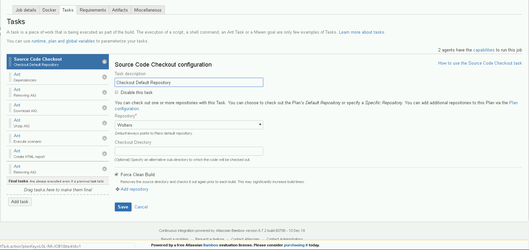
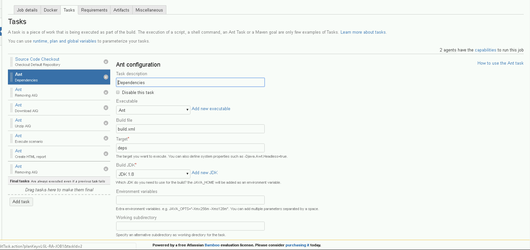
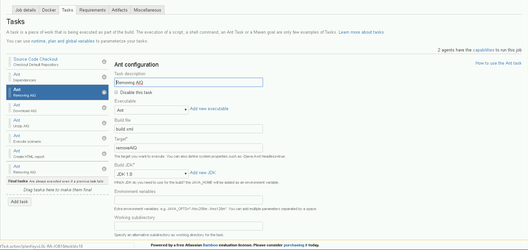
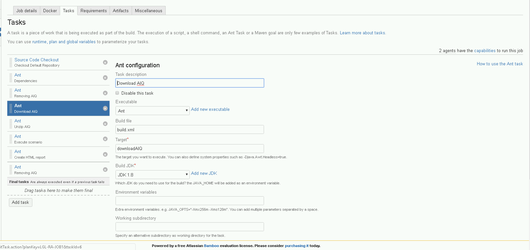
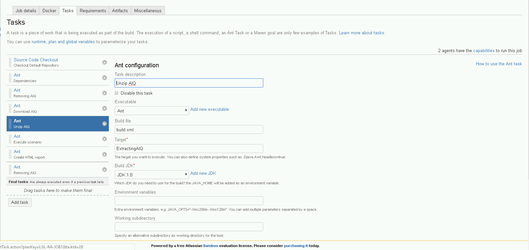
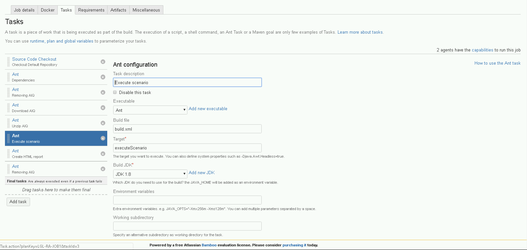
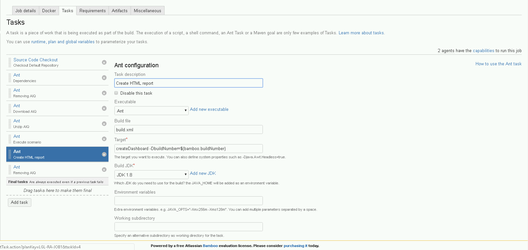
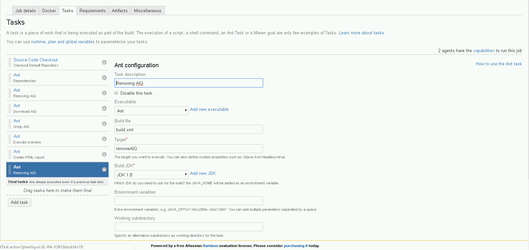
Please take a look to the attached build.xml and crds.json file for a full understanding of the ant targets.
Linux installation (Debian based)
This installation assumes an UBUNTU 16.04 EC2 machine, follow these commands to install a Linux Bamboo agent.
7 zip
sudo apt-get install p7zip-full p7zip-rar
Oracle JDK 8
sudo add-apt-repository ppa:webupd8team/javasudo apt updatesudo apt install oracle-java8-installersudo apt install oracle-java8-set-default
ANT
sudo apt install ant
XVFB, Firefox and Chrome
sudo apt install xvfb firefox
sudo apt install mysql-serversudo systemctl status mysqlsudo mysql_secure_installation
wget https://dl.google.com/linux/direct/google-chrome-stable_current_amd64.debsudo dpkg -i google-chrome-stable_current_amd64.deb
Adding access globally to there packages
cd /etc/profile.d/
vi ant.shexport ANT_HOME=/usr/local/antexport PATH=${ANT_HOME}/bin:${PATH}
vi java.shexport JAVA_HOME=/usr/lib/jvm/java-8-oracle/jre/bin/java
vi xvfb.shXvfb :99 -ac -screen 0 1280x1024x24 &
chmod +766 ant.sh java.sh xvfb.sh
Install Bamboo agent
java -jar atlassian-bamboo-agent-installer-6.7.2.jar http://<dns or ip-address>:8085/agentServer/
Last updated: JulySeptember 28,29, 20232026
If you have any feedback on this topic, please contact us at documentation@appvance.ai.