
How to write multiple queries in sql script to use with Process SQL file API and retrieve the values from locker?
In order to create a valid SQL script,below basic configuration settings is required to create a connection.
-- dbvendor=(MYSQL,ORACLE,MSSQL any of these one)
-- username=(User that is owner of the database objects)
-- password=(Related password)
-- host=(dns name for database host)
-- schema=(database or schema)
-- port=(Port for related database vendor or custom port)
Use --step=Step1 with step numbers to distinguish queries and -- storeInLocker= after each query statement to store the query results in locker.
DefinitionID is parameterized here with parameter name “defintionId”, this value will be passed from ds script.
-- dbvendor=MYSQL
-MYSQL-- username=aiq
-aiq-- password=pwd
-pwd-- host=localhost
-localhost-- schema=aiq
-aiq-- port=3306
-3306-- connect
-connect--step=Step1
SELECTStep1SELECT * from Definition where DefinitionID = :definitionId
-- storeInLocker=
--step=Step2
SELECTStep2SELECT * from summaryelement where Anchor ="8"
-- storeInLocker=

-- step=BeforeDisc
-BeforeDisc-- step=Disconnect
-Disconnect-- disconnect
To retrieve the value stored in locker , use Retrieve form Locker API and input the column name in value field.
In the below example, “DefinitionValue” and “DefinitionID” are the columns of Definition table and returns the value based on the parameter specified in above code. “SummaryElementID” returns the value as a result of second select statement in the code.
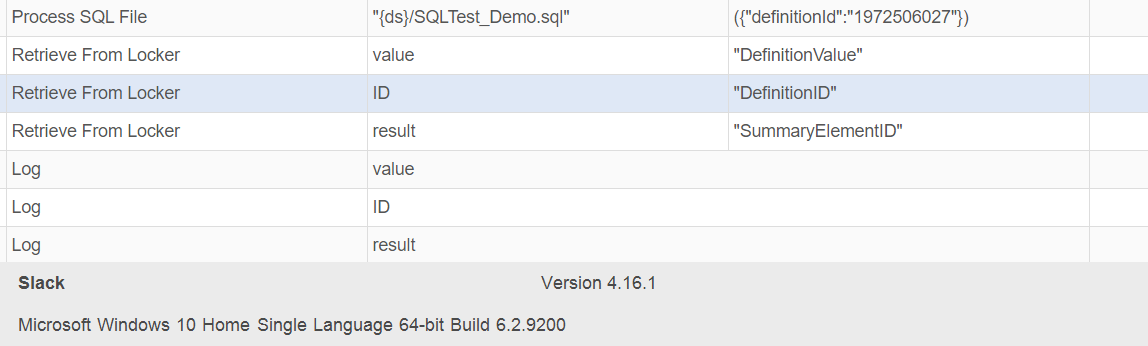
Some of the example queries :
SELECT * from Definition where DefinitionID = :definitionId and DefinitionValue = "Iteration"
SELECT * from Definition where DefinitionID = :definitionId or DefinitionValue = "Iteration"
execquery is used for microsoft sql server stored procedures that do return data
SQL script execution notes
Keep connection directives, numbered --step markers, and --storeInLocker= directives in the SQL file so each result can be retrieved predictably. Match the locker column name to the returned query column and pass the same parameter name from the Designer script. Test each query independently, then test the complete sequence including the disconnect step.
Last updated: JuneOctober 01,15, 20232026
If you have any feedback on this topic, please contact us at documentation@appvance.ai