
Remove Executions from the Database - Controlled Procedure
Removing
Remove dataExecutions from the Database - Controlled Procedure
Removing executions from the AIQ database should be treated withas greata care.controlled administrative operation. Execution records can include report history, evidence, logs, and troubleshooting details that may be required later.
In
Required orderchecks
- Confirm
removetheanexact execution IDs ora group of executions until a specificdatethere are two stored proceduresrexeutionandrexecuntil. rexecutiontakes execution date time as parameter, the store procedure will remove the execution with a date time equal to
rexecuntil takes a high limit date time, so all the execution with date time previous to the one specified in the parameter will be removed.
It is highly recommended to execute those stored procedures using MySQL Workbench, but they can be executed in any MySQL compatible client.
How to call the stored procedures
CALL aiq.rexecution(<Execution Date Time>);
CALL aiq.rexecuntil(<Execution Date Time>);
Where to find the desired execution date time?
Click Report option at the left menu and then click Analyze link of the execution containing the execution date time until it is desiredrange to remove.
Safe workflow
- Run read-only queries first to confirm the target records.
- Export any evidence that must be retained.
- Perform the removal during a maintenance window.
- Verify that current executions, reports, and dashboards still load after the cleanup.
- Record what was removed, when it was removed, and who approved it.
Warning: Do not remove executions with open-ended conditions such as unrestricted dates, empty filters, or unverified IDs.
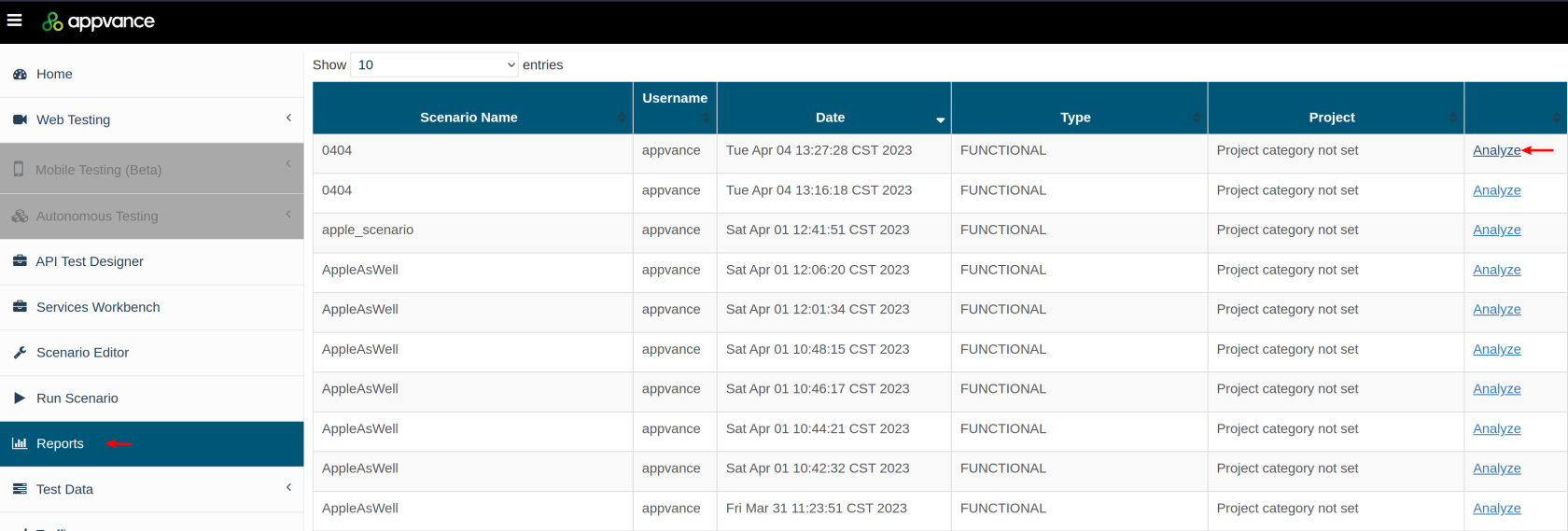
Once you have clicked Analyze link and the report dashboard is displayed, take a look to the URL and you will notice the exeId parameter, the value is what is needed as the parameter for the stored procedures.
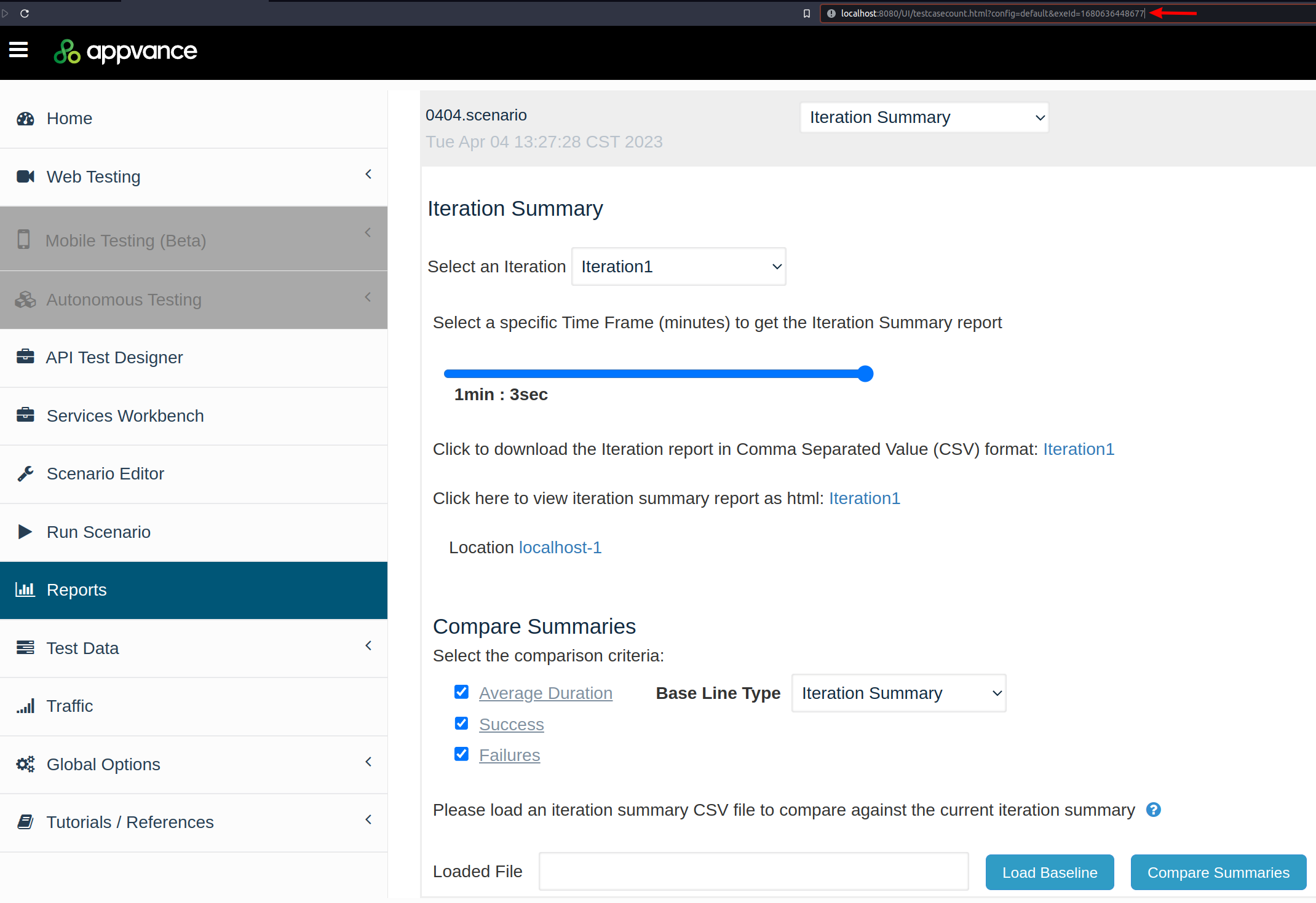
Following the example.
CALL aiq.rexecution(1680636448677);
This will remove the execution with exactly that execution date time.
CALL aiq.rexecuntil(1680636448677);
This will remove all the executions until the specified execution date time. This process can take even hours if there are many executions to be deleted.
Automating the deletion of old executions from database
The following sample bash script will calculate the time stamp for two months prior and then call the stored procedure to delete all executions prior to the calculated date.delete_old_executions.sh
#!/bin/bash
# Calculate timestamp for 2 months ago
timestamp_2months_back=$(date -u -v-2m +%s)

echo "Removing executions prior to" $timestamp_2months_back
# Call the MySQL stored procedure with the calculated timestamp
MYSQL_PWD='aiq' mysql --user=aiq -h localhost --database=aiq --execute="CALL aiq.rexecuntil('$timestamp_2months_back')"
Make the script executable using (chmod +x delete_old_executions.sh).
Add the script to your crontab to run it at your desired schedule (e.g., nightly):
0 0 * * * /path/to/delete_old_executions.shIf you’re on Windows OS, use the Task Scheduler to execute a Windows PowerShell script: delete_old_executions.ps1
# Calculate timestamp for 2 months ago
$twoMonthsAgo = (Get-Date).AddMonths(-2)
epochTime = $twoMonthsAgo.ToUniversalTime().ToString("yyyy-MM-dd HH:mm:ss")

# Call the MySQL stored procedure with the calculated timestamp
$mysqlCommand = @"mysql.exe --user=aiq --password=aiq -h localhost --database=aiq --execute="CALL aiq.rexecuntil('$epochTime')""@
Invoke-Expression $mysqlCommand
Last updated: SeptemberOctober 23,8, 20242026
If you have any feedback on this topic, please contact us at documentation@appvance.ai