
Removing Executions from the Database
Remove
Removing Executionsdata from the Database - Controlled Procedure
Removing executions from the AIQ database should be treated aswith great care.
In order to remove an execution or a controlledgroup administrativeof operation.executions Executionuntil recordsa specific date there are two stored procedures rexeution and rexecuntil.
rexecution takes execution date time as parameter, the store procedure will remove the execution with a date time equal to
rexecuntil takes a high limit date time, so all the execution with date time previous to the one specified in the parameter will be removed.
It is highly recommended to execute those stored procedures using MySQL Workbench, but they can includebe reportexecuted history,in evidence,any logs,MySQL compatible client.
How to call the stored procedures
CALL aiq.rexecution(<Execution Date Time>);
CALL aiq.rexecuntil(<Execution Date Time>);
Where to find the desired execution date time?
Click Report option at the left menu and troubleshootingthen detailsclick thatAnalyze maylink be required later.
Required checks
Confirmof theexactexecution containing the executionIDs ordaterangetime until it is desired to remove.Verify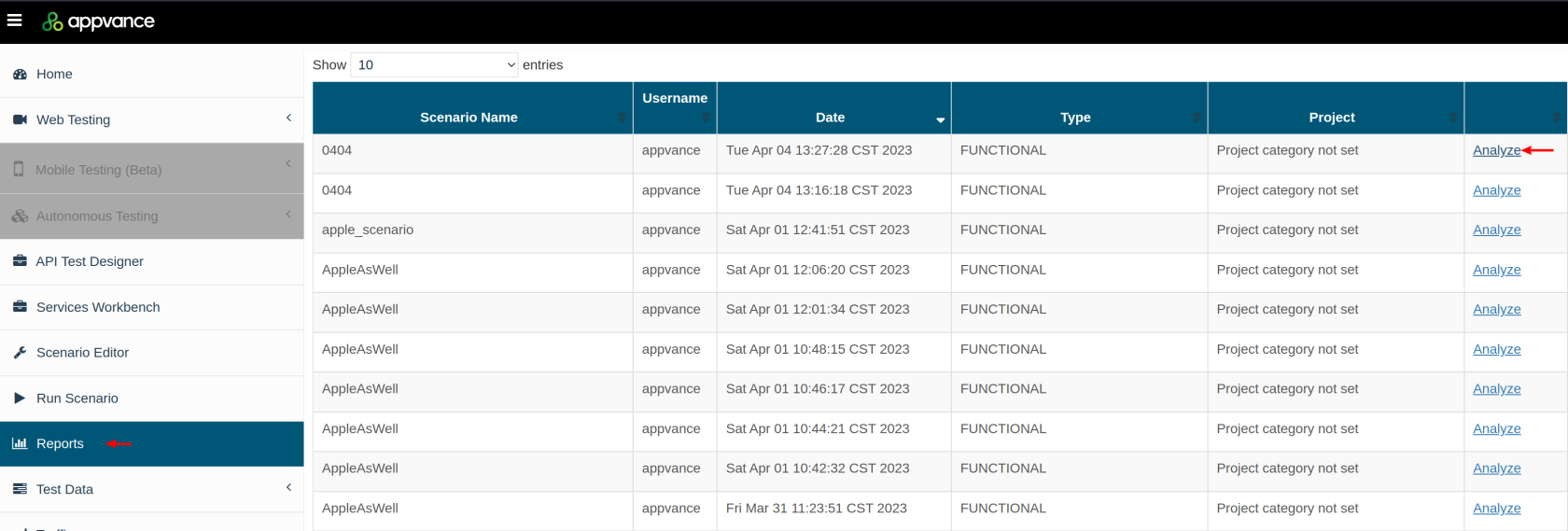
Once you have clicked Analyze link and the report dashboard is displayed, take a look to the URL and you will notice the
exeIdparameter, the value is what is needed as the parameter for the stored procedures.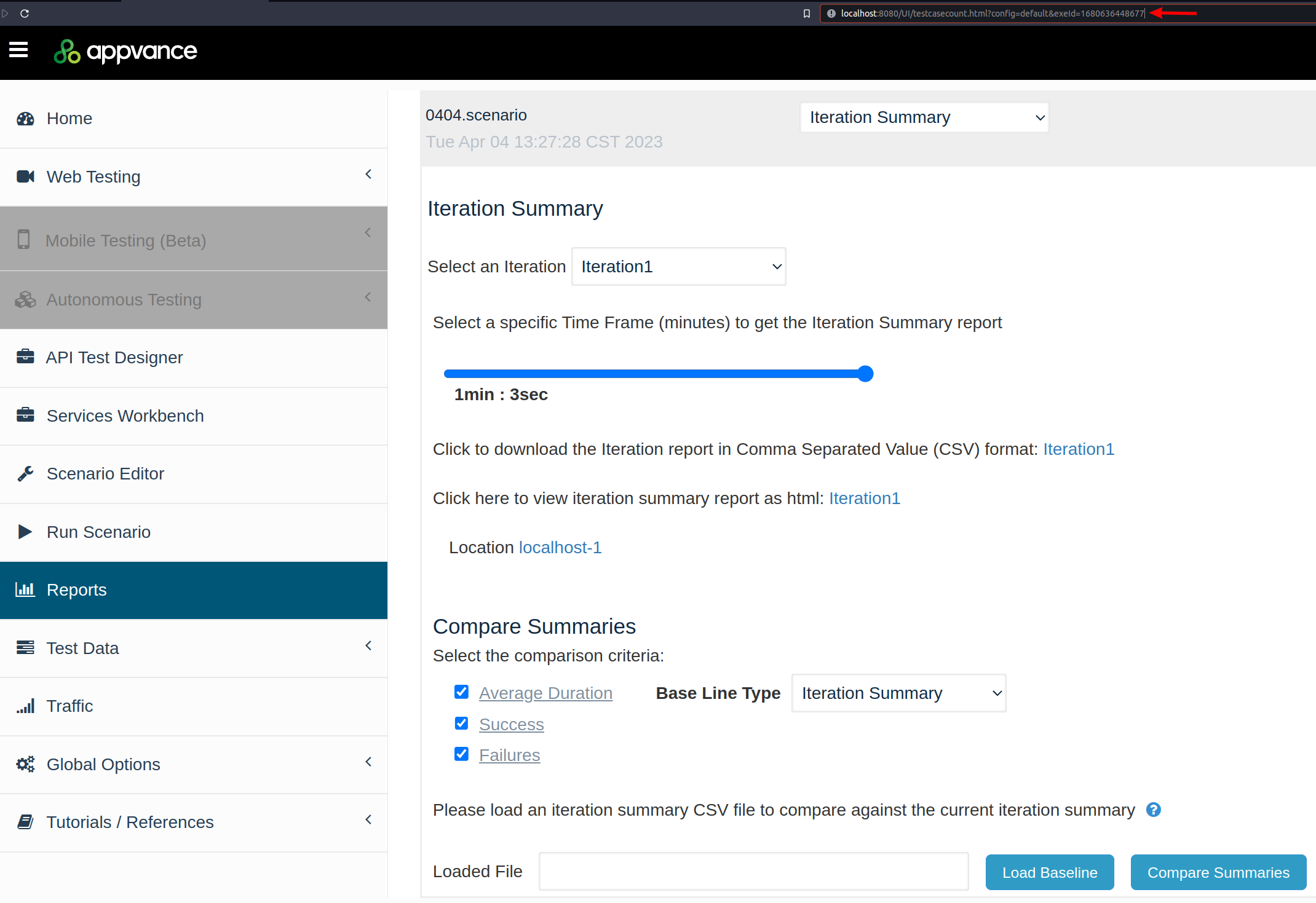
Following the example.
CALL aiq.rexecution(1680636448677);This will remove the execution with exactly that
stakeholdersexecutionnodatelongertime.needCALL aiq.rexecuntil(1680636448677);This will remove all the
relatedexecutionsreportsuntilortheevidence.Createspecified execution date time. This process can take even hours if there are many executions to be deleted.Automating the deletion of old executions from database
The following sample bash script will calculate the time stamp for two months prior and then call the stored procedure to delete all executions prior to the calculated date.
delete_old_executions.sh#!/bin/bash
# Calculate timestamp for 2 months ago
timestamp_2months_back=$(date -u -v-2m +%s)
echo "Removing executions prior to" $timestamp_2months_back
# Call the MySQL stored procedure with the calculated timestamp
MYSQL_PWD='aiq' mysql --user=aiq -h localhost --database=aiq --execute="CALL aiq.rexecuntil('$timestamp_2months_back')"
Make the script executable using (chmod +x delete_old_executions.sh).Add the script to your crontab to run it at your desired schedule (e.g., nightly):
0 0 * * * /path/to/delete_old_executions.shIf you’re on Windows OS, use the Task Scheduler to execute a
databaseWindowsbackupPowerShellorscript:snapshotdelete_old_executions.ps1beforeany#deleteCalculateoperation.UsetimestampsupportedforAIQ2retentionmonthsorago
$twoMonthsAgocleanup=features(Get-Date).AddMonths(-2)
epochTimewhen=available$twoMonthsAgo.ToUniversalTime().ToString("yyyy-MM-ddbeforeHH:mm:ss")
#changing database tables directly.
Safe workflow
Run read-only queries first to confirmCall thetargetMySQLrecords.Exportstoredanyprocedureevidence that must be retained.Performwith theremovalcalculatedduringtimestamp
$mysqlCommanda=maintenance@"mysql.exewindow.Verify--user=aiqthat--password=aiqcurrent-hexecutions,localhostreports,--database=aiqand--execute="CALLdashboardsaiq.rexecuntil('$epochTime')""@
Invoke-Expressionstill$mysqlCommand
Warning: Do not remove executions with open-ended conditions such as unrestricted dates, empty filters, or unverified IDs.
Last updated: OctoberSeptember 8,23, 20262024
If you have any feedback on this topic, please contact us at documentation@appvance.ai