
Setup SSL/TLS for MySQL community for Microsoft Windows
Configure
OpenSSL installation.
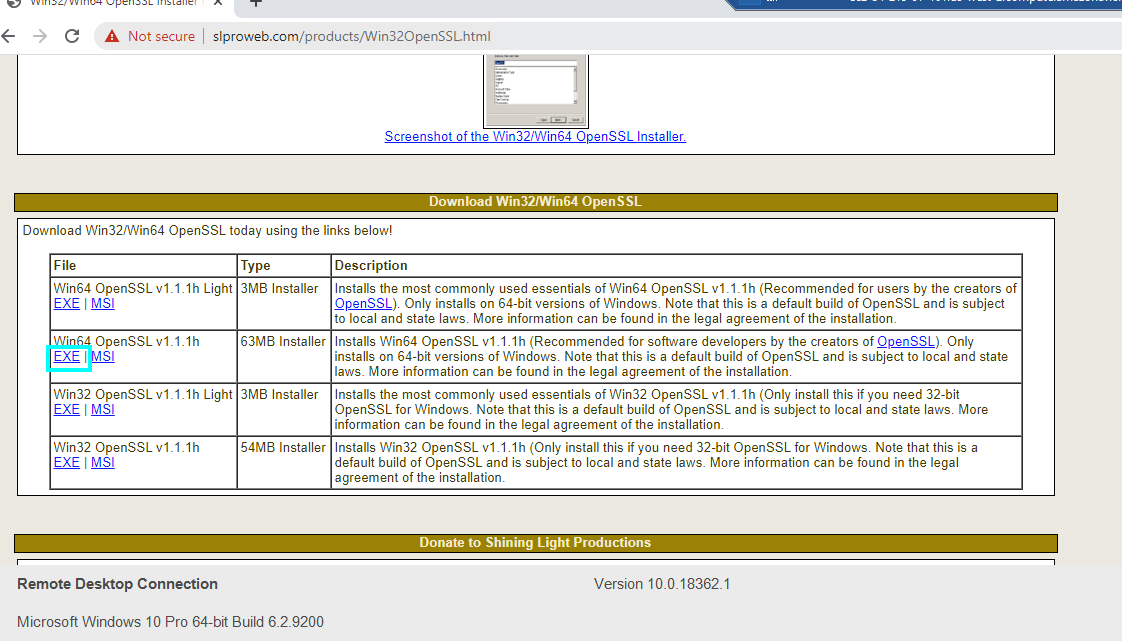
OpenSSL needs to be installed, the proper package can be found at https://wiki.openssl.org/index.php/Binaries there, it could be found third party binary distributions, for our purposes any for Windows product could work but the first choice in the list will offer self-install executables.
https://slproweb.com/products/Win32OpenSSL.html
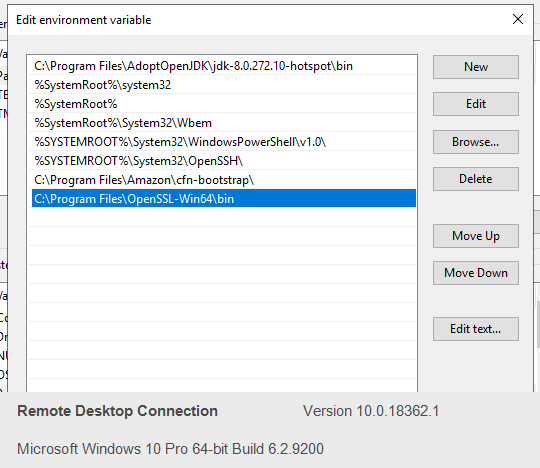
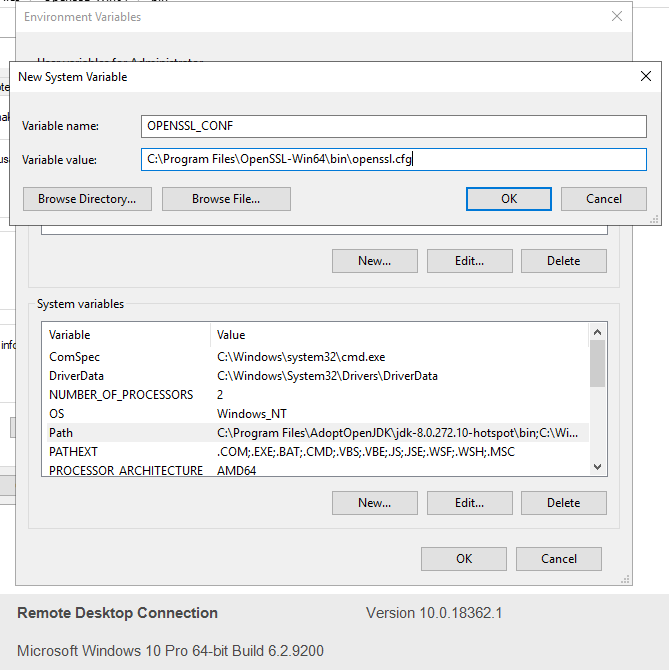
Environment Variable setup
Please set up the environment variables as mentioned below.
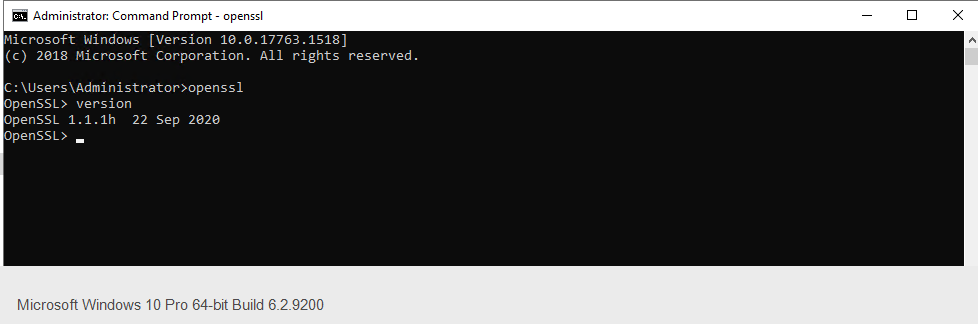
Check if OpenSSL is installed
Open cmd and type openssl
Creating and configuring the MySQL SSL/TLSpublic certificate.
a) Open a Command prompt as administrator.
b) Move to the MySQL 8 Server’s bin folder.
c) Execute mysql_ssl_rsa_setup.exe as below.
mysql_ssl_rsa_setup.exe --datadir="C:\ProgramData\MySQL\MySQL Server 8.0\Data"
Folder specified for AIQ–datadir Environmentsparameter
Useis the one that points to the MySQL SSL/TLSData configurationfiles onlyusually withunder environment-ownerProgramData approvalroot and release-specific AIQ database guidance.folder.
Recommended
d) guidance
Confirm whether the database is managed by AIQ, customer infrastructure, or a third party.Use approved certificates, key storage, and rotation procedures.Avoid documenting private keys, passwords, or internal hostnames.Validate connectivity from AIQ components after enabling SSL/TLS.
Validation workflow
PlanVerify the certificate by issuing as follow obtaining an output similar to the one.C:\ProgramData\MySQL\MySQL Server 8.0\Data>openssl x509 -in ca.pem -text Certificate: Data: Version: 3 (0x2) Serial Number: 1 (0x1) Signature Algorithm: sha256WithRSAEncryption Issuer: CN = MySQL_Server_8.0.22_Auto_Generated_CA_Certificate Validity Not Before: Nov 3 16:28:59 2020 GMT Not After : Nov 1 16:28:59 2030 GMT Subject: CN = MySQL_Server_8.0.22_Auto_Generated_CA_Certificate Subject Public Key Info: Public Key Algorithm: rsaEncryption RSA Public-Key: (2048 bit) Modulus: 00:b6:40:7d:bc:53:c3:c3:43:db:0b:2e:e5:c1:0b: 53:da:0a:0d:6d:f6:ce:21:0a:34:e1:49:02:10:1d: dc:7c:dc:92:53:1a:02:7d:4e:e1:44:89:14:26:c8: f9:4f:6c:f5:64:b5:20:c0:2b:67:00:d9:cc:7e:f2: be:e4:8a:03:fd:5e:37:24:b0:96:97:0e:70:cc:b4: 02:d1:75:e7:eb:18:74:5b:7f:5a:3e:4a:6b:35:a8: ec:3a:d9:a3:60:68:cf:c6:16:11:92:2d:e9:ae:fe: 04:18:fa:9c:cf:88:4e:f7:a8:da:a4:5f:29:a0:7f: ed:90:af:59:b0:a1:5f:1e:85:bc:d2:74:6e:d8:52: 0e:ee:4c:ac:2c:7b:d9:61:a9:13:2e:35:41:20:11: cf:ec:db:b8:e1:d1:47:f1:e2:16:02:31:a1:ad:2f: 7d:2d:43:00:65:71:cb:11:65:e5:55:f0:ad:0d:b6: b3:43:4c:27:91:0b:19:52:f2:e7:d0:8a:2a:56:0a: 8d:c6:38:cf:bf:8e:38:59:fe:9a:f4:f1:81:3e:93: f4:51:f8:cc:3f:5f:ad:51:0c:2a:30:e4:1d:c9:69: 8f:07:19:de:e3:a7:e5:0d:24:7f:31:be:43:34:6b: 15:c2:32:6d:0b:02:c0:cc:2c:fa:50:f3:42:c9:c7: 5d:8d Exponent: 65537 (0x10001) X509v3 extensions: X509v3 Basic Constraints: critical CA:TRUE Signature Algorithm: sha256WithRSAEncryption 84:33:78:03:09:bc:ac:a3:3c:41:e1:6e:a5:db:6e:7c:09:1e: 5c:83:59:70:f6:11:7e:43:04:b9:1e:bd:a7:eb:f7:b1:19:f2: 41:97:ca:52:42:ce:a8:09:a8:38:94:1d:c8:39:c6:e6:7e:fd: 39:a5:04:4b:ca:b4:5d:66:de:d7:db:0e:38:78:54:1e:3f:3a: 91:f4:27:9b:1a:7b:af:a7:73:42:26:5e:92:e0:c7:ad:ae:04: 38:3a:00:23:31:83:37:9d:98:8e:81:50:eb:e3:46:17:f2:32: c0:6b:e0:06:25:52:6d:ec:3d:67:5c:e3:9a:29:11:e8:e9:2a: b6:87:61:77:13:24:0a:33:4f:a7:11:67:e5:5f:77:77:db:64: 08:c7:c3:1d:b3:e3:59:67:95:7b:b0:2b:c5:c3:e8:7c:d2:c3: d1:31:5f:89:11:0b:da:db:dc:73:74:4f:4b:80:43:37:eb:b5: 4e:41:c6:1d:43:d5:74:51:ac:76:c4:7c:00:85:9e:3d:b8:9b: 8b:45:09:df:9d:8e:1b:9f:0d:7b:f0:fc:6e:30:8b:be:b9:63: 6b:eb:4a:7d:b5:8d:48:bf:5c:07:43:0f:b0:5f:ed:24:08:1c: 61:b9:6b:d8:69:33:48:c5:9c:2a:57:23:87:63:c2:e8:32:6e: 4d:f8:10:2f -----BEGIN CERTIFICATE----- MIIDBjCCAe6gAwIBAgIBATANBgkqhkiG9w0BAQsFADA8MTowOAYDVQQDDDFNeVNR TF9TZXJ2ZXJfOC4wLjIyX0F1dG9fR2VuZXJhdGVkX0NBX0NlcnRpZmljYXRlMB4X DTIwMTEwMzE2Mjg1OVoXDTMwMTEwMTE2Mjg1OVowPDE6MDgGA1UEAwwxTXlTUUxf U2VydmVyXzguMC4yMl9BdXRvX0dlbmVyYXRlZF9DQV9DZXJ0aWZpY2F0ZTCCASIw DQYJKoZIhvcNAQEBBQADggEPADCCAQoCggEBALZAfbxTw8ND2wsu5cELU9oKDW32 ziEKNOFJAhAd3HzcklMaAn1O4USJFCbI+U9s9WS1IMArZwDZzH7yvuSKA/1eNySw lpcOcMy0AtF15+sYdFt/Wj5KazWo7DrZo2Boz8YWEZIt6a7+BBj6nM+ITveo2qRf KaB/7ZCvWbChXx6FvNJ0bthSDu5MrCx72WGpEy41QSARz+zbuOHRR/HiFgIxoa0v fS1DAGVxyxFl5VXwrQ22s0NMJ5ELGVLy59CKKlYKjcY4z7+OOFn+mvTxgT6T9FH4 zD9frVEMKjDkHclpjwcZ3uOn5Q0kfzG+QzRrFcIybQsCwMws+lDzQsnHXY0CAwEA AaMTMBEwDwYDVR0TAQH/BAUwAwEB/zANBgkqhkiG9w0BAQsFAAOCAQEAhDN4Awm8 rKM8QeFupdtufAkeXINZcPYRfkMEuR69p+v3sRnyQZfKUkLOqAmoOJQdyDnG5n79 OaUES8q0XWbe19sOOHhUHj86kfQnmxp7r6dzQiZekuDHra4EODoAIzGDN52YjoFQ 6+NGF/IywGvgBiVSbew9Z1zjmikR6OkqtodhdxMkCjNPpxFn5V93d9tkCMfDHbPj WWeVe7ArxcPofNLD0TFfiREL2tvcc3RPS4BDN+u1TkHGHUPVdFGsdsR8AIWePbib i0UJ352OG58Ne/D8bjCLvrlja+tKfbWNSL9cB0MPsF/tJAgcYblr2GkzSMWcKlcj h2PC6DJuTfgQLw== -----END CERTIFICATE-----e) Check MySQL SSL support status
Connect to the instance via
mysql -uroot -p(in Windows,mysql.exeis located inC:\Program Files\MySQL\MySQL Server 8.0\bin) anddatabaserun:
Connectconfigurationtochange.Applythe instance viamysql -uroot -p(in Windows,mysql.exeis located inC:\Program Files\MySQL\MySQL Server 5.7\bin) and run:mysql> show global variables like '%ssl%'; +-------------------------------------+-----------------+ | Variable_name | Value | +-------------------------------------+-----------------+ | admin_ssl_ca | | | admin_ssl_capath | | | admin_ssl_cert | | | admin_ssl_cipher | | | admin_ssl_crl | | | admin_ssl_crlpath | | | admin_ssl_key | | | have_openssl | YES | | have_ssl | YES | | mysqlx_ssl_ca | | | mysqlx_ssl_capath | | | mysqlx_ssl_cert | | | mysqlx_ssl_cipher | | | mysqlx_ssl_crl | | | mysqlx_ssl_crlpath | | | mysqlx_ssl_key | | | performance_schema_show_processlist | OFF | | ssl_ca | ca.pem | | ssl_capath | | | ssl_cert | server-cert.pem | | ssl_cipher | | | ssl_crl | | | ssl_crlpath | | | ssl_fips_mode | OFF | | ssl_key | server-key.pem | +-------------------------------------+-----------------+ 25 rows in set (0.02 sec)
f) Grant permissions allowing SSL connection.
ALTER USER 'aiq'@'localhost','aiq'@'%' REQUIRE SSL;
FLUSH PRIVILEGES;
g) Create the folder for our certificates:
mkdir C:\mysqlCerts
h) Create CA Certificates.
openssl genrsa 2048 > "C:\mysqlCerts\ca-key.pem"openssl req -new -x509 -nodes -days 3600 -key "C:\mysqlCerts\ca-key.pem" > "C:\mysqlCerts\ca-cert.pem"Country Name (2 letter code) [AU]:US
State or Province Name (full name) [Some-State]:CA
Locality Name (eg, city) []:SanJose
Organization Name (eg, company) [Internet Widgits Pty Ltd]:Appvance
Organizational Unit Name (eg, section) []:
Common Name (e.g. server FQDN or YOUR name) []:
Email Address []:info@appvance.com
i) Create Server certificates.
openssl req -newkey rsa:2048 -days 3600 -nodes -keyout "C:\mysqlCerts\server-key.pem" > "C:\mysqlCerts\server-req.pem"Provide the same values as defined above.
Can give blank challenge password and optional company name
openssl x509 -req -in "C:\mysqlCerts\server-req.pem" -days 3600 -CA "C:\mysqlCerts\ca-cert.pem" -CAkey "C:\mysqlCerts\ca-key.pem" -set_serial 01 > "C:\mysqlCerts\server-cert.pem"
j) Create client certificates.
openssl req -newkey rsa:2048 -days 3600 -nodes -keyout "C:\mysqlCerts\client-key.pem" > "C:\mysqlCerts\client-req.pem"Provide the same values as above.
openssl x509 -req -in "C:\mysqlCerts\client-req.pem" -days 3600 -CA "C:\mysqlCerts\ca-cert.pem" -CAkey "C:\mysqlCerts\ca-key.pem" -set_serial 01 > "C:\mysqlCerts\client-cert.pem"
k) Update MySQL's config file (in Windows, it's called my.ini, not my.cnf as in Linux, and not my-default.ini because the latter is a template), which normally lives in C:\ProgramData\MySQL\MySQL Server 8.0\ (note: ProgramData is a hidden folder), to include this under the [mysqld] section:
Note: If you have
\sin your path, you will need to replace itinwith\\sbecause mysqld will substitue the \s for anon-productionwhitespaceenvironmentcharacterfirst.ValidatewhichAIQwilldatabasebreakconnectivitythe path to your key. The extra backslash escapes the original backslash, leaving your path intact.ssl-ca = "C:\mysqlCerts\ca-cert.pem"ssl-cert = "C:\mysqlCerts\\server-cert.pem"ssl-key = "C:\mysqlCerts\\server-key.pem"
l) and
logs.DocumentrestartrollbackMYSQLstepsservice/server.m) Now let's connect again via our normal user (not the ssluser) with mysql -uroot -p, and
certificatecheckrenewalourownership.
mysql> show global variables like '%ssl%';
+-------------------------------------+-------------------------------+
| Variable_name                       | Value                         |
+-------------------------------------+-------------------------------+
| admin_ssl_ca                        |                               |
| admin_ssl_capath                    |                               |
| admin_ssl_cert                      |                               |
| admin_ssl_cipher                    |                               |
| admin_ssl_crl                       |                               |
| admin_ssl_crlpath                   |                               |
| admin_ssl_key                       |                               |
| have_openssl                        | YES                           |
| have_ssl                            | YES                           |
| mysqlx_ssl_ca                       |                               |
| mysqlx_ssl_capath                   |                               |
| mysqlx_ssl_cert                     |                               |
| mysqlx_ssl_cipher                   |                               |
| mysqlx_ssl_crl                      |                               |
| mysqlx_ssl_crlpath                  |                               |
| mysqlx_ssl_key                      |                               |
| performance_schema_show_processlist | OFF                           |
| ssl_ca                              | C:\mysqlCerts\ca-cert.pem     |
| ssl_capath                          |                               |
| ssl_cert                            | C:\mysqlCerts\server-cert.pem |
| ssl_cipher                          |                               |
| ssl_crl                             |                               |
| ssl_crlpath                         |                               |
| ssl_fips_mode                       | OFF                           |
| ssl_key                             | C:\mysqlCerts\server-key.pem  |
+-------------------------------------+-------------------------------+
25 rows in set (0.01 sec)
n) connect with the aiq user then, now with the --ssl-mode flag:
mysql.exe -uaiq -p --ssl-mode=REQUIRED
o) If it connects, we're done.
C:\Program Files\MySQL\MySQL Server 8.0\bin>mysql.exe -uaiq -p --ssl-mode=REQUIREDEnter password: ***Welcome to the MySQL monitor.  Commands end with ; or \g.Your MySQL connection id is 12Server version: 8.0.22 MySQL Community Server - GPL
Copyright (c) 2000, 2020, Oracle and/or its affiliates. All rights reserved.
Oracle is a registered trademark of Oracle Corporation and/or itsaffiliates. Other names may be trademarks of their respectiveowners.
Type 'help;' or '\h' for help. Type '\c' to clear the current input statement.
mysql>
Last updated: SeptemberJune 20,26, 20262023
If you have any feedback on this topic, please contact us at documentation@appvance.ai