
Unable to connect to database - Password expired
Troubleshoot
My Databaselocal Passwordmachine's ExpirationSQL
Usepassword thisgot checklistexpired whenand I did change it from Workbench, but AIQ cannotstill connectthinks that it is not changed, I tried restarting both AIQ and MYSQL services, but no luck.
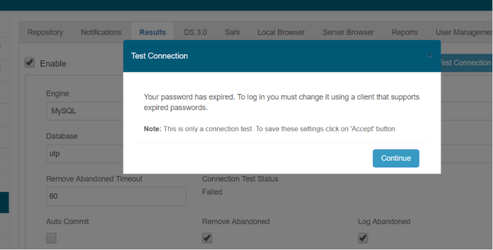
In order to reactivate the instance, You must go to the databaseprompt or MYSQL Workbench and logs indicate an expired or invalid password.
Recommended guidance
Confirmexecute thefailingbelow.accountmysql -u<user> -p<password> --connect-expired-password
then
ALTER USER 'root'@'localhost' PASSWORD EXPIRE NEVER;
and
databaseALTER
endpointUSERbefore'utp'@'localhost'changingPASSWORDcredentials.FollowEXPIRE NEVER;inmy.cnf
It would be necessary to replace
[mysqld]
default_password_lifetime = 180
to
[mysqld]
default_password_lifetime = 0
or
issuingSET GLOBAL default_password_lifetime = 0;
when you are logged in as root in mysql tool, this would set this param for all the
approvedschema.credentialrotation process.Do not paste passwords into documentation, tickets, or shared output.Restart or refresh only the affected services after credential updates.
Validation workflow
Review AIQ and database logs for the exact authentication error.Coordinate credential reset with the database owner.Update the approved secure configuration location.Validate AIQ connectivity and document the change without exposing secrets.
Last updated: SeptemberJune 20,26, 20262023
If you have any feedback on this topic, please contact us at documentation@appvance.ai