
AIQ AI Implementation Strategy
Strategy,
Last Thoughtreviewed: ProcessSeptember and30, Driving Toward Success
ResetUse Assessorthis Preferencesarticle onas Controller/TestNodea whereplanning checklist for introducing AIQ AI willcapabilities runsuch as AISG into a governed testing program.
What changed in this article
- Updated
IftheAccessorstrategyPreferencespage to use AISG terminology and governance language instead of vague AI adoption wording. - Added planning checks for
theapplicationAUTreadiness,aredataalreadyprivacy,known,validationupdatecoverage, human review, rollout stages, success metrics, andsaveownership. - Added
thoseguidanceontoController/TestNodetreatwheregeneratedAIQscenarios as reviewable assets that require validation before production use.
Validation workflow
- Choose a narrow application area and define success criteria before enabling AI-assisted generation.
- Review generated scenarios, validations, data usage, and evidence with application owners.
- Expand only after the team has measured maintainability, coverage value, and false-positive/false-negative behavior.
Review note: This page now reads like an implementation plan rather than a generic AI willpositioning run
article.
Determine domains to include & which to avoid
Instant Replay > Record, then
Test Designer IDE > Record
Navigate around the app, not worrying about what IDE is recording
Stop Recording
Return to Instant Replay, dump results into CSV, and determine Valid domains and if observed any ignore URLs
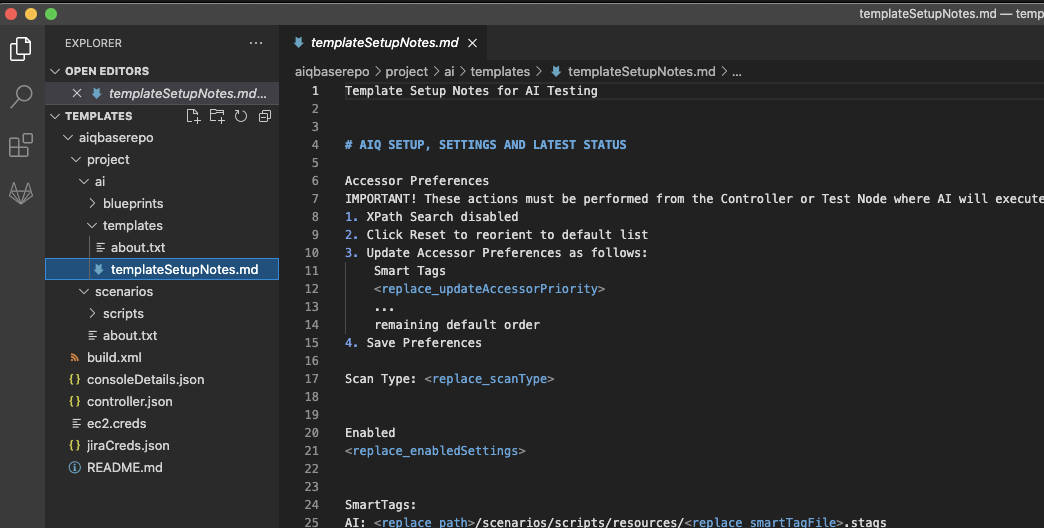
Begin tracking the settings in ai/templates/templateSetupNotes.md
Adjust on Controller and TestNode(s) where AI will run
Tags Only Execution with a twist: SmartTags + Tags Execution (with 1 dummy SmartTag)
Note: You can run with SmartTags + Tags with one ‘dummy’ SmartTag to avoid having to create a new AISG in step 6 (below)
Run first AISG using SmartTags + Tags with one ‘dummy’ SmartTag - only at ~15 - ~25 browsers (not too much)
Note observations such as:
Accessors which need altering
Use to determine optimal accessor preferences
Use to determine SmartTags required for proper assessor usage
Repetitive links?
Determine classes and or characteristics of links which are hit multiple times, but should only be triggered once, or once per page, etc.
Note ideas behind potential SmartTags needed
Missing elements which visible in Visual Hints’ capture but not picking up in page state element lists
Note as potential SmartTags needed
Data needed to get any type of depth and breadth?
Create js (or synth, just not hash) csv with some sample data
Adjustments based on SmartTag + Tags (w/ 1 dummy SmartTag) Execution
Adjust Assessor Preferences based on observations on Controller/TestNode where AIQ AI will run
Create at least one SmartTag based on observations above
Update templateSetupNotes.md to keep it in sync with findings
SmartTags + Tags Execution
Update AISG with changes to SmartTags file (using File > Update SmartTags Library), and allow it to run again
Again, note observations such as:
How have accessors improved? Still need changes?
How are SmartTags behaving? Make any necessary adjustments
Remember: do not create SmartTags unless necessary
Remember: Try to keep as much automatic as possible, as minimize “prescriptive” actions
What other SmartTags are needed?
SmartTags needed due to accessors?
SmartTags needed due to ai hinting?
Repeat until:
AI not recursively actioning items it shouldn’t
AI able to find and interact properly with all necessary objects (varies by scope of AI / POC)
SmartTags are helping drive areas automatically as much as possible
NOTE: IF too many SmartTags are required to avoid recursive erroneous clicking, consider shifting to SmartTags + Inputs. Do not do so too soon, or you may create more SmartTag work than needed..
Run template from ant (or pipeline) to generate dashboard
While the AISG is not ‘complete’, it’s often interesting and beneficial to start generating dashboard results now, allowing you to observe the growth and differences more easily.
Data-driving the AISG
Some applications require data to get almost anywhere, in such cases, the data driving likely needs to come earlier.
Using the template created above, begin incorporating data into the AISG
Careful not to overly prescribe too many actions
But instead, map actions in page states to help exercise portions of the application which:
Cannot be automatically exercised using SmartTags and auto-navigations
Upon performing mapped actions in page states, reveal new areas of the application to AI
Consider using Test Designer “snippets” with AI Hint feature to speed up (or replace) mapping data and actions within page states
Avoid:
Duplicating use cases already implemented in Test Designer which are very specific and narrow scoped flows, which have little area to branch out from when navigated.
Expanding AI by only adding mapped actions on page states, and where I even with those additions is finding little to nothing else beyond the prescriptive steps
Ready for Validations When:
If need validations sooner, keep in mind, and watch for the impact of adding validations, for example, if resulting pages or page states vary once the validation is added, if resulting data from one action must be validated and used for subsequent actions.
Element accessors and SmartTags have stabilized
AI is covering both breadth and depth of the application, with as much automatic as possible
Page state and/or AI Hint script snippets provide the nudges needed to reveal additional areas of the application which AI then covers automatically
Failed and Inconsistent actions are minimal if at all present. Note: Some failed actions will almost always exist. It is for the user to judge if it’s acceptable or not.
Validations:
Create Validation Workbench trigger-based validations
Create SmartTag Workbench based validations (adding additional SmartTags as needed).
Add each validation as created (or small collections) to the existing blueprint template and run to validate the expected result. Repeat.
Autonomous auto-validations
Create
Export to CSV (don’t forget to commit this CSV, before it is converted to JSON format upon import)
Clean up validations, and provide more meaningful names (can be done quickly with find replace and formulas in excel)
Retain only those applicable for your application
Save and retain the CSV
Import the autonomous auto-validations into Validations Workbench and add to template
Run and test the auto-validations, and repeat cleanup until working as expected
Continue building and expanding based on observations
A AISG is never complete. There is always more to explore, and many times additional discoveries within the same or new builds.
Save the resulting AISG of each execution, analyze and compare prior executions, and expand or enhance based on your observations.
Above is an ideal world. Not all implementations entirely mesh with the ideal world but following this approach will ensure you implement AI wisely!
Last updated: September 06,30, 20232026
If you have any feedback on this topic, please contact us at documentation@appvance.ai.