
AIQ Best Practices for Stable Test Execution
Last
ProjectSeptember Best30, Practices
2026
Create
Use this article as a collaborativechecklist documentationfor spacebuilding
Document, createtests and share the recommended settings, naming conventions, approaches, Accessor Preferences, SmartTags, etc. with your team in a common collaborative space.
Take these best practices, add to them, and make them your own!
Repository Organization
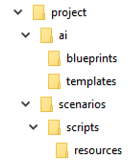
project is the root folder (often renamed to the given project or application name)
ai folder houses the ai blueprints and templates
scenarios folder contains scenarios and related content within sub folders
scripts folder contains test designer scripts
Note: The scripts folder can contain subfolders that groups the test scripts into specific categories
resources folder contains resources referenced by scripts, such as test data files
Why do we need naming conventions?
A good naming convention is the one that is short, descriptive and that provides context to the users. Naming conventions play an important role in standardization, helping streamline development and testing processes. Consider an example where a test is broken, someone who is looking at a failed test should be able to figure out the functionalitiesenvironments that are broken without going through the implementation. This saves lots of time and brings effectiveness.
Different case styles
Camel Case
It is the practice of writing phrases without spaces or punctuation, indicating the separation of words with a single capitalized letter, and the first word starting with lowercase. Example: pageCount
Pascal Case
It is very similar to the camel case, but the first letter starts with Upper case. Example: PageCount
Snake Case
Here we separate the words using underscore (_) and the words can be either in lower or upper case. Example: page_count or PAGE_COUNT
How should I select a case style for naming?
Folder/Package: Camel Case
Example, ai, scenarios, utilityFunctions
Test Scripts: Custom
It’s very important to name test scripts appropriately such that the name provides clear context. Here is the recommended naming syntax:
[name of functionality under test]_[test input]_[expected result]
Example: Checkout_NewUser_Pass.ds
Checkout_NewUser_Fail.ds
Helper/Utility Scripts: Camel Case
Examples:
generateIncrementedNumber.ds
navigateToHomePage.ds
Test Data Files: Camel Case
Examples
emailGenerator.csv
filterSelector.csv
Javascript in AIQ
If you write custom Javascript code in AIQ, below are the recommended naming conventions:
Functions: Camel Case
Examples
getUserDetails()
Variables: Camel Case
Examples:
userName
password
shippingAddress
Constants:Upper Snake Case
Examples
TOTAL_COUNT
PRIMARY_COLOR
Test Designer Best Practices
Script Documentation
Include a description for EVERY script, indicating what it is and reference the source document identifier
Accessor Preferences
Before creating any planned scripts, exercise the application by recording with Test Designer, and determine the answers to these questions:
What are the recommended Accessor Preferences settings?
Which objects require manual Accessor edits when recording?
Do SmartTags make sense in these cases?
For example, the edits are more complex or frequent, and cannot be handled by the Accessor Preferences settings alone
What SmartTags are required?
What are common object types?
Which of the common object types work with the above recommended Accessor Preferences automatically?
Which objects require alternate Accessor Preferences when recording?
Simplify Navigate statements
When a Navigate To statement in a script causes or creates multiple entries or a redirect, simplify the URL to the base an end-user would actually enter
Remove unnecessary Navigate To statements
At times unnecessary Navigate To statements may record.
Remove all Navigate To statements which the end-user wouldn’t explicitly enter.
Wait Statements
Adjusting the automatic wait duration and using manually entered Wait Statements
It is best to never include a hard-coded duration Wait statement which does not also rely on other logic.
Should the application need a longer wait duration, consider these options:
AIQ automatically contains a ‘wait’ duration for all steps using setSearchRetries.
Default setSearchRetries = 12
Should the application react slowly and often need to be more patient before the next step is read, consider increasing the setSearchRetries higher than 12.
For a one-off longer wait duration, consider using a conditional wait by combining Wait and isVisible
Wait with isVisible
isVisible
More about Waits in AIQ: Ultimate Guide Conditional Wait
Script Modularization
Test scripts that are hundreds of lines long are difficulteasier to maintain, can be even more difficult to debug, and canscale.
What morechanged fragilein this article
- Refocused the generic best-practices page on stable execution, maintainable scenarios, data control, and
subjectenvironmenttoreadiness. - Added
failurespecificwhenpracticesanforapplicationlocatorchanges.strategy,Tips:waits, - data,
browserKeepTestyourNodescriptscapacity,compact
Break scripts into functional subunitslogs, and useresult anreview.
As you build your library of scripts, the re-usable subunits or sub scripts will enable you to move faster when
Creating new scripts
Maintaining script changes
Collaboratingit with aconcrete team
Data Driving Tests
Data-driven scripts enable varying data without maintaining multiple scripts. You may data-drive form field information, navigate statements and even accessors. Just about anything which may change over time may be data driven.
Ask yourself: What can and should be data-driven?
The most common area to data drive is the destination URL and credentials for an application
Form data is also another common data-driven area
Read more about data-driving tests and AIQ’s data production library in Operational Test Data with DPLs
Other common areas where data may impact test design:
Test prerequisites
Ask yourself: what data must exist or what state must the application reside in for the test to succeed?
Any dates?
Ask yourself...will this test run tomorrow, next month, next year?
Remember, every test scriptchecks that uses DPL data must also specify the DPL data to use in a Scenario’s Resources and Test Case Scripts
Relative Paths
Relative paths are key to script portability, as the root of the path on your system or repository may vary from the path of other usersf
Please try to remember never to use absolute paths
Relative Paths in Test Designer
Test Designer script steps with Relative and Absolute path options
Scenario Editor Resources and Relative Paths
Naming Conventions
Use meaningful variable names
Establish and agree upon clear naming conventions of all variables, scripts and test assets
Important Scenario Design & Options
For Functional testing especially, ensure the following are enabled insupport Scenario Editor >and Optionscurrent >AIQ Testterminology.
Validation Options:workflow
- Review
- locator,
Fail step when getting failing http status codes
Take Snapshot on failure
Take Script Snapshot
Attach Test Designer Script
Attach Instant Replay
Save requestswait, and responsesdata
Scenariologs Executionand
Always design your scenariostrends to run in parallel with other scenarios
Even when just getting started, run all scenarios in parallel - do this fromtune the beginning,suite not at the endinstead of themaking projectuntracked toone-off test for unforseen conflicts along the way
PayReview attentionnote: toThis scenariopage dependenciesnow -complements What must run first, next, last?
Considerperformance and documentinstallation whicharticles testwithout userduplicating idstheir candetailed be used multiple times concurrently
procedures.
The execution duration goal should be the minimum possible wall-clock-time
Script Design & Parallelization
When creating scripts, it's possible a process could become extremely slow, sometimes due to the nature of the application. Let Appvance know if you experience, are anticipate any potential issues before beginning to create scripts.
It's important to understand if scripts can be written/executed in parallel vs sequential: There are applications where you cannot create scripts in parallel with the same account. For those, multiple accounts are required to perform parallel execution (and even recording in some cases).
Other Best Practices to Keep in Mind
Leadership
SME (subject matter expert) - to lead, divide scripting work and review changes
Communicate findings and add to best practices
Design for Multiple Environments
DPL
Coming soon…
(Add design option and best practices here)
CICD & Build.xml
Working with multiple environments
Coming soon…
How can I pass scenario parameters from build.xml
Coming soon…
How many concurrent users?
How many concurrent Browsers per Test Node?
Self-Healing and Fallback Accessors best practices
Coming soon...
SmartTags
To determine which SmartTags are necessary to create, see Accessor Preferences topic (above)
Coming soon…
Last updated: AugustSeptember 14,30, 20232026
If you have any feedback on this topic, please contact us at documentation@appvance.ai.