
AIQ Project Branching Best Practices
AIQ
Repository StructurePractices
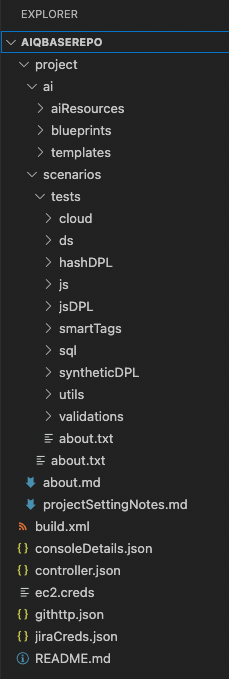
TheUse structureproject below was developedbranching to providemanage test changes safely across maintenance, feature work, and release validation.
Recommended guidance
- Keep branch names clear
organizationand tied toyour AIQ project assets
Branching
Two strategies for test asset versioning andor maintenance areobjective.
Strategythat A: Single-Branch + Status by File Naming Convention
Using this strategy, all work occursdrift from the Mainmain branch,project baseline.
Validation workflow
- Create a branch for the planned change.
- Apply and
edits are performed only to files that have been renamed to indicate a work in progress. Branches are only created when a new release occurs, optionally maintaining a historical version for all test assets.DesignMain (or Master) Branch
data, or configuration update.All work performed fromvalidate theMainscenario,branch- Review execution output and affected suites.
- Merge,
Priorpromote,toorbeginningretirework on a new release, optionally create a version-specificthe branchfrom Main
The pipeline shall run assets within Main, and optionally against historical version-specific branches for example:
If there is a new software build, it will trigger the pipeline
Run nightly
Status by File Naming Convention
The assets tiedaccording to the pipeline,project and in a state ready to run, maintain their original test asset name
Test assets that are new or require change shall be appended by an indicator, such as _editing or any other agreed-upon naming convention
Upon completion of testing an edited test asset, rename the _editing asset(s) to their original name, overwriting the existing, now historic, test asset file(s)
Optionally delete the _editing file(s)
Pipelines are designed to only use those test assets whose naming conventions match the agreed-upon standard (for example, do not include _editing)
Version-Specific Branches
In addition to the Main branch, version-specific branches also prove valuable. This enables testing to continue on an older version while permitting changes for a new or upcoming version. Such branches can be created in advance of finalizing changes, or from Main upon completion of final changes for the given version.
Branch Naming Conventions
For this approach, only one branch per historical version to maintain is used
While optional, version-based branching does provide benefit for maintaining alignment for testing against specific releases
Pros & Cons
Pros:
Eliminates the need to create branches on a regular basis
Eliminates branch merging
Provides historical test assets based on product version
Cons:
Users must follow strict adherence to naming conventions
Users must coordinate to avoid replacing or eliminating another user’s work when renaming a test asset from, for example, testABC_editing.ds to testABC.ds
Strategy B: User-Specific Working Branching & Merging
This strategy more closely follows the development strategy performed when updates are made on a child branch and merged upon readiness to a parent branch.
Design
Master (or Main) Branch
Only those items tested and production-ready shall exist in this branch
The pipeline shall run assets within Main, or a version specific-branch based on a pipeline-defined trigger. For example:
If there is a new software build, it will trigger the pipeline
Run nightly
Working Branches
All changes, edits, additions, removals of anything within the repository shall be performed from a working branch other than the Main branch
Before merging any working branch into Main:
Create a Version branch from Main to retain a specific runnable version should more than one version of the tests be required to run at any given time
Test the working branch to confirm it successfully executes and produces the expected result as a part of the pipeline
Upon merging, merge the working branch as a whole, and only modified files will be taken
Should merge conflicts exist, resolve conflicts in a working branch and retest before attempting a subsequent merge
Version-Specific Branches
In addition to the Main branch, version-specific branches also prove valuable. This enables testing to continue on an older version while permitting changes for a new or upcoming version. Such branches can be created in advance of finalizing changes, or from Main upon completion of final changes for the given version.
Branch Naming Conventions
{feature/bug/hotfix}-{ticket number, if applicable}-{feature name/string}
'-' is used as a separator to allow for readability
Examples
feature-JIRA1234-dashboard
bug-JIRA678-fixForAdminPanel
A prefix is important
The remaining portion of the naming string helps provide additional context
Pros & Cons
Pros:
Maintains a clean and clear branch where only assets ready and tested to include in the pipeline exist
Users can use their individual working branches to thoroughly produce new, update existing and test all changes before including them in a shared branch
Cons:
Requires merging knowledge
Requires more frequent branch creation and merging (and outside of Appvance IQ)
Merging changes between branches within a single file can prove challenging and sacrifice the stability of the automated test
For example, in-file merging is not recommended for some automated test asset types, such as those stored in XML
Manual merges are often required to ‘piece’ together changes from other branches, which do not contain obvious merge decisions.
Common Questions (and Answers)
How long should I keep a non-main branch?
You should keep a non-main branch only until it has been merged into the Main and tested there. Once you’ve verified it works, you can get rid of it. Often a checkbox exists for a merge request which will auto-purge the branch should the pipeline triggered build succeed.
What should I do after I merge a branch?
After merging a branch, you should verify the changes are working on the parent branch and delete the feature branch.
What if I have conflicts on merge, how do I resolve them?
With test scripts, often changes from multiple users cannot be merged, or the flow of the script may no longer work as expected. You will have to use a Diff tool and/or review the conflict in the script editor, such as the Test Designer IDE, and choose which script to keep, or how to update the script to keep both changes should that make sense. Most of the time this requires manual investigation and resolution.
How often should I merge?
You should merge whenever the “feature” you are working on a feature branch is deemed complete and successfully tested. Keep in mind, that the smaller the changes, additions, or a number of areas impacted are easier to troubleshoot where new failures exist instead of many changes.
How many changes should I make in a working branch before merging?
As many changes as needed until the “feature” is deemed complete.
What if we need multiple versions of scripts because we have to run against multiple versions of our software?
We recommend you create separate version branches and create the feature branches below those.
Last updated: JuneSeptember 26,20, 20232026
If you have any feedback on this topic, please contact us at documentation@appvance.ai