
Best Practices to Improve AIQ Performance
Consider
Best the following factorsPractices to improveImprove AIQ performance.
SplitUse testthese assetspractices into morekeep thanAIQ oneexecutions repositorystable, project
The size of the repositories should be manageable. Repositories should not be too big as each user clones its repo in a user-related folder in the controller. Specifically, the AI team should have a repository separate from teams that do not work with AI. Each saved blueprint contains a lot of files, including images, that can significantly affect the performance of other users openingmaintainable, and savingmeaningful. files.
Teamscenarios, membersTest should only have the required repositories
Individual user repositories impact the generalNodes, controller performance.health, Usersdata, must manage their repositories to ensure only the required ones are present and properly configured. Any repository configurations that fail because of incorrect credentials should be fixed or deleted.
Minimal latency between the controller and git the repository server
In some closed networks, the network security configuration can make the connectivity with external git repositories slow. Increased latency greatly impacts user experience waiting for repo synchronization when saving files.
MySQL database should be a separate instance
The MySQL database has stored procedures that are used to process some of the results data. It is recommended that you have the MySQL service installed in a different instance than the controller, such as an AWS RDS.
Controller should be located in the same geographical region/zone as the users
Whenever possible, the controllerbrowsers, and the userstarget shouldapplication.
Recommended guidance
- Validate scenarios with small runs before scaling.
- Use condition-based waits instead of unnecessary fixed sleeps.
- Size Test Nodes for the expected browser, service, mobile, or performance workload.
- Document environment and version changes before comparing results.
Validation workflow
- Run a focused validation execution.
- Review output, errors, active users, and Test Node health.
- Tune scenario logic, data, and environment settings in
thecontrolledsame geographical location. Doing so will reduce any connection lag. For example, if the controller is in a US region, and the testing team is in London or Australia, there will be a significant lag in the connection.
Controller, test nodes, and RDS database should be located in the same geographical region/zone
Whenever possible, the servers should be in the same geographical location. This will help in reducing the time required to save test results and improve the general performance of the infrastructure.Note: If the controller is experiencing latency issues with commits to the DB then the RDS should have a higher IOPS storage rating. A minimum of 6000 IOPS is recommended.
VPN configuration
VPNs can slow down communication between the local computer browser and the AIQ controller. Check with your networking/security team to see if this can be improved. VPN server location could also impact AIQ Controller access. (See recommendations #5 and #6)
Servers should have high-performance hard drive volumes.
Hard drives of the controller and test nodes should have, at a minimum, 6000 IOPS (input/output operations per second) ratings. If possible, use hard drive with even higher ratings. The speed of the volumes significantly impactsRecord the execution ofID, theenvironment, Testand Designer’sassumptions browser-based test cases, Each browser writes its cache files to the volume, so slow hard drives risk creating bottlenecks when runningwith performance tests. For the most efficient hard drive performance consider using NVME instance types and copy the aiq_distribution and graalvm folders to the SSD volume.
Antivirus configuration
Exclude AIQ-related folders (TestDesigner and aiq_distribution folders) in the controller, nodes, and local computers from the antivirus program. This can have a significant impact on performance because some antivirus programs slow down writing files to the disk.
Performance scenarios should not log details to the database
By default, the performance scenario setting for logging details is set to 10% of transactions. In some cases, this setting can still be too big for big performance tests. Reducing or even disabling logging any details to the database will make the scenario tear-down process faster.
Remove users that are not longer active
Users that has left the company or will not be using AIQ anymore should be removed from the AIQ controller user configuration as their configured repositories will keep being synchronized and taking disk space on controller.
Enforce a maximum number of history builds in the CICD dashboard using housekeeping target.
Everytime a CICD build is processed, the complete history of builds is traversed to create the history dashboard report. On CICD build.xml you can configure the housekeeping target to a maximum number of builds to keep (default is 50).
Scenarios should handle dynamic requests with regular expressions.
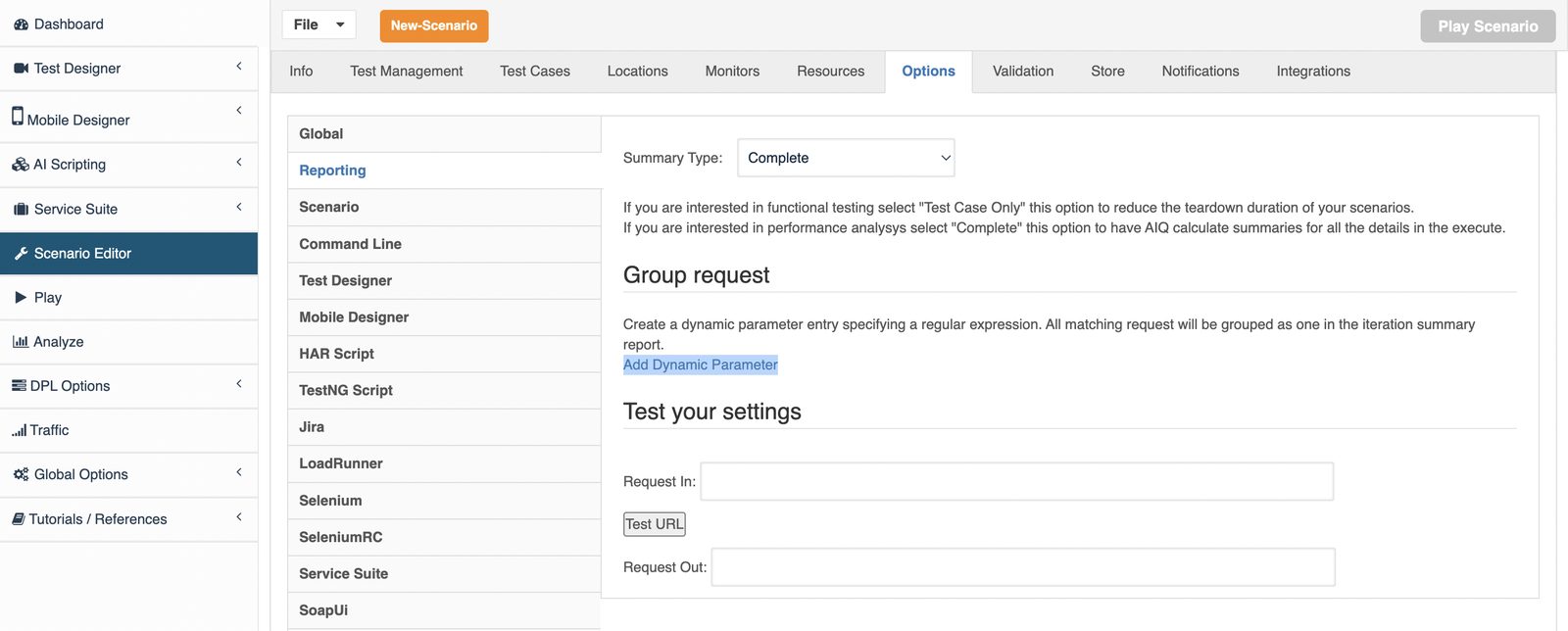
In the Reporting section on the Options tab of the Scenario Editor, there is an option called “Add Dynamic Parameter” that allows replacing dynamic values from test URLs using regular expressions, so the summaries can be calculated to all occurrences of that URL ignoring the dynamic parameter/path values. Failing to do this can cause long durations for scenario and CICD pipeline teardown specially in performance scenarios but also in functional scenarios with many test cases.
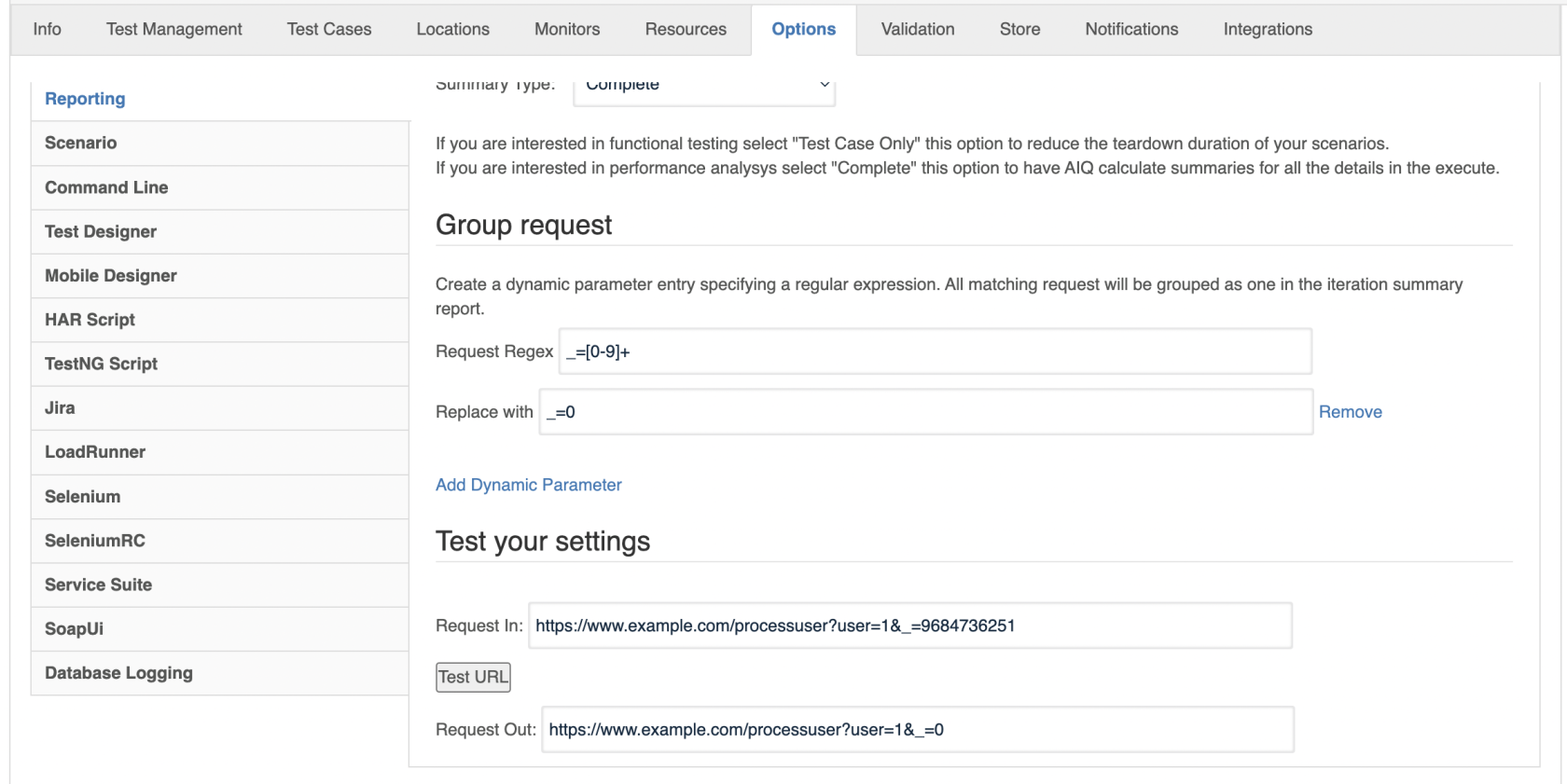
It is very common that a timestamp be added to query parameters with an _ as the name of the parameter. For example:https://www.example.com/processuser?user=1&_=9684736251So you can create a regular expression to replace that dynamic value with some static value like the following:
Last updated: JuneSeptember 26,20, 20232026
If you have any feedback on this topic, please contact us at documentation@appvance.ai