
How to change Appvance Testnode port from 8443 to 443
Please follow the below instructions to change the port number.
- User needs to open and edit the jetty.xml. The path for this file is:/Appvance UTP/TestNode/etc/jetty.xml
- Open the jetty.xml file in notepad++,
- go to line 55:<Set name="confidentialPort">8443</Set>
- change it to:<Set name="confidentialPort">443</Set>
- Also go to line 74:<Set name="Port">8443</Set>
- Change it to:<Set name="Port">443</Set>
- Restart Appvance UTP.
Possible Issues:
The port 443 could already been used by some other processes like skype.exe for example or any other process.
To check this goto Task Manager > Performance tab > Open Resource Monitor > Network tab > Under listening ports, check the port column to see what port is being used, if 443 is being used by some other process, that process needs to be killed for Appvance to make use of the port.
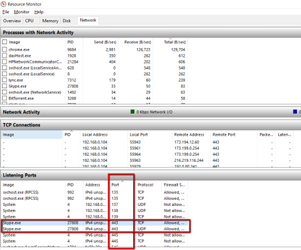
If port is not being used by any other process, then AIQ will run on 443 without any issues.
Start Appvance IQ, and navigate to https://localhost:443
Last updated: June 26, 2023
If you have any feedback on this topic, please contact us at documentation@appvance.ai