
Change the AIQ Test Node Port from 8443 to 443
Please follow
Change the belowAIQ instructionsTest Node Port from 8443 to 443
Last reviewed: September 21, 2026
Use this page when a test node must listen on HTTPS port 443 instead of the default service port. Validate the change in a maintenance window because it affects controller-to-node communication.
When to use this guidance
- Security or network policy requires standard HTTPS port 443.
- No other service is already bound to port 443 on the test node.
- Firewall rules can be updated at the same time as the AIQ setting.
Recommended approach
- Back up the current AIQ/test node configuration before editing ports.
- Confirm port 443 is free on the host and allowed by host firewall and network firewall.
- Update the test node port setting in the supported AIQ configuration file or administration setting for your version.
- Restart the test node service and verify it binds to the new port.
- Update any controller, load balancer, monitoring, or documentation references that still point to 8443.
Note: If another service already uses port 443, do not force the change; resolve the port number.conflict first.
Possible Issues:
The port 443 could already been used by some other processes like skype.exe for example or any other process. To check this goto Task Manager > Performance tab > Open Resource Monitor > Network tab > Under listening ports, check the port column to see what port is being used, if 443 is being used by some other process, that process needs to be killed for Appvance to make use of the port.
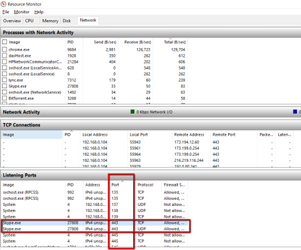
If port is not being used by any other process, then AIQ will run on 443 without any issues. Start Appvance IQ, and navigate to https://localhost:443
Last updated: JuneSeptember 26,21, 20232026
If you have any feedback on this topic, please contact us at documentation@appvance.ai.