
Enterprise-Managed Chrome Policies for AIQ Testing
Recommended guidance
IfEnterprise-managed youChrome policies can change how Scenario Editor tests behave. Before changing a scenario, confirm whether Chrome policies control downloads, popups, certificates, extensions, permissions, proxy settings, site isolation, or automatic updates.
Symptoms of policy interference
- Downloads are
usingblocked or saved to anEnterpriseunexpectedManagedlocation. - Camera,
Googlemicrophone, location, clipboard, or notification prompts behave differently than expected. - Extensions, certificates, proxy settings, or security warnings cannot be changed by the user.
- Playback differs between a corporate workstation and a clean Test Node.
- Chrome updates occur automatically and change test behavior.
Recommended checks
- Open Chrome policy information on the affected machine and identify managed settings.
- Compare the affected machine with a known-good Test Node.
- Coordinate policy changes with IT instead of bypassing enterprise controls.
- Document required browser policies for AIQ execution environments.
- Retest affected scenarios after policy, browser,
bedriver,sureor Test Node changes.
Important: Do not instruct users to checkbypass thatsecurity policies. Work with the policycustomer’s IT team to define approved settings are not blockingfor AIQ from functioning correctly.testing.
UserData Profile and Proxy are examples of critical settings that need to be checked.
PromptForDownloadLocation
This policy controls if Google Chrome asks where to save each file before downloading. This policy must be set as false at the machine level.
Setting this policy to false prevents a Save As popup window from opening when saving file. If this setting is not properly configured, when using Incognito mode files may download with incorrect file names.
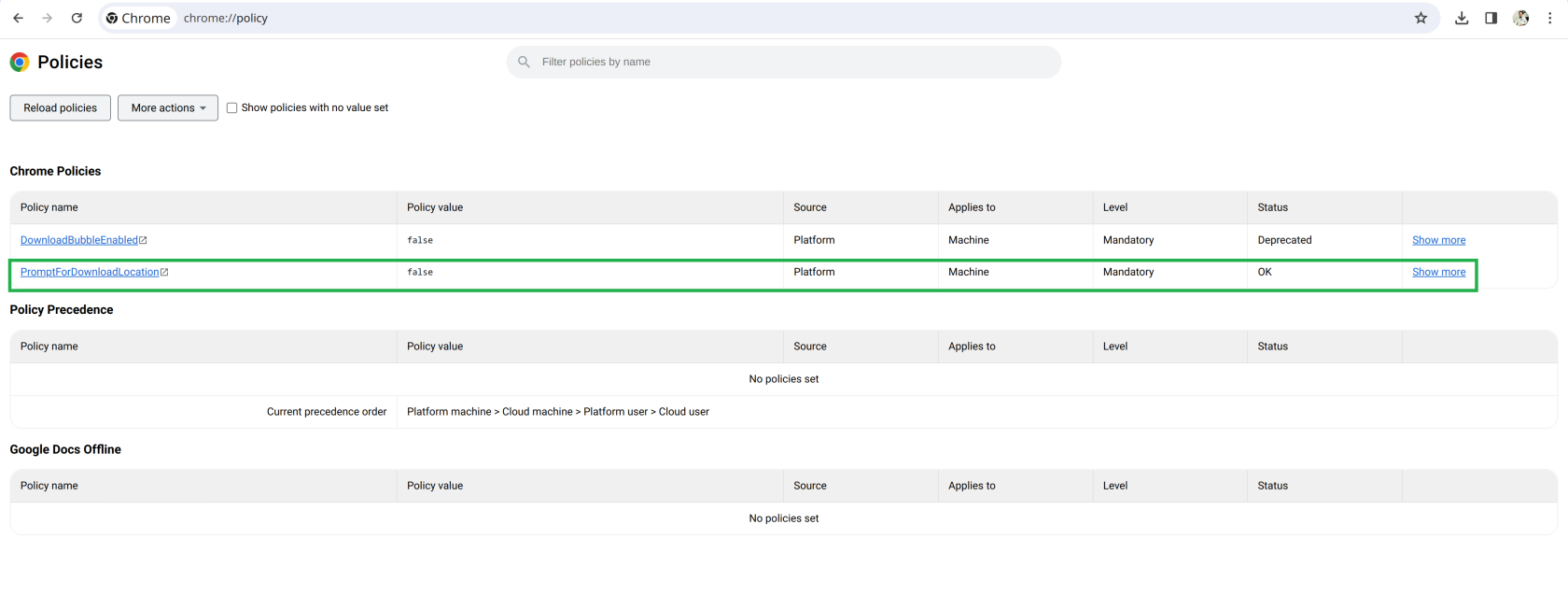
See the documentation for PromptForDownloadLocation in the Google documentation for Chrome Enterprise Policies.
Last updated: MarchOctober 11,5, 20242026
If you have any feedback on this topic, please contact us at documentation@appvance.ai