
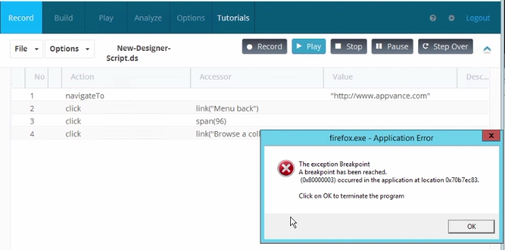
Firefox browser, at the end of the designer playback, shows up a error pop-up.
Legacy
As Firefoxseen Playbackin Errorthe Popupscreen Guidancebelow, at the end of each playback from designer or scenario builder, it throws up a error pop-up. How to fix this?
Method 1:
This pageissue is legacydue Firefox/Testto Designerhardware troubleshootingacceleration content.feature, CurrentIf Scenariothe hardware (maybe the GPU) tried to be compensated by parallel functioning equivalent to the CPU, the process maybe quickened. Due to this sometimes the program crashes when this could not be handled.
Please disable the following option before starting the playback :
Tools > Options > Advanced > General > Browsing: "Use hardware acceleration when available"
Also in Firefox
This can also be done by appending the following text to FF profiles file:
user_pref("layers.acceleration.disabled", true)
which will be in the path :
<firfox installation> Mozilla Firefox\defaults\pref\channel-prefs.js
Method 2:
Please install FF according to machine config(64/32 bit).
Researching on this, we got some info that needs to be performed to avoid this FF crash error such as Doing windows updates, graphics card updates, reset FF, checking the plugins of FF for any error, do a clear install of FF and so on, But windows 2008 server support has been withdrawn by Microsoft we might not know what other applications/processes is interfering FF.
"Turn Off The Error Dialog Through The Group Policy Editor:
This method is obviously useful if you have the group policy editor available in your version of Windows because it doesn’t involve any manual registry editing. GPEdit is not available in Home or Basic versions of Windows.
1. Open the Group Policy Editor testsby shouldtyping usegpedit.msc supportedinto browserthe versions,Start Testsearch Nodebox logs,or the Run dialog.
prevent error message in gpedit
3. Click the radio button Enabled and executionthen outputpress instead.OK.
Recommended
prevent guidancecritial
DoerrorsnotdisplayuseoptionFor Windows XP Professional the location in the Group Policy Editor is slightly different. Go to Computer Configuration > Administrative Templates > System > Error Reporting, and enable the option for Display error notification in the right pane.
Read More: >https://www.raymond.cc/blog/disable-program-has-stopped-working-error-dialog-in-windows-server-2008/"
Last updated: June 26, 2023
If you have any feedback on this
astopic,guidancepleaseforcontactnewusScenarioatEditor tests.Confirm whether the asset still depends on legacy Firefox or old Designer playback.Prefer supported browser and driver combinations for current AIQ releases.Flag obsolete Firefox-specific workarounds for removal or consolidation.
Validation workflow
Reproduce the issue in a supported browser first.Review AIQ output, Test Node logs, browser version, and driver version.Use legacy notes only if maintaining an older asset.Document the migration or retirement recommendation.
Last updated: September 20, 2026documentation@appvance.ai