
Encrypt Scenario EC2 Cloud Config Files Using API Calls
Encrypt Scenario EC2 Cloud Config Files Using API Calls
ThereUse arethis nowinstallation optionsand inconfiguration AIQarticle UXwhen toa encryptscenario’s different files with sensitive data needed for CICD pipeline jobs as seen in the screenshot below for ec2EC2 cloud configconfiguration files /AppvanceServer/rest/file/encryptFileContent call. Below you will find examples on how to encrypt ec2 cloud files used in scenario to start and stop ec2 instances using the en. If you need to encrypt the CICD credential file used to upload dashboard to Amazon S3 service can use the same encryptFileContent HTTP call but in this case the payload is not a JSON but the simple text of that file.
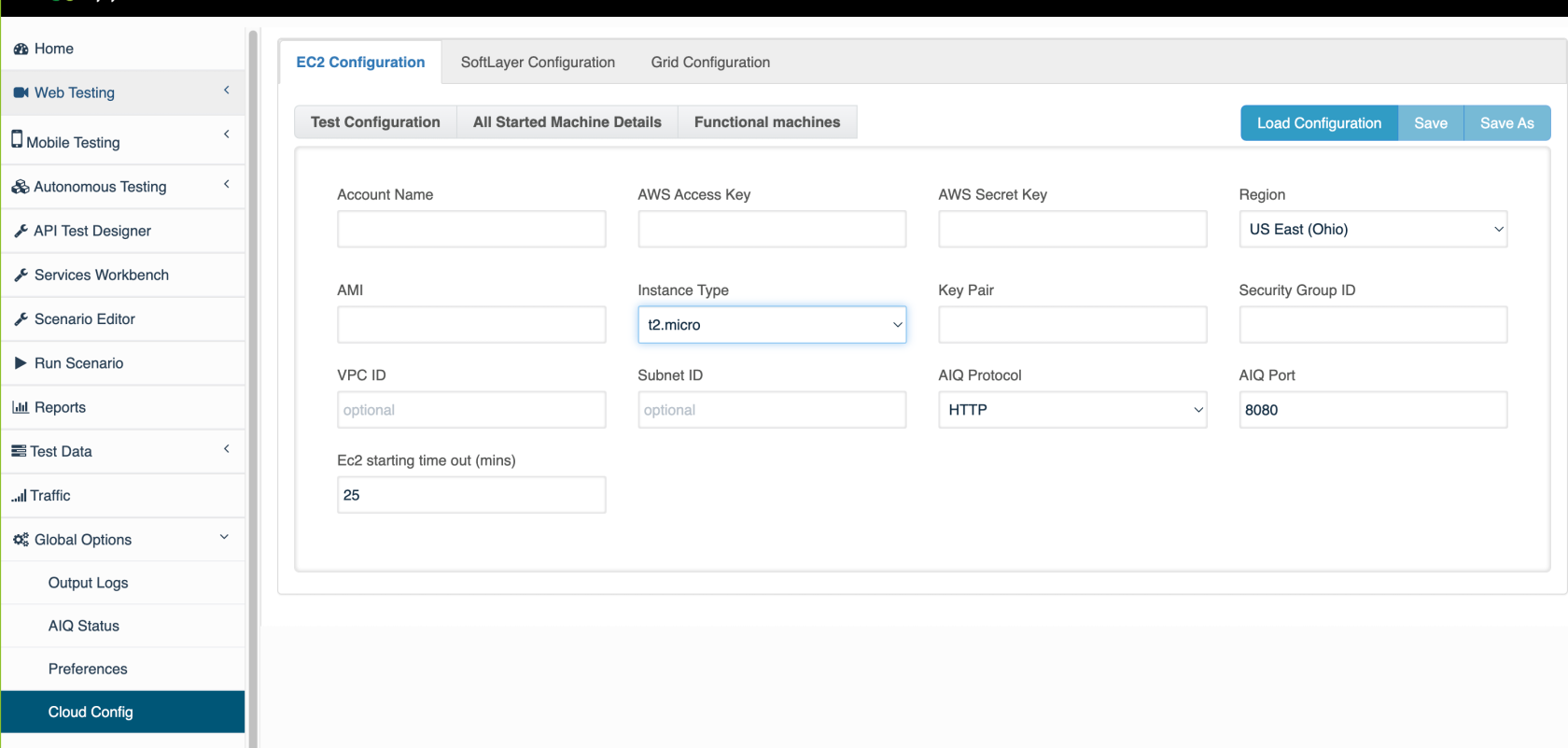
Sometimes you need to be able to encrypt files in an automated wayencrypted using CURL or service suite files to rotate the AWS credentials. Here we list two ways of achiving the same using AIQ Restapproved API calls.
EC2Keep Cloudthis configprocedure samplealigned unencrypted structure
<?xml version="1.0" encoding="UTF-8"?>
<cloud type="EC2" version="1"> <config-param key="AIQProtocol" value="http"/>
    <config-param key="AIQPort" value="8080"/>
    <config-param key="Ec2Timeout" value="25"/>
    <config-param key="AccountName" value="appvance"/>
    <config-param key="AWSKey" value="DUMMYDUMMYDUMMYDUMMY"/>
    <config-param key="AWSSecretAcessKey" value="dummDUMMYDUMMYDUMMYDUMMYDUMMYDUMMY/>
    <config-param key="AMI" value="ami-0dfc3da39bb6f571c"/>
    <config-param key="InstanceType" value="t3a.xlarge"/>
    <config-param key="KeyPair" value="AppvanceOps"/>
    <config-param key="Security" value="sg-00d4ef05804c7a117"/>
    <config-param key="AWSRegion" value="us-west-1.ec2.amazonaws.com"/>
    <config-param key="vpcId" value=""/>
    <config-param key="subnetId" value=""/>
</cloud>
Using CURL
By issuingwith the followingCI/CD sequenceversion ofand CURLavoid commandsduplicating implementation details unnecessarily.
Recommended guidance
- Confirm which scenario configuration files require encryption and who owns them.
- Use approved credentials, IAM roles, or temporary credentials with minimum required permissions.
- Back up the original configuration before applying encryption changes.
- Never expose plaintext secrets or decrypted configuration values in
aoutputMac/ubuntu terminal you can grablogs. - Document the
resultingencryptionencryptedkeyfromowner,thestorageresulting JSON response.Please replace the AIQ controller DNSlocation, andtherecoveryAIQprocedure.
Validation credentials,workflow
- Encrypt
wellaascontrolledthetestactual XML text that you want to encrypt.curl -c cookies.txt -X POST -d "username=appvance&password=appvance" http://localhost:8080/AppvanceServer/rest/admin/logginForServices -H "ContentType: application/x-www-form-urlencoded"curl -b cookies.txt -X POST -d "content=Replace here the xmlcopy of theec2configurationcloudfile. - Run
file"ahttp://localhost:8080/AppvanceServer/rest/file/encryptFileContentsmall-scenarioHsmoke"Content-Type:testapplication/x-www-form-urlencoded"
Forencrypted Windowsconfiguration.
curlcurl.exeDuplicate-content note: This page overlaps with the CI/CD article. Keep this version focused on scenario configuration and installation guidance.
The response for the second curl (encryptFileContent) will be similar to
{
"data": "pma9QDLKQn1OMlkce6L4AHwwW8d/xS3yZuvdeUTPrnCv4s3kNSGzTGicu4tu
CTvusxiUfNSVL7A6Z5Br3/lW248GS3j8WA05EF7w9sWogHyC5L2JLo/rHAJqb6qI/NGq4
ZE9hy3sobAKkVq7sadFUH3Fg/Pz+OCD94J/PR5X9CbZ9mJbcctEh73+kqZLf8v2lrgCY
ibSs957WJUub0sPC3E9XDdgjT53y0GafA8xiIbHbDxaEL4WikoFqglzjLAvkY3h4u/Pcb4
12XjVNwOUCkx51ML294jJRJs7ZQgFYbunLOxOPhJ2R9xzbaLjqiBXaiic9VvNmbgJX5RB
dcWnw4js6/+wDFkTSHgHrht6KxmwUG7ASghNz8pujjf4IOZX2JGPerxqAfD++M5ilKf5f
2buwYZiBQBFyNCW9F7H9Rwu+y2q2M73NZ6WIxzCmQfMeL+ZHHWSFTxV1OeSPdeaXCtSD
wWrY7eKWS0EvQYtPmKRDwiAnkInTDZSBDHnl2WNnZTAY1x/izUdSlL7BldjV0m9X3jP41
zIEiUuo6wXUqx5BhLT7a22lVQiSfIK4DZqENvjMDrnY0dHBLi2mX40kbALfsxrYjj3cm1
PI3cVkdUs1skM0qOL8ZsOZnzmqkUTshoPoxjKvmN32KaN9Py6UdaoEOHBIekmR7K2cot
tKvbyBuPQlWSbU8/W2/bMWxO3UDPtHDvYiVHLQax+XhuNeOOp5Lfai9jWED3WAdFXXy
7KpXJXh6dyx0dKTf1SI+F8IR4w4OPJcG2kSSuE0yzbH0bjxXDKiFiozwMYSJrWQobqBH
kdX/4V1nw2vUHjI6FASt3c3aWId417LLkZzEFQxiv3bfEAnSwkCTp0raw2jW/O4aHpg
pDwv0YqCtnHPZHN0tvkOI8Jd0Prf2fMnRIdzjj+8lWGOd1UtXPgIZPRdxXhippZA8Ne
jom0cjOsQt+NrW8YE4c6o/39JRW56e9M3Un6Kf/MWq1k4a62HQBChGHAF81+6OWc7HG
zN+HSVPWPoRQv8Rgk+ULAcX+2U2mO4w==",
"success": true

}
Just grab the data contents in the above JSON and save it as a .cloud file name.
Using ServiceSuite
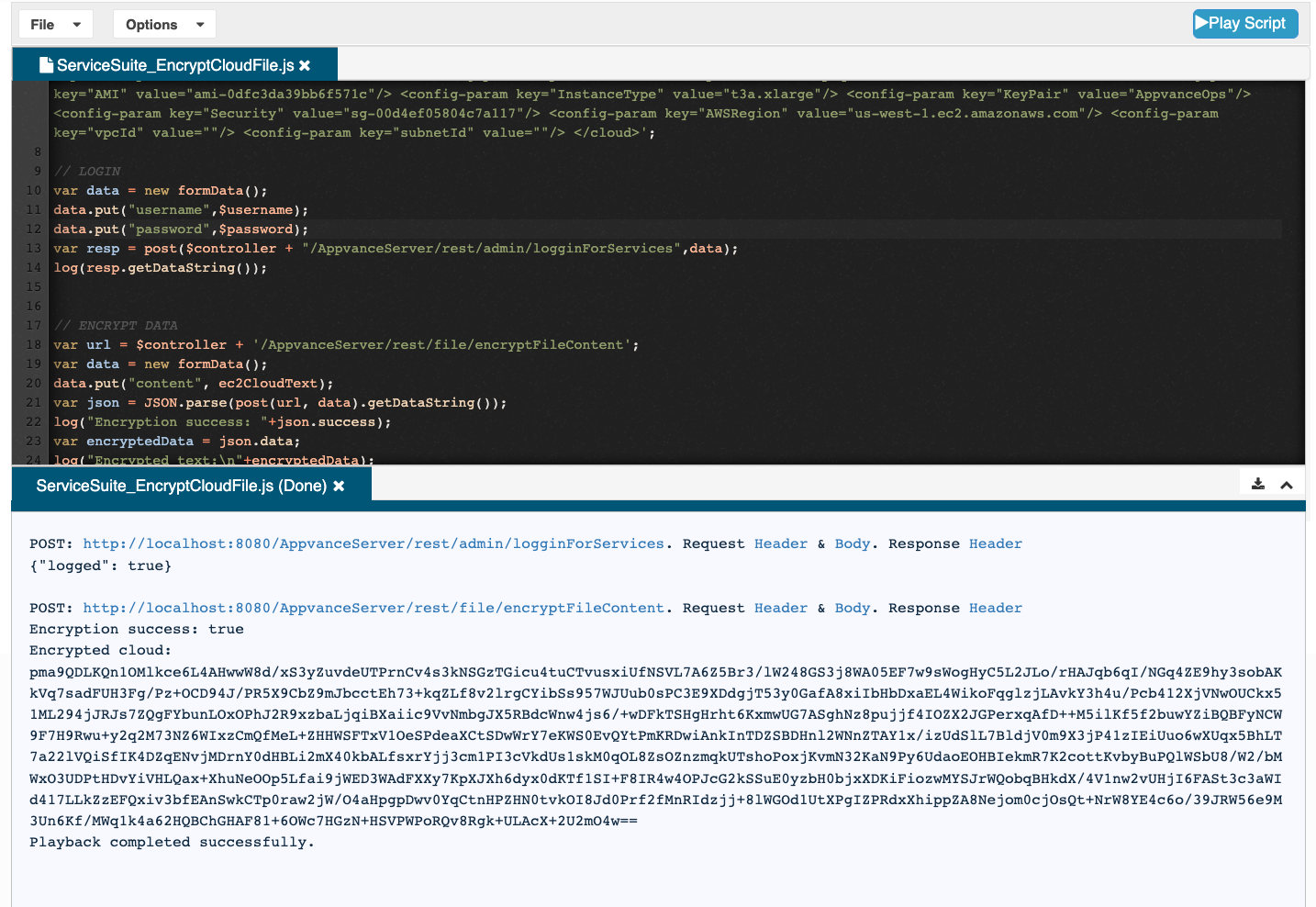
Here is a service suite script that will make the same calls seen above in the CURL example:
// MODIFY THIS TO POINT TO YOUR CONTROLLER
var $controller = "http://localhost:8080"
var $username ="appvance";
var $password ="appvance";

// THIS VARIABLE CAN BE USED TO CONSTRUCT THE EC2 CLOUD XML AS A STRING. PROVIDED BELOW SAMPLE DATA:
var ec2CloudText = '<?xml version="1.0" encoding="UTF-8"?> <cloud type="EC2" version="1"> <config-param key="AIQProtocol" value="http"/> <config-param key="AIQPort" value="8080"/> <config-param key="Ec2Timeout" value="25"/> <config-param key="AccountName" value="appvance"/> <config-param key="AWSKey" value="DUMMYOWGVPHYCUXYASDF"/> <config-param key="AWSSecretAcessKey" value="dummyxqmHB6IFeJ3KAar7zh3l7Id4AeQR8Uasdf"/> <config-param key="AMI" value="ami-0dfc3da39bb6f571c"/> <config-param key="InstanceType" value="t3a.xlarge"/> <config-param key="KeyPair" value="AppvanceOps"/> <config-param key="Security" value="sg-00d4ef05804c7a117"/> <config-param key="AWSRegion" value="us-west-1.ec2.amazonaws.com"/> <config-param key="vpcId" value=""/> <config-param key="subnetId" value=""/> </cloud>';

// LOGIN
var data = new formData();
data.put("username",$username);
data.put("password",$password);
var resp = post($controller + "/AppvanceServer/rest/admin/logginForServices",data);
log(resp.getDataString());


// ENCRYPT DATA
var url = $controller + '/AppvanceServer/rest/file/encryptFileContent';
var data = new formData();
data.put("content", ec2CloudText);
var json = JSON.parse(post(url, data).getDataString());
log("Encryption success: "+json.success);
var encryptedData = json.data;
log("Encrypted text:\n"+encryptedData);
After executing this script the encrypted contents are in the encryptedData variable. Then you can use writeText service suite command to write it to a file in your repository.
Last updated: AprilOctober 28,10, 20252026
If you have any feedback on this topic, please contact us at documentation@appvance.ai