
Working with Appvance IQ on https (https://localhost:8443) in Firefox and having issues with designer?
ThisWorking pagewith Appvance IQ on https (>https://localhost:8443) in Firefox browser and having issues with designer?
Designer launches and downloads “start-proxy” every time when user navigates to designer and gets stuck in between and does not move forward and also does not get proxy started pop-up.
Firefox Settings:
Note: Please make sure the proxy is retainedrunning (2 Java process should be running)
If you are seeing the above, Please click Add Exceptions and it will add the certificates for you.
We need to add the Exceptions as ashown legacyin referencethe forbelow olderscreenshot.
Go to Firefox HTTPSsettings localhost> issuesAdvanced > Certificates tab > Click View certificates.
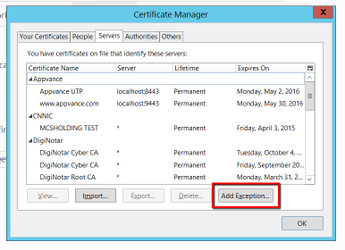
Go to Servers tab > Add Exceptions
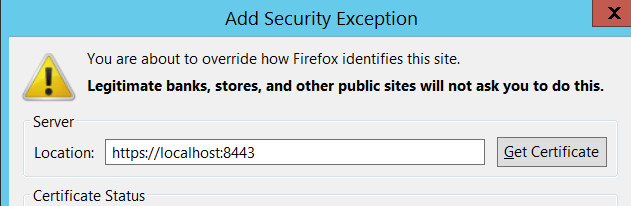
In the locations text box, type https://localhost:8443 as seen in AIQthe environments.below screenshot, click Get Certificate and then click 'Confirm security exception'
Validation
workflow
ConfirmRepeat the
currentsamesupportedstepbrowser path before troubleshooting an older Firefox localhost issue.Verify certificate trust, URL/port, proxy settings,above andwhetheradd theAIQURLservice-is>https://localhost:9443reachableandonConfirmlocalhost.IfsecuritytheException.issueand
isalsoFirefox-specific,thisdocumentURL as well: >http://localhost:9999/_s_/dyn/pro/DBReportsRestart the browser
versionafter the settings andcomparethenwithnavigateatosupportedDesigner.Chrome/EdgeProxy
executionStartedpath.
Last updated: September 30,11, 20262023
If you have any feedback on this topic, please contact us at documentation@appvance.ai