
Legacy Outlook Email Status Update via HTTP Call
YouLast canreviewed: useSeptember 30, 2026
This page is retained as a legacy integration reference for environments that still update Outlook email status through an HTTP call.
What changed in this article
- Marked the Outlook HTTP-call procedure as legacy and integration-specific because Microsoft authentication and Graph/API behavior can change.
- Added checks for OAuth/token handling, endpoint ownership, least-privilege permissions, response validation, and audit logging.
- Added guidance to
setavoid hard-coded credentials and to confirm whether Microsoft Graph or a maintained integration should replace this approach.
Validation workflow
- Confirm the customer still needs this legacy HTTP-call workflow and identify the supported endpoint.
- Validate authentication, permission scope, request body, expected status code, and failure response in a controlled test.
- Document token storage and audit requirements before using the workflow in shared automation.
Review note: This page now warns that Outlook emailsstatus tochanges “unread”should oruse ”read”maintained status.Microsoft/API An example ofpractices where you might find this functionality useful is in the case of a mailbox attached to a project where there is a steady accumulation of email and you need to keep the unread queue clear. Being able to set unread mails as read will meet this need.available.
This ability was added in the 4.10.0 release of AIQ.
Process
In your main script, call markAsReadOrUnread(), with these parameters:
emailId = id of the email to update the read status.
isRead = true if the user wants to mark the email as read, otherwise should be false to mark it as unread.
mailSender = active user
folder = working folder where is the email.In your main script, call for markAsReadOrUnread(), parameters
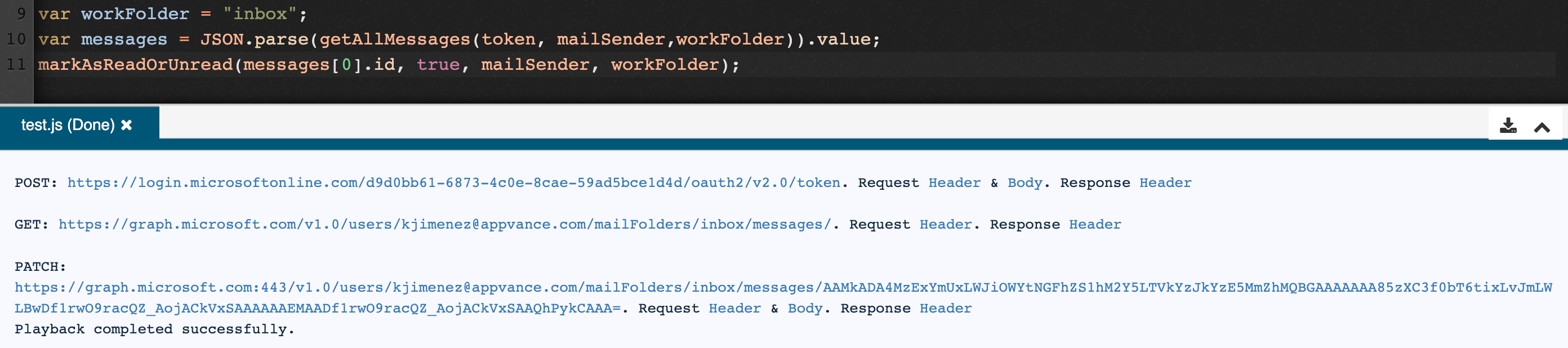
Example Script
//get token
function generateToken(clientId, clientSecret, tenantId) {
var data = formData();
data.put("grant_type", "client_credentials");
data.put("scope", "https://graph.microsoft.com/.default");
data.put("client_id", clientId);
data.put("client_secret", clientSecret);
var tokenResponse = post("https://login.microsoftonline.com/" + tenantId + "/oauth2/v2.0/token", data);
var tokenJson = JSON.parse(tokenResponse.toStringContent());
return tokenJson.access_token;
}
//send email
function sendMessage(token, mailSender, destination, subject, message) {
var url = "https://graph.microsoft.com/v1.0/users/" + mailSender + "/sendMail"
var body = {
"message": {
"subject": subject,
"body": {
"contentType": "Text",
"content": message
},
"toRecipients": [
{
"emailAddress": {
"address": destination
}
}
]
},
"saveToSentItems": "false"
};
var request = createPost(url, body);
request.addHeader("Authorization", "Bearer " + token);
process(request);
}
//reply email
function replyMessage(token, emailId, mailSender, destination, message) {
var url = "https://graph.microsoft.com/v1.0/users/" + mailSender + "/messages/" + emailId + "/reply"
var body = {
"message": {
"toRecipients": [
{
"emailAddress": {
"address": destination
}
}
]
},
"comment": message
};
var request = createPost(url, body);
request.addHeader("Authorization", "Bearer " + token);
process(request);
}
//reply all email
function replyAllMessage(token, emailId, mailSender, message) {
var url = "https://graph.microsoft.com/v1.0/users/" + mailSender + "/messages/" + emailId + "/replyAll"
var body = {
"comment": message
};
var request = createPost(url, body);
request.addHeader("Authorization", "Bearer " + token);
process(request);
}
//get emails
function getAllMessages(token, mailSender, folder) {
var url = "https://graph.microsoft.com/v1.0/users/" + mailSender + "/mailFolders/" + folder + "/messages/";
var request = createGet(url);
request.addHeader("Authorization", "Bearer " + token);
request.addHeader("Content-type", "application/json");
request.addHeader("Prefer", "outlook.body-content-type='text'");
return process(request).toStringContent();
}
//get mail folders
function getAllFolders(token, mailSender) {
var url = "https://graph.microsoft.com/v1.0/users/" + mailSender + "/mailFolders";
var request = createGet(url);
request.addHeader("Authorization", "Bearer " + token);
request.addHeader("Content-type", "application/json");
return process(request).toStringContent();
}
//delete mail
function deleteMessage(token, folder, emailId) {
var url = "https://graph.microsoft.com/v1.0/users/" + mailSender + "/mailFolders/" + folder + "/messages/" + emailId;
var request = createDelete(url);
request.addHeader("Authorization", "Bearer " + token);
request.addHeader("Content-type", "application/json");
return process(request).toStringContent();
}
//get unread emails
function getUnreadMessages(token, mailSender, folder) {
var url = "https://graph.microsoft.com/v1.0/users/" + mailSender + "/mailFolders/" + folder + "/messages/?$filter=isRead+ne+true";
var request = createGet(url);
request.addHeader("Authorization", "Bearer " + token);
request.addHeader("Content-type", "application/json");
request.addHeader("Prefer", "outlook.body-content-type='text'");
return process(request).toStringContent();
}
//mark email as read or unread
function markAsReadOrUnread(emailId, isRead, mailSender, folder) {
var url = "https://graph.microsoft.com/v1.0/users/" + mailSender + "/mailFolders/" + folder + "/messages/" + emailId;
var body = { isRead: isRead };
var request = createPatch(url, body);
request.addHeader("Authorization", "Bearer " + token);
//request.addHeader("Content-type", "application/json");
//request.addHeader("Content-length", "248");
process(request);
}
Last updated: AugustSeptember 15,30, 20232026
If you have any feedback on this topic, please contact us at documentation@appvance.ai.