
Mac Test Designer Install - Getting Test designer.app cannot be opened because the developer cannot be verified
Recommended
guidance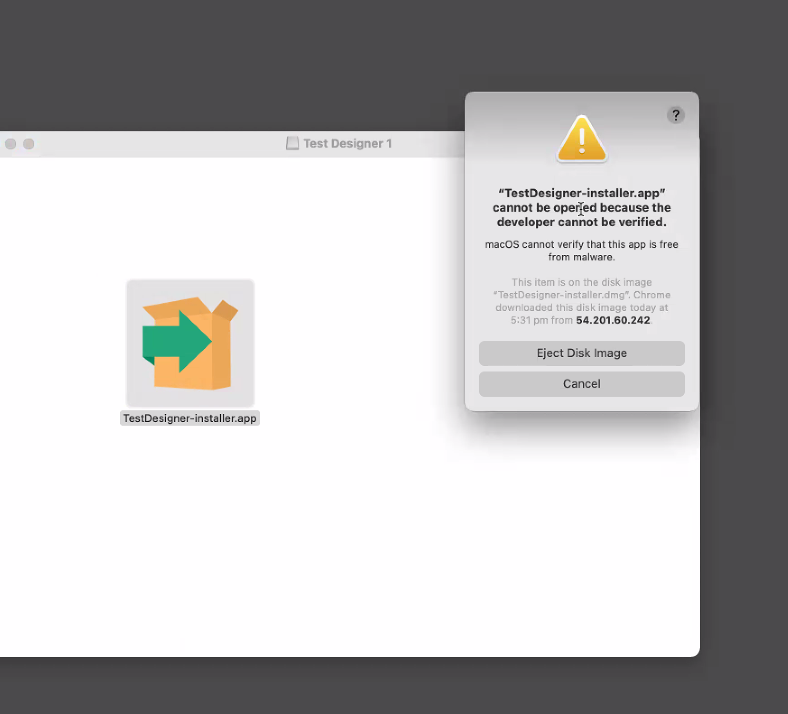
macOS may block an AIQ application when Gatekeeper cannot verifyIn the developerFinder oron whenyour theMac, file is quarantined after download. Treat this as a macOS security workflow; the user or administrator must approvelocate the app throughyou want to open.
Don’t use Launchpad to do this. Launchpad doesn’t allow you to access the approvedshortcut company process.menu.
Before
Confirm the AIQ package came from an approved Appvance distribution channel.Verify macOS version, CPU architecture, AIQ version, checksum, and installer type.Check customer security policy, device management, and administrator requirements.Do not document bypasses that weaken macOS security controls.
Validation workflow
Have the user or administrator approveControl-click the app
usingicon, then choose Open from theapprovedshortcutmacOSmenu.flow.
Click Open.
The app is saved as an exception to your security settings, and confirmyou requiredcan permissionsopen areit grantedin the future by thedouble-clicking user.it just as you can any registered app.
Note: You can also grant an exception for a blocked app by clicking the Open Anyway button in the General pane of Security & Privacy preferences. This button is available for about an hour after you try to open the app.
To change these preferences on your Mac, choose Apple menu > System Preferences, click Security & Privacy, then click General.
Last updated: OctoberJuly 7,31, 20262024
If you have any feedback on this topic, please contact us at documentation@appvance.ai