
For all the navigated sites, IE asks the user to add the site to the white list.
Amazon EC2 recent windows server instances has by default active a IE Enhanced Security Configuration. This makes IE to ask adding new navigated domains to a white list.
Internet Explorer is no longer supported browser in AIQ.
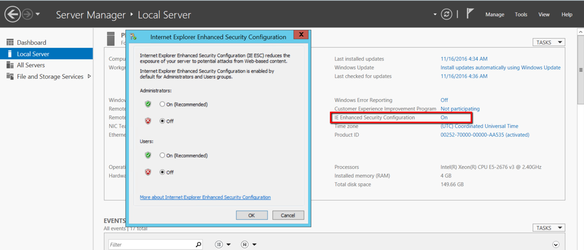
To turn this OFF, follow the below steps: (For windows server 2012)
- Go Start panel and search for Server Manager
- Open Server Manager
- Click Local Server in the left navigation pane.
- Select IE Enhanced Security Configuration and select OFF.
For windows server 2008:
- To turn off Internet Explorer Enhanced Security Configuration
- Close any Internet Explorer browser windows that you might have open.
- Open Server Manager
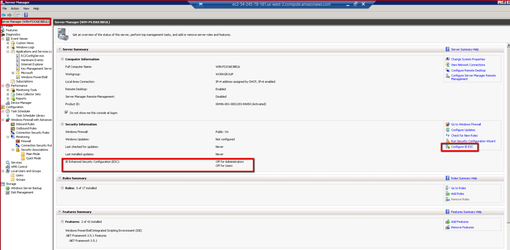
- If your server is running Windows Server® 2008 R2, in the Security Information section of Server Summary, click Configure IE ESC to open the Internet Explorer Enhanced Security Configuration dialog.
- To allow members of all other groups to use Internet Explorer in its default client configuration, under Users click Off.
Last updated: October 25, 2023
If you have any feedback on this topic, please contact us at documentation@appvance.ai