
OpenStack issue: enabling remote access to a MySQL database (linux)
LastOpenStack reviewed:issue: September 22, 2026
Use this article when an AIQ environment requires remote MySQL access for administration, diagnostics, or integrations. Apply least-privilege network and account controls.
Recommended guidance
Confirmenabling remote access to a MySQL database (linux)Issue that is
required;seenpreferinlocalControllerorisbastionattached below and also error logs has been attached.Solution:
This steps should fix the issue with the openstack generator not been able to access
whendatabase:possible.RestrictStart
bindwithaddress,editingfirewallmysqlrules,config file in the database machine:
vim /etc/mysql/my.cnfComment out following lines.
#bind-address = 127.0.0.1
#skip-networking
If you do not find skip-networking line, add it anddatabasecommentgrantsouttoit.approvedRestart
sources.UsemysqlTLSserver:
service mysql restartEnter mysql and
secretexecutemanagementfollowingwherequeries:
GRANTsupported.
ValidationPRIVILEGES workflow
ON Identify*.*theTOclient‘utp'@'%'host,IDENTIFIEDdatabaseBYhost,‘utp'port,WITHandGRANTapprovedOPTION;
FLUSHaccess path.Update MySQL bind and firewall settings only for the required network scope.Create or update a least-privilege database account for the task.Test connectivity from the approved source and verify logs.Remove temporary access after the maintenance window when applicable.
Note:Generator_Error_log.txt
Opening
broadly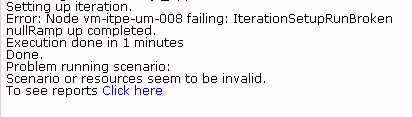
to
Last updated: SeptemberJuly 22,03, 20262023
If you have any feedback on this topic, please contact us at documentation@appvance.ai.