
Chrome Issues on Mac M1/M2
Troubleshoot
When accessing Appvance’s Web Designer with Google Chrome Issues on Mac OS Sonoma (14.x) and Sequoia (15.x), you may experience slow performance. The underlying issue is the interaction between Java and the dual-architecture used by Google Chrome.
Google Chrome builds come with two architecture versions, the Intel version (called x86_64) and the Mac (M1/M2M2) version (called arm64). The Intel versions runs using a VM called Rosetta and slow performance in this version of the Google Chrome architecture has been noticed in recent updates of Mac OS.
Supporting External Documentation
For reference, here are some links to external information about the interaction between Mac OS and the dual-architecture of Google Chrome:
Google Chrome Support Forum: ChromeBrowser x86_64 opening for AIQautomated UseTCs this articleeven when Chromechromedriver behavesis inconsistently on Apple Silicon Macs usedarm64 for AIQmac authoring,m1playback, or browser validation. Confirm Chrome, macOS, driver, and security settings before changing AIQ configuration.
Common
Official Apple documentation has not provided much information on the environmentsubject explicitlyof requireswhy a binary with M1 capabilities executes using Rosetta.
Verifying Your Configuration
To avoid the slow performance issues caused by Google Chrome using the Rosetta VM, you must verify your configurations and make any appropriate modifications. The following procedures will help you verify that your configuration is appropriate to help avoid the issue.
Confirm the Chromebuild of Java supports arm64 (M1/M2)
Check if the executable Java file is set to arm64 at the file level, by typing “file java” in the folder where Java is located. The detailed steps are documented below.
Follow these steps to confirm that the installed version matchesof Java supports arm64 (M1/M2).
You can locate the browserJava driverinstallation location with the following command: whereis java
This should output something similar to: java: /usr/bin/java
Navigate to the Java folder and check the file version with the following command: cd /usr/bin && file java
/usr/bin/java is a pointer file, not really a program. The most accurate method is to check in real time which version of Java is being used. There may be older JDK versions present because the installer may not have removed them. If one of these older JDK versions is Intel-only, it could cause problems.
If you are not sure where the Java version is located, you can check the Activity Monitor when Web Designer is running to confirm the Java path. You can also use the following command when Web Designer: ps -eo pid,comm | grep java
This will output something similar to the following:
1787 /Users/macuser/.sdkman/candidates/java/current/bin/java
From this result, you will only need to reference the process ID (PID). In the above example the PID is 1787. Generate a list of processes using the PID.lsof -p <PID> | grep 'cwd\|txt'
The output of this command is a list of files opened by this process. The result will be similar to the following:
java 1787 macuser cwd DIR 1,18 80 7843 /Users/macuser/Appvance/ds/distribution
java 1787 macuser txt REG 1,18 924 7752 /Applications/jdk/graalvm-11/bin/java
java 1787 macuser txt REG 1,18 114 7758 /Applications/jdk/graalvm-11/lib/jli/libjli.dylib
Usually, the second line will be the Java file that was executed. Once you have the Java file (in the example above it is /Applications/jdk/graalvm-11/bin/java) you can navigate to that directory.
cd / Applications/jdk/graalvm-11/bin/
Enter the following command:
file java
If this output contains a Java executable arm64e or automationexecutable dependency used byarm64 the test.java version is compatible.
java: Mach-O universal binary with 2 architectures: [x86_64:Mach-O 64-bit executable x86_64] [arm64e:Mach-O 64-bit executable arm64e]
java (for architecture x86_64): Mach-O 64-bit executable x86_64
java (for architecture arm64e): Mach-O 64-bit executable arm64e
If privacythe Java version is compatible, you can proceed to the section on confirming if Google Chrome supports arm64.
If the Java version is not compatible, you must install an arm64-compatible version of Java. Follow the steps documented in the next section.
Installing an arm64 Compatible version of Java
Update to a build version that supports arm64. As noted before, if you have a version that is Intel-only (x86_64), AIQ’s Web Designer will be slow even in other browsers (Firefox and securityEdge). promptsTo avoid this issue you must install a GraalVM Java 11 with arm64 support.
Install sdkmann: https://sdkman.io/install/
Install a GraalVM Java 11 version.
Download the the zip file from: https://github.com/graalvm/graalvm-ce-builds/releases/download/vm-22.1.0/graalvm-ce-java11-darwin-aarch64-22.1.0.tar.gz
When the download completes, unzip it and navigate to the Contents folder.
List the contents with the ls command. This will output something similar to the following:
macuser@ Downloads % tar -xf graalvm-ce-java11-darwin-aarch64-22.1.0.tar.gz
macuser@ Downloads % cd graalvm-ce-java11-22.1.0
macuser@  graalvm-ce-java11-22.1.0 % cd Contents
macuser@  Contents % ls
Home Info.plist MacOS
Install GraalVM Java 11 from the shell with the following command:sdk install java graalvm-11 $(realpath HOME/)
Once GraalVM Java 11 is installed, you should receive a confirmation message.
Linking java graalvm-11 to /Users/MACUSER/Downloads/graalvm-ce-java11-22.1.0/Contents/Home
Done installing!
Set this version as the default Java with the following command:sdk default java graalvm-11
Once set, you should receive a confirmation message.
setting java graalvm-11 as the default version for
screenall recording,shells.accessibility,
Verify the the Java version with the following command: java -version
The confirmation message should be similar to the following:
openjdk version "11.0.15" 2022-04-19
OpenJDK Runtime Environment GraalVM CE 22.1.0 (build 11.0.15+10-jvmci-22.1-b06)
OpenJDK 64-Bit Server VM GraalVM CE 22.1.0 (build 11.0.15+10-jvmci-22.1-b06, mixed mode)
Confirm Google Chrome supports arm64
Follow these steps to confirm that the build of Google Chrome you are using supports arm64.
Navigate to the install location of Google Chrome.
cd /Applications/Google\ Chrome.app/Contents/MacOS
Verify if Google Chrome is arm64 compatible with this command:
file Google\ Chrome
The result should be similar to the following:
Google Chrome: Mach-O universal binary with 2 architectures: [x86_64:Mach-O 64-bit executable x86_64] [arm64:Mach-O 64-bit executable arm64]
Google Chrome (for architecture x86_64): Mach-O 64-bit executable x86_64
Google Chrome (for architecture arm64): Mach-O 64-bit executable arm64
If the result shows executable arm64 that means Google Chrome is installed with arm64 (Mac M1/M2) support.
If the result does not show arm64 support, you can download a new version of Google Chrome from: https://www.google.com/chrome
Confirm that AIQ is using the arm64 version of Google Chrome
Follow these steps to confirm that AIQ is using the build of Google Chrome that supports arm64.
Start Web Designer using the installer first, to install a fresh version but not launch it. However, if it is launched, you can kill the process using: killall -9 java
Start Web Designer from the command line.
Web Designer will install a startup icon, this icon sometimes will start the Java and networkChrome access.Intel version, instead of the Apple arm64 version.
As noted before, Apple has not provided enough documentation of why this happens. One solution is to run the Web Designer shell script instead of launching it from startup icon.
To do this, open the terminal and cd to where Web Designer is installed. This is generally in the following location: /Users/MACUSER/WebDesigner/NetworkProxy
From there run the startup script (startds.sh):
./startds.sh
From extensions,AIQ, profiles,click orRecord cachedusing browserGoogle dataChrome.
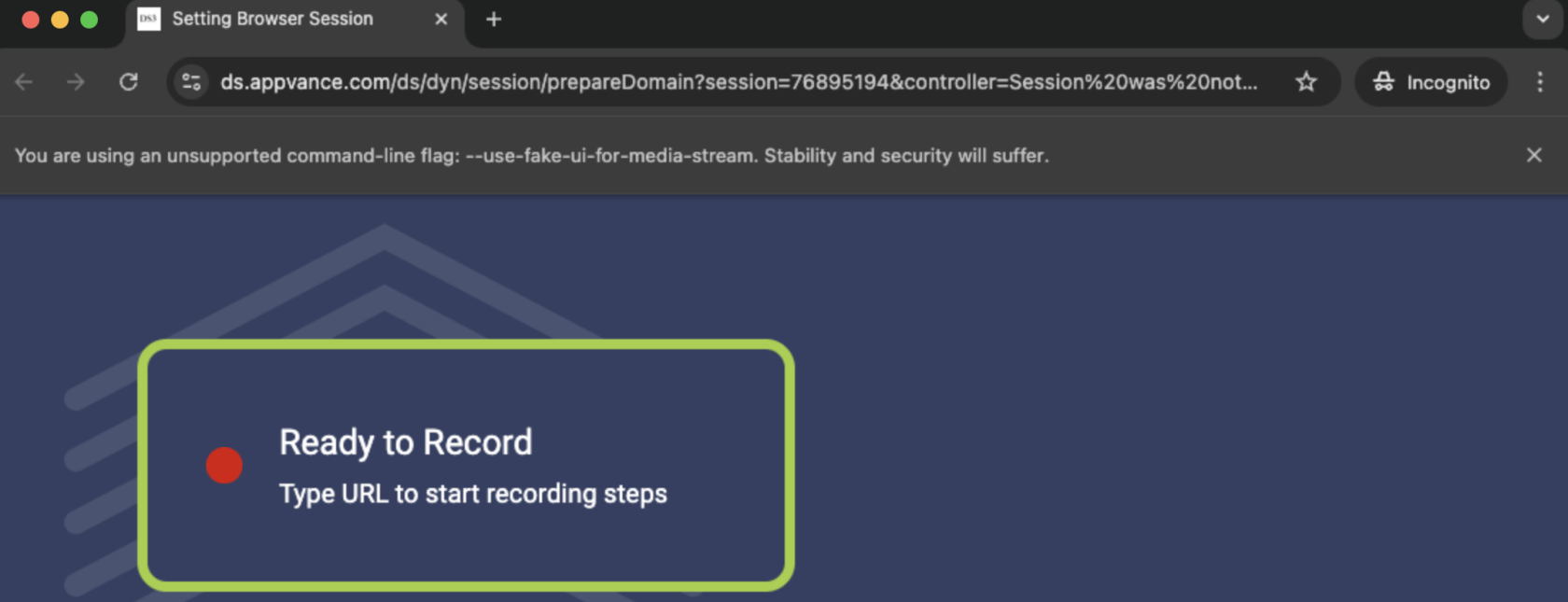
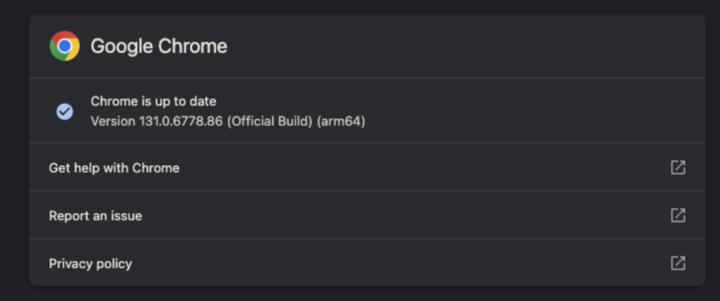
After Chrome starts, click Customize and control Google Chrome (the three dots) > Help > About Google Chrome.
If you see “(Official Build) (arm64)” as part of the Version information, that means that AIQ is using the arm64 version of Google Chrome.
If you are affectingstill playback.
Validationinformation workflow
you Recordmay have missed some of theMacconfigurationmodel,steps.macOSPleaseversion,reviewChromethemversion, and AIQ version.Reproducefrom theissuestart.witha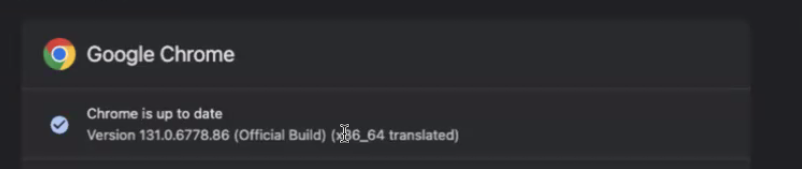
smallknown-good
Last updated: OctoberDecember 8,03, 20262024
If you have any feedback on this topic, please contact us at documentation@appvance.ai