
Troubleshoot the AIQ Options Page Not Loading
Solution: Change
Troubleshoot the internetAIQ settings,
Options IfPage youNot areLoading
Last Googlereviewed: Chrome,September Navigate21, 2026
Use this article when the AIQ Options or Global Options page does not load in a browser. Start with browser/session checks, then validate AIQ services and logs.
When to Settingsuse >this Searchguidance
- The AIQ application loads partially but Options does not.
- A browser shows a blank page, spinner, or server error.
- Administrators need a safe triage path before restarting services.
Recommended approach
- Refresh the session and test in a supported browser profile without extensions.
- Confirm the user has permission to access Options or Global Options.
- Check browser developer tools for
Proxyfailed>requestsClickandChangeHTTPProxystatussettingscodes. - Review
>AIQClickserverLANlogsSettings.for>matchingun-checkerrorsautomatically detect settings.Below isat thescreenshottimeforofreference.the failed load. - Restart affected AIQ services only after collecting evidence and confirming impact.
Note:
The 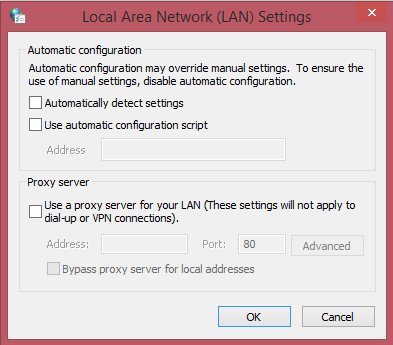
title contained a spelling error; use “Appvance” or “AIQ” in future references.
Last updated: JuneSeptember 26,21, 20232026
If you have any feedback on this topic, please contact us at documentation@appvance.ai.