Validate File Downloads in JMeter Tests

Validate

InFile JMeter,Downloads wein JMeter Tests

Last reviewed: September 21, 2026

Use this page when a JMeter-based AIQ test needs to request and validate downloadable files. Focus on response validation rather than browser download behavior.

When to use this guidance

  • A JMeter scenario downloads files or reports from an application.
  • You need to addvalidate "Savecontent Responsestype, size, status code, or response body.
  • The test should avoid storing unnecessary files on load generators.
  1. Confirm the download request works manually and capture the expected headers.
  2. Configure the JMeter sampler to a file" listener to saverequest the file downloads,endpoint wedirectly.
  3. Add canassertions providefor aHTTP filenamestatus, prefixcontent type, size, or evenchecksum thewhen directory path for the download file.
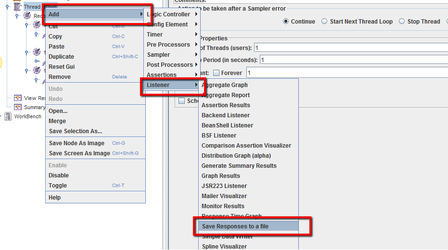
Please refer below screenshot on how to add "Save Responses to a file" Listener
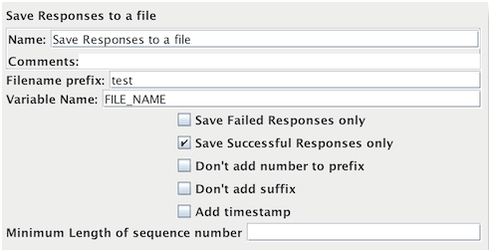
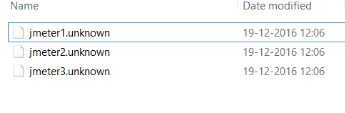
For each sample in its scope, it will create apractical.Parameterize file ofIDs theor responseURLs Data.Thethrough fileAIQ namedata is created from the specified prefix, plus a number (unless this is disabled, see below). The file extension is created from the document type,sources if known. If not known, the file extension is set to 'unknown'. If numbering is disabled, and adding a suffix is disabled, then the file prefix is taken as the entire file name. This allows a fixed file name to be generated if required. The generated file name is stored in the sample response, and can be saved in the test log output file if required.
The current sample is saved first, followed by any sub-samples (child samples). If a variable name is provided, then the names of themultiple files are tested.Clean up any saved inartifacts theand orderavoid thatwriting thelarge sub-samplesfiles appear.during Seehigh-volume below.
load
tests.

Note:

For
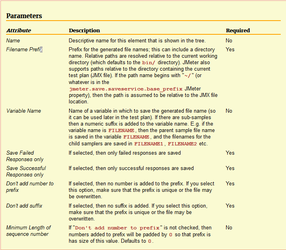
Pleasebrowser-driven finddownloads, belowuse theScenario detailedEditor descriptiondownload validation guidance instead of the parameters used
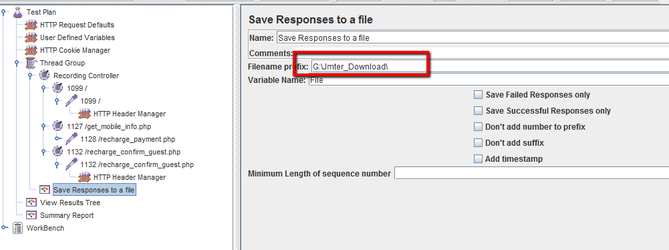
Without providing the path, the file gets saved in "jmeter/bin" directory.
We can mention the path in "Save Responses to a file" listener as seen below and this scriptJMeter-specific can be used in Appvance IQ.
File downloaded after running the scenario from Appvance IQ:
page.

Last updated: JuneSeptember 26,21, 20232026

If you have any feedback on this topic, please contact us at documentation@appvance.ai.