
Getting Started with iOS and AIQ
Requirements
- Mac OS X
At this time Catalina 10.15.3 required. This is to evolve as Mac OS X evolves. - iOS Simulator compatible App file
- AIQ Controller locally installed on Mac
Setup
Install and Setup Xcode
- Download, install and open Xcode for first time.
- Make sure to accept the End User License Agreement.
- Make sure to install additional components.
- To view installed Simulators or connected physical iPhones
- Open Xcode, select Window > Devices and Simulators
- Click Simulators and select any model
- Note the iOS version number, Identifier value and Model name for later use. These correspond to platformVersion, udid and deviceName capabilities.
For example: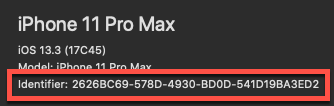
- Sign into your Apple account (Required if test will use physical iPhones. Skip this step if test uses Simulators)
- Select Xcode > Preferences > Accounts
- Click +
- Select Apple ID and click Continue
- Enter your Apple ID (must be a paying Account so Team ID value is assigned to Membership) and follow prompts until account appears in Accounts list
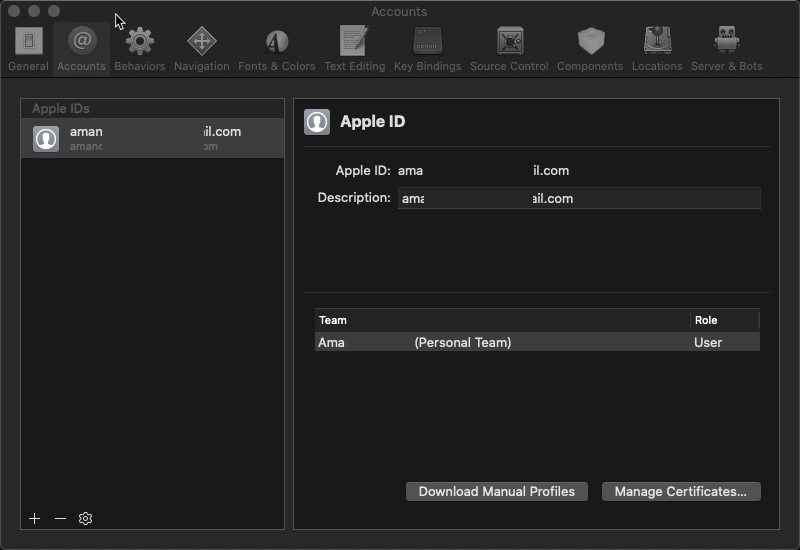
- Create a new Xcode Project (This step is only to test connection between Mac and Simulator or physical iPhone. Can be skipped)
- Open Xcode > File > New > Project
- Select iOS > Single View App and click Next
- Enter a name in the Project Name box
- Select a Team
- Enter a name in the Organization Name box
- Enter com.<anything> in the Organization Identifier box (I used com.appvance)
- Bundle identifier appears as com.appvance.ProductName
- Leave the remaining options as default
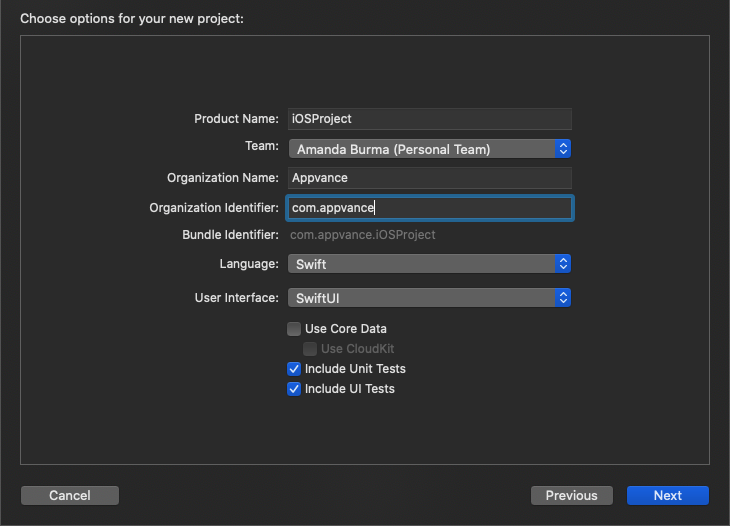
- Click Next
- Specify the location to save the Project and click Create
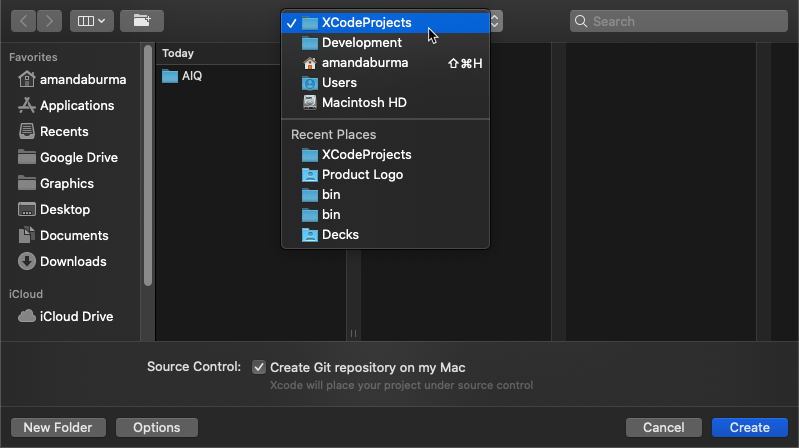
- Press Play and confirm the Application launches in the Simulator or physical iPhone and displays your Hello World! app. You can change the Simulator or physical iPhone by clicking on the device name.

- Drag and drop any iOS Application file (have .app extension) to install to the Simulator
- Confirm just installed Application runs successfully
- Press Command + Q to stop the Simulator
- Press Command + Q to close Xcode
Install Homebrew
- Open Terminal
- Run the following command
/bin/bash -c "$(curl -fsSL https://raw.githubusercontent.com/Homebrew/install/master/install.sh)"- More details about Homebrew and installation: https://brew.sh/
Appium Pre-requisites and Install
- Open Terminal
- Run the following commands in the order listed below
brew update
brew install libimobiledevice
brew install ios-deploy
brew install carthage
brew install appium- More details about Appium installation: https://appiumpro.com/editions/40
Configure your Appium Server Simulator configuration file
The Appium Server Simulator configuration file must be updated for your specific environment and Application. This is a JSON file that contains an array of objects. Each object corrresponds to a machine which has Appium running and the Simulator installed. The required keys and values of each object are:
{
  “serverURL”: “http:/example.com:4723/wd/hub, URL in which Appium runs”,
  “proxyURL”: “http://example.com:9090, optional, URL in which Test Designer runs”,
  “capabilities”: {
    “platformVersion”: “13.1, must correspond to one of installed Simulators”,
    “udid”: “some identifier, must correspond to one of installed Simulators”,
    “wdaLocalPort”: “8100 - 8199, to automate multiple Simulators or physical iPhones”,
    “deviceName”: “iPhone 8, must correspond to one of installed Simulators”
  },
  “app”: “Absolute path to where .app file is in local file system or URL of .app file, needed if value for bundleId is empty”,
  “bundleId”: “Bundle ID of AUT, needed if value for app is empty, otherwise is optional if value for app is not empty”
}
0. Download the ios-simulator.json file and open it in an editor
- Update the platformVersion to match the version of the Simulator.
- Replace the udid value in the template with the Identifier number noted during the Xcode setup.
- Update the bundleId to match your Application’s bundleId.
How to find the Bundle ID?- Right-click .ipa file and select Show Package Contents
- Look for a file ending in .plist
- Open the located file with a text editor
- Locate the Bundle ID, often a key containing the string BundleID or BundleIdentifier
- Locate a string tag similar to com.companyname.Appname
- Rename the configuration file to an app-specific name and save
Save it someplace you’ll remember, for example with AIQ assets.
Configure your Appium Server physical iPhone configuration file
The Appium Server Simulator configuration file must be updated for your specific environment and Application. This is a JSON file that contains an array of objects. Each object corrresponds to a machine which has Appium running and the physical iPhone connected. For iOS physical devices 3 additional capabilities are needed:
- xcodeOrgId
String representing Apple developer team identifier. The Team ID is a unique 10-character string generated by Apple that is assigned to your team. You can find your Team ID using your developer account. Sign in to developer.apple.com/account, and click Membership in the sidebar. Your Team ID appears in the Membership Information section under the team name. You can also find your Team ID listed under the "Organizational Unit" field in your iPhone Developer certificate by opening Keychain Access app, click My Certificates in Category section and clicking appropriate certificate to show its details.
- xcodeSigningId
String representing a signing certificate. This is usually just ‘iPhone Developer’ without quotes.
- updatedWDABundleId
String representing Bundle ID to update WDA before building and launching on real devices. This is usually just ‘com.facebook.WebDriverAgentRunner’ without quotes.
The required keys and values of each object are:
{
  “serverURL”: “http:/example.com:4723/wd/hub, URL in which Appium runs”,
  “proxyURL”: “http://example.com:9090, optional, URL in which Test Designer runs”,
  “capabilities”: {
    “platformVersion”: “13.1, must correspond to one of connected physical iPhones”,
    “udid”: “some identifier, must correspond to one of connected physical iPhones”
    “wdaLocalPort”: “8100 - 8199, to automate multiple Simulators or physical iPhones”,
    “deviceName”: “iPhone 8, can be whatever name”,
    “xcodeOrgId”: “Team ID”,
    “xcodeSigningId”: “iPhone Developer”,
    “updatedWDABundleId”: “com.facebook.WebDriverAgentRunner”
  },
  “app”: “Absolute path to where .ipa file is in local file system or URL of .ipa file, needed if value for bundleId is empty”,
  “bundleId”: “Bundle ID of AUT, needed if value for app is empty, otherwise is optional if value for app is not empty”
}
0. Download the ios-physical.json file and open it in an editor
- Update the platformVersion to match the version of the physical iPhone.
- Replace the udid value in the template with the Identifier number noted during the Xcode setup.
- Update the bundleId to match your Application’s bundleId.
How to find the Bundle ID?- Right-click .ipa file and select Show Package Contents
- Look for a file ending in .plist
- Open the located file with a text editor
- Locate the Bundle ID, often a key containing the string BundleID or BundleIdentifier
- Locate a string tag similar to com.companyname.Appname
- Rename the configuration file to an app-specific name and save
Save it someplace you’ll remember, for example with AIQ assets.
Create iOS AISG
- Open Terminal
- Enter appium and press Enter

- Start AIQ services if not already running
- Log into AIQ and go to AI Scripting > Create AISG
- Click Mobile
If Mobile is disabled, request an updated AIQ license - Select iOS in the Platform box
- Select Bundle Id in the Source box
- Select Tags in the Scan Type box (SmartTags not yet supported for Mobile)
- Confirm Visual Hints are enabled
- Click Browse in the Appium Servers box
- Select the Appium Server Simulator description file created earlier in the setup
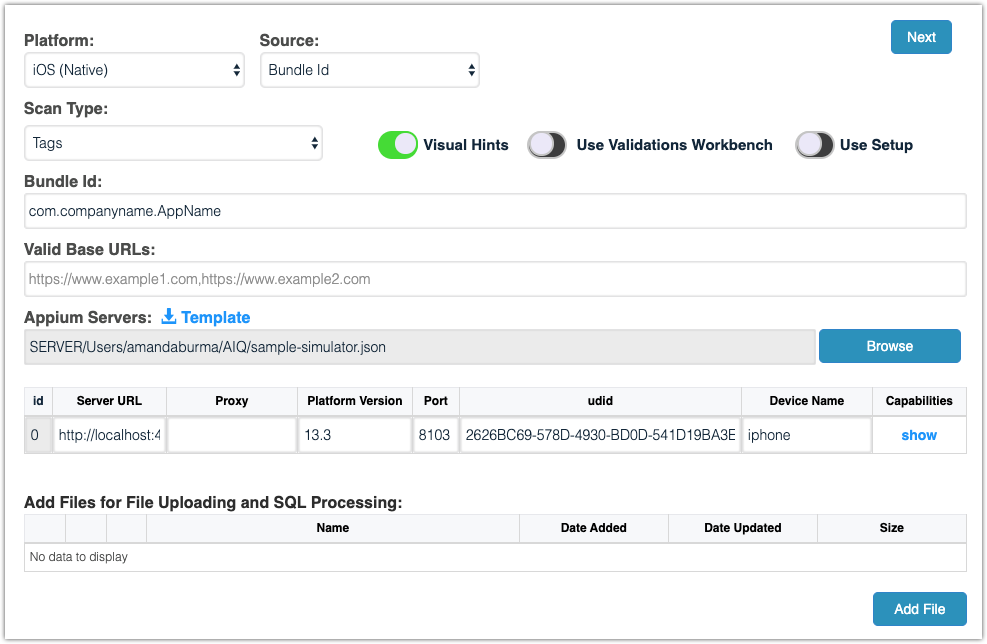
- Click Next
- Proceed with the AISG creation as you would with any other AISG
- Enter a name in Execution Name box
- Click Load a Dataset from CSV file and check the file in the list or check Default and enter variables and values
- Click Create
- The Simulator launches, starts the Application and begins walking through the Application
- As Inputs Found updates, map any Custom Actions until reach the desired end point in the Application
- Download scripts in JS format (DS not yet supported for Mobile) to run in JS Edit & Play or in a Scenario
Notes
- Appium starts up the Simulator that matches provided platformVersion, udid and deviceName capabilities.
- If capability “app”: “absolute path or URL of .ipa or .app file” is provided, Appium will try to install Application if not installed. Generally, if file has .ipa extension, this means Application was compiled for ARM and will only work with physical iPhones. If file has .app extension, this means Application was compiled for x86 and will only work with Simulators.
- After connecting iPhone to computer, Trust this computer dialog may show, click Accept button.
- First time testing Application in physical iPhone will show Untrusted Developer dialog. Close dialog, go to Settings, tap General, tap Device Management and tap blue link to trust certificate.
- First time installing WDA takes a long time and is normal for Appium logs to freeze. Afterwards it will show many ECONNRESET messages, the capabilities and finally start the AUT.
Last updated: October 16, 2026