
Legacy LoadRunner Download Reference
Last reviewed: September 29, 2026
AccessThis page is retained as a legacy reference for locating and preparing LoadRunner software in environments that still depend on it.
What changed in this article
- Marked the
installationdownloadpackageinstructions as legacy because LoadRunner availability, licensing, and vendor download paths can change. - Added checks for license ownership, version compatibility, installer source, checksum/security review, and supported operating system.
- Added a warning not to download installers from unapproved third-party locations.
Validation workflow
- Confirm the approved LoadRunner
Professionalversion and license with the customer or tool owner. - Use the vendor-approved download path and validate the installer before use.
- Record version and install location before configuring AIQ integration.
Review note: This page ornow byavoids selectinghard-coding yourstale accountvendor ondownload the Software Licenses and Downloads page.guidance.
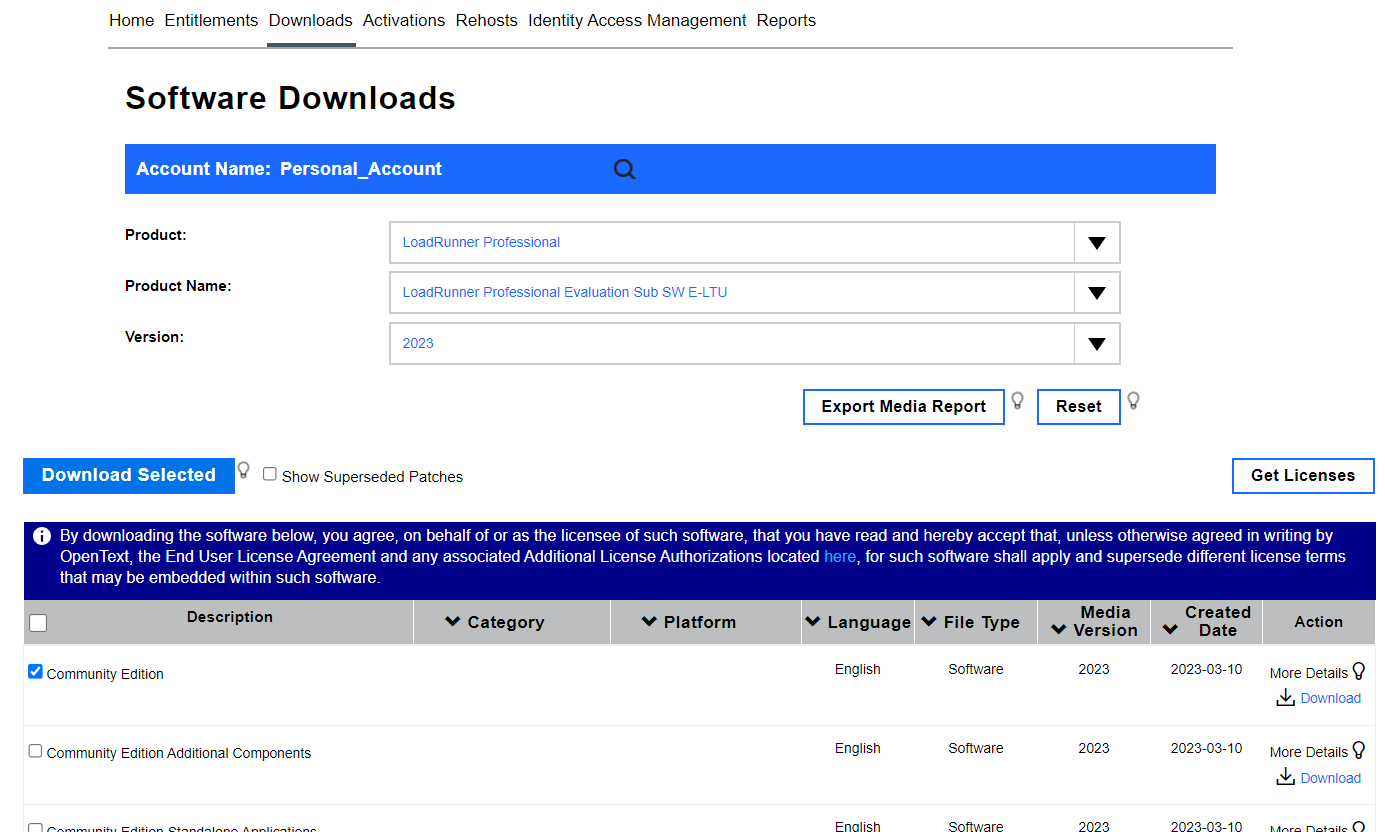
In the Product drop down, select Load Runner Professional.
In the Product Name drown down, select the appropriate version for your license.
In the Version drop down, select the latest available version.
Select Community Edition from the list of available choices.
Select any other necessary components for your installation.
Click Download Selected.
Next Steps:
Last updated: AugustSeptember 09,29, 20232026
If you have any feedback on this topic, please contact us at documentation@appvance.ai.