
Review Live Results While a Test Runs
Unified
Review Live Results While a Test PlatformRuns
Use thelive results of every test, every step, and every failure to a Results Repository (normally MySQL or Oracle RDBMS) as it operates the test. Unified Test Platform displays the results in the Controller window and also through from Analyze button from the Start Screen. Results Analysis Reports display the results in a browser-based Web page by making live requests to the Results Repository. Use the browser's reload/refresh command to update the results as the test operates.
Controller windows communicate with the Test Nodes, Results Repository, and AIQ Monitors while operatingmonitor a test towhile giveit ais liverunning. viewLive ofdata helps detect invalid runs early, but final analysis should use completed results after the results.
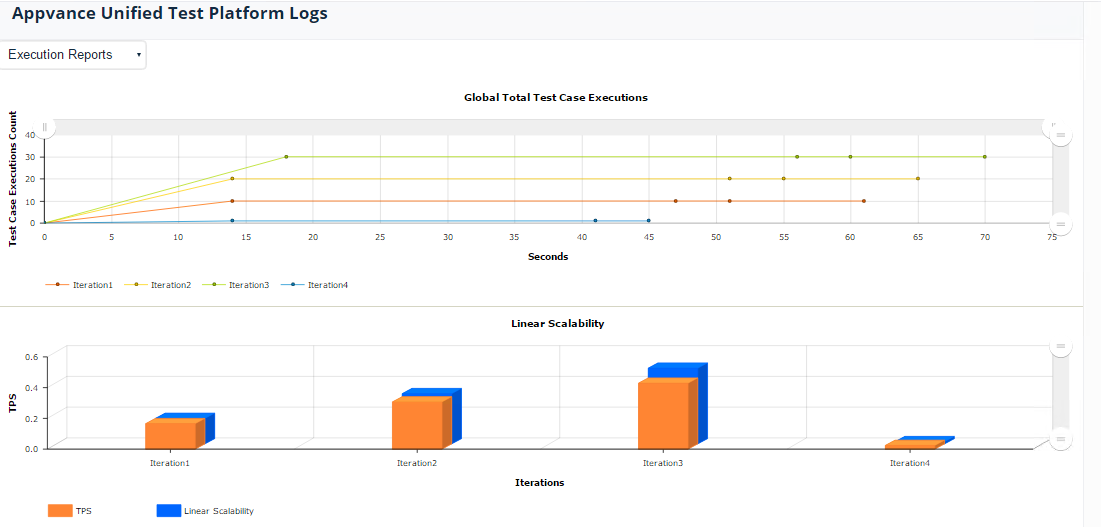
Controller windows provide several ways to understand app performance while a test is running:
Performance tests show a Scalability Index chart and Total Transactions chart
The upper right panel shows the logged conversation between the Controller, Test Nodes, and AIQ Monitors
The middle right panel shows a list of Test Nodes operating the test and a summary of the pass/fail statistics for each Test Node
The middle right panelrun has a Transactions tab to show the most recently completed transactions on all the Test Nodes running this test. A pop-up menu lets you select how recently to show the results: Most recent 10 transactions, most recent 50,ended and all transactions.data has been processed.
Monitor during execution
- Active
To view the standardusers anderrorrampoutputbehavior. - Error
ofrateaandspecificrepeatedTestfailureNode,messages. - Response-time
clicktrendthe Test Nodes tab in the middle right panel. Then clicke of thechanges. - Test Node
rows.orTheenvironmentstandardhealthandsymptoms.
When outputto appearsstop ina tabsrun
- Stop if credentials, data, or environment selection is wrong.
- Stop if the
lowerapplicationrightunderpaneltest
To viewoutside the request,intended response,test andscope.
Last updated: JuneSeptember 26,18, 20232026
If you have any feedback on this topic, please contact us at documentation@appvance.ai