
Live Results While a Test Runs
Review
Unified LiveTest Platform stores the results of every test, every step, and every failure to a Results WhileRepository (normally MySQL or Oracle RDBMS) as it operates the test. Unified Test Platform displays the results in the Controller window and also through from Analyze button from the Start Screen. Results Analysis Reports display the results in a Testbrowser-based RunsWeb
Usepage by making live resultsrequests to monitorthe Results Repository. Use the browser's reload/refresh command to update the results as the test operates.
Controller windows communicate with the Test Nodes, Results Repository, and AIQ Monitors while operating a test to give a live view of the results.
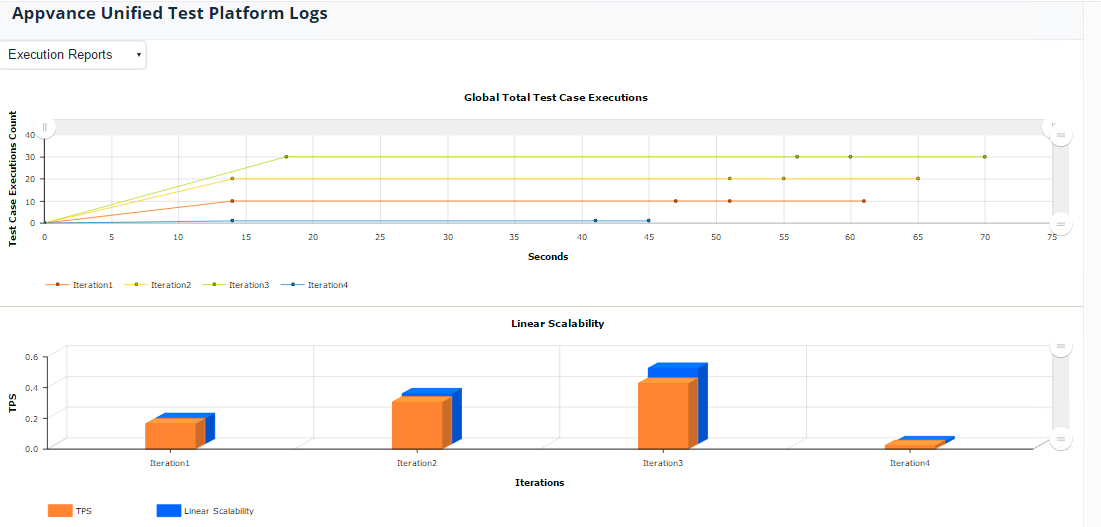
Controller windows provide several ways to understand app performance while ita test is running.running:
Performance detecttests invalidshow runsa early,Scalability butIndex finalchart analysisand shouldTotal useTransactions chart
The upper right panel shows the logged conversation between the Controller, Test Nodes, and AIQ Monitors
The middle right panel shows a list of Test Nodes operating the test and a summary of the pass/fail statistics for each Test Node
The middle right panel has a Transactions tab to show the most recently completed resultstransactions afteron all the runTest hasNodes endedrunning this test. A pop-up menu lets you select how recently to show the results: Most recent 10 transactions, most recent 50, and all data has been processed.transactions.
Monitor
To
Activeviewusersthe standard andramperrorbehavior.ErroroutputrateofandarepeatedspecificfailureTestmessages.Response-timeNode,trendclickchanges.- the Test Nodes tab in the middle right panel. Then clicke of the Test Node
orrows.environmentThehealthstandardsymptoms.
Whenerror tooutput stopappears ain run
tabs Stop if credentials, data, or environment selection is wrong.Stop ifin theapplicationlowerunderrighttestpanelbecomes
To view the intendedrequest, testresponse, scope.
Last updated: SeptemberJune 18,26, 20262023
If you have any feedback on this topic, please contact us at documentation@appvance.ai