
Remove or Deactivate AIQ Users Safely
LoginLast reviewed: September 22, 2026
Use this guidance when removing, disabling, or deactivating AIQ users as part of user lifecycle management.
Recommended guidance
- Prefer deactivation when audit history or ownership needs to
AppvanceremainIQintact. - Transfer ownership of projects, scenarios, schedules, or integrations before removal.
- Follow company identity and access-management policy.
Validation workflow
- Confirm the user and reason for removal.
- Review assets, scheduled executions, tokens, and integrations owned by the user.
- Transfer ownership or disable dependent automation as
anneeded. - Deactivate
Adminor remove the user using the supported admin workflow. - Validate that access is removed and
navigateaudittorecordsOptionsremainpage > Preferences > Credentials and Click the ‘Delete’ button on the same line of a user whom you want to delete.available.
Note: 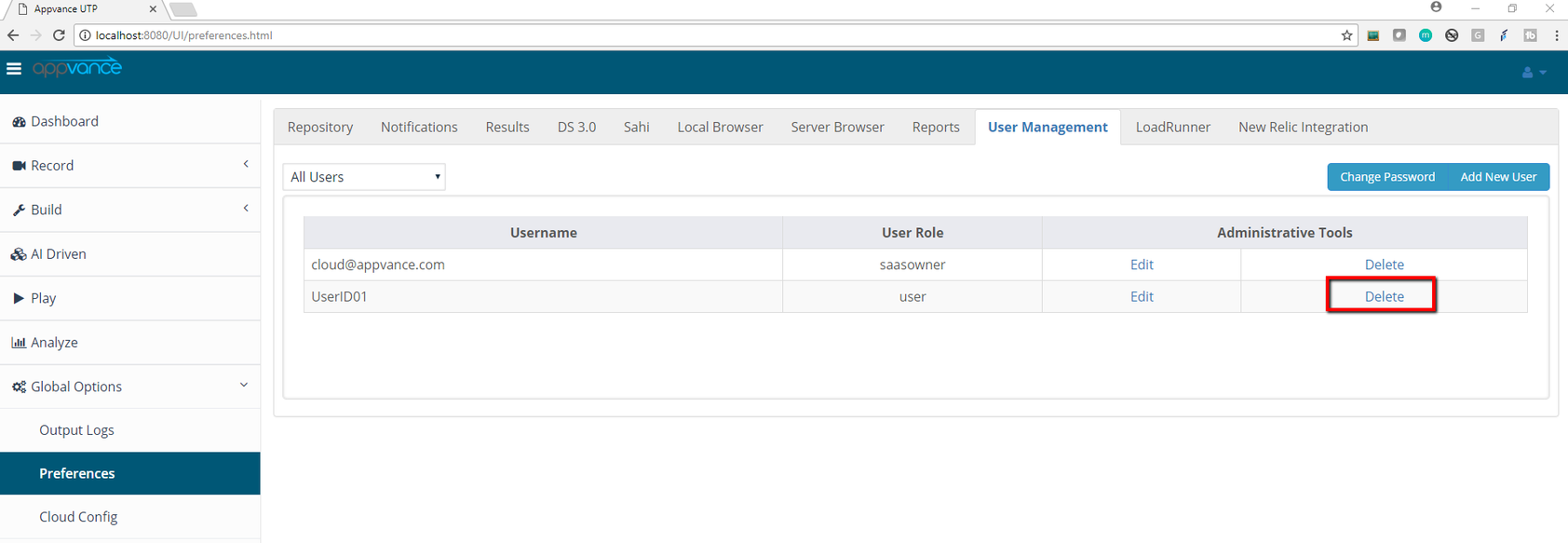
A confirmation message will pop up with a message “Are you sure you want tonot delete theusers user:casually Username”if their account owns active assets or audit history.
Click 'Yes' to delete the User from the User list.
Last updated: JulySeptember 10,22, 20232026
If you have any feedback on this topic, please contact us at documentation@appvance.ai.