
CICD- AntTags
Appvance IQ - CICD - All about Ant tags
Below is the list of all Ant tags/Java Class that is defined in build.xml file and their descriptions
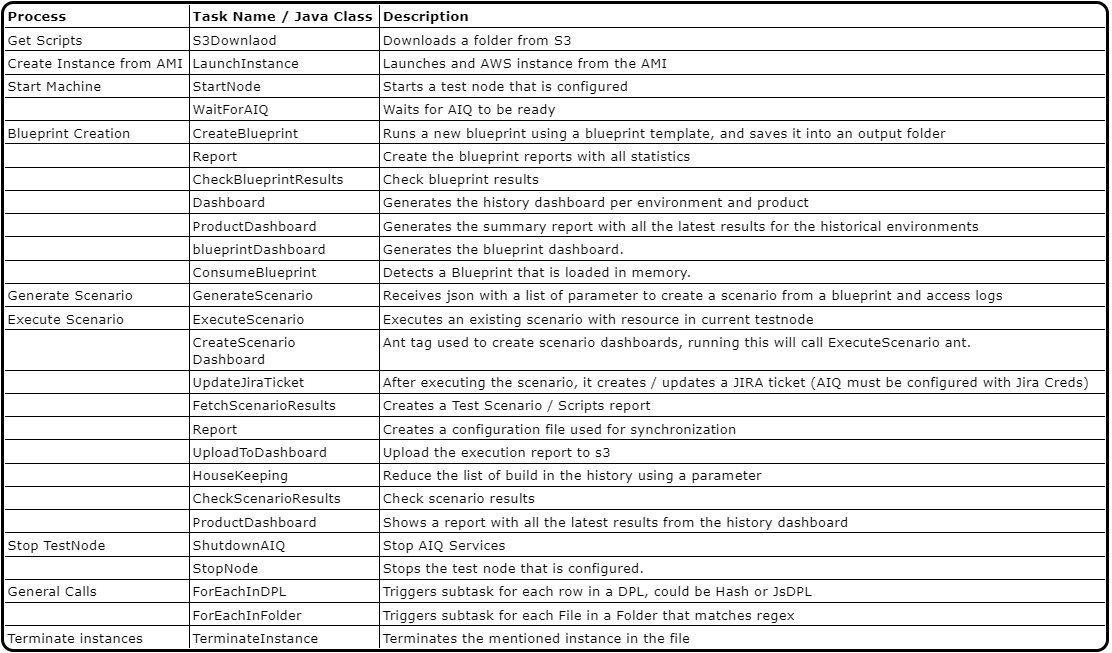
Below are Ant Tasks and their descriptions and examples
-
S3Downlaod
-
StartNode
-
WaitForAIQ
-
CreateBlueprint
-
Report (blueprint)
-
CheckBlueprintResults
-
Dashboard (blueprint)
-
GenerateScenario
-
ExecuteScenario
-
UpdateJiraTicket
-
FetchScenarioResults
-
Report (Scenario)
-
UploadToDashboard
-
HouseKeeping
-
CheckScenarioResults
-
ProductDashboard
-
ShutdownAIQ
-
StopNode
-
AddAIQUser
-
ForEachInDPL
-
UpdateBlueprintTemplate
-
ForEachInFolder
-
ExtractAutovalidations
-
UpdateCSVValidations
-
DownloadRepository
-
GitReporter
-
History Manager
-
ProjectManager
-
ProductManager
-
UploadRepository
-
Git Support
-
ConsumeBlueprint
-
FunctionalExecuter
-
FunctionalReport
-
Dashboard Git Support
-
Terminate Instance
-
Launch Instance
-
UploadReportToS3
S3Downlaod
Description
Downloads a folder from S3. Requires S3 credentials and an output file.
Input Parm
credentials: This points to the credentials file. It is a property file similar to
AWS_ACCESS_KEY_ID=AKIA........
AWS_SECRET_ACCESS_KEY=G8w...............
REGION:us-west-2.ec2.amazonaws.com
bucketBase: It is the AWS Bucket where the folder is located
localFolder: The folder where the file will be downloaded
remoteFolder: Remove the folder inside AWS Bucket
StartNode
Description
Starts an AIQ Machine using the information in aiqCreds. Creates machine id in the generatedConfig file.
Input params
aiqCreds: Path of the configuration relative to the project (build.xml). Should have next format
{
"controller": {
"instances": ["i-07cb37f006XXXX"],
"ec2Creds": "ec2.creds",
"timeOut": 60,
"username": "AIQUserName",
"password": "AIQPassword",
"workFolder": "."
}
}
ec2Creds is a creds file to connect to EC2, the format is
AWS_ACCESS_KEY_ID=AKIA....
AWS_SECRET_ACCESS_KEY=W96Axh4UqDl.....
REGION:us-west-2.ec2.amazonaws.com
-
generatedConfig Path of the generated configuration file relative to the project (build.xml). Contains EC2 AMI information. Should have next format
{"instanceId":"i-07cb37f006083a225",
"url":"http://ec2machine1:8080/TMServer/ws/TestNode"
}
WaitForAIQ
Description
Waits until AIQ is ready
Input Params
-
timeout: The timeout for this ant task in seconds. If AIQ is not ready after these seconds the task will fail. IF the parameter is not set the default value is 10 minutes
-
aiqCreds: The AIQ credentials are in JSON format, the same format for running a scenario. The URL is optional. if not set. The Task will use the URL from consoleDetails
{"controller":{"url":"http://localhost:8080",
"username":"",
"password":""
}
}
-
consoleDetails: File which contains URL if it is not set in aiqCreds
{"url":"http://localhost:8080"
}
Output
AIQ should be ready and available otherwise the ant task will fail
CreateBlueprint
Description: Creates a blueprint.
Inputs
-
projectName: "LeadGenius".
-
template: "<Project-Folder>/blueprintTemplateFile.abpt".
-
aiqCreds: "<Project-Folder>/localhost.json".
{"controller":{"url":"http://[ec2.machine.dns]:8080",
"username":"appvance",
"password":"appvance",
"workFolder":"/Users/[UserName]/workFolder" <--- for mac users
"workFolder":"c:/Users/administrator/workFolder" <--- for windows users
}
}
-
outputFolder: "<Project-Output-Folder>/Output"
-
forceNewScan: "true" // is defined as true
-
requestMaxDuration: "2000"
-
reportStatusCode: "300" for page updates
-
customer: CustomerSample.com
-
buildVersion: 0001
Ant Task Example
<taskdef name="createBlueprint" classname="com.appvance.ci.CreateBlueprint">
<classpath refid="RestClientLibPath" />
</taskdef>
<createBlueprint template="${template}" aiqCreds="${aiqCreds}" buildVersion="${buildVersion}" outputFolder="${blueprintResults}"
projectName="${projectName}" requestMaxDuration="4000" consoleDetails="${consoleDetails}" reportStatusCode="400" customer="${customer}" forceNewScan="true" />
Output
Blueprint is created inside outputFolder parameter
Report (blueprint)
Description
Creates a Dashboard report based on Junit results. It can handle integrations in the Junit results
Input Params
-
fileConfig="generateRegressionScenario.json"
-
aiqCreds="controller01.json"
-
consoleDetails="consoleDetails.json"
-
logsRemoteFolder="E:/Regression/Logs"
-
projectName="moduleName"
-
outputFolder="Output"
Output
Generates a Scenario and its scripts inside the Output folder
Ant Task Example
<taskdef name="uploadReportToS3" classname="com.appvance.blueprint.UploadReportToS3">
<classpath refid="RestClientLibPath" />
</taskdef>
<uploadReportToS3 buildVersion="${buildVersion}" credentials="${awsCredentials}" bucketBase="${Bucket}" executionType="blueprints"
reportFolder="${blueprintResults}" environment="${environment}" product="${product}" />
CheckBlueprintResults
Description
Checks Blueprint and fail if results are worse than expected
Input Params
-
maxFailingRequests : max allowed number of requests with failing status codes. If not set, it will not be tested
-
maxValidationFailures : max allowed number of blueprint validations failures. If not set, it will not be tested
-
minValidationRatio : minimum allowed percentage integer (1-100) that shows the ratio of succeeded validations. If not set, it will not be tested
Output
Fail if results are worse than expected
Ant Task Example
<taskdef name="checkBPResults" classname="com.appvance.blueprint.CheckBlueprintResults">
<classpath refid="RestClientLibPath" />
</taskdef>
<checkBPResults maxFailingRequests="${maxFailingRequests}" maxValidationFailures="${maxValidationFailures}" minValidationRatio="${minValidationRatio}" reportFolder="${reports}" />
Dashboard (blueprint)
Description
Creates the history for the current branch and product using the blueprint history.
Input params
-
credentials="${awsCredentials}" s3 credentials
-
customer="${customer}" customer name for description
-
bucketBase="${Bucket}" s3 source to save data
-
environment="${environment}" parameter used for classifying content
-
executionType="blueprints" helps create an html with two tabs (for scenarios and for blueprints content only)
-
product="${product}" parameter used for classifying content
Output
Creates the blueprint HTML for the history dashboard and uploads these all synchronized files to s3.
Ant Task Example
The first scenario saves the initial time and the second scenario is set to false to avoid overwriting it.
<taskdef name="dashboard" classname="com.appvance.blueprint.BlueprintDashboard">
<classpath refid="RestClientLibPath" />
</taskdef>
<dashboard credentials="${awsCredentials}" customer="${customer}" bucketBase="${Bucket}" environment="${environment}" executionType="blueprints" product="${product}" />
GenerateScenario
Description
Generates a regression scenario
Input Params
-
fileConfig="generateRegressionScenario.json"
-
aiqCreds="controller01.json"
-
consoleDetails="consoleDetails.json"
-
logsRemoteFolder="E:/Regression/Logs"
-
projectName="moduleName"
-
outputFolder="Output"
Output
Generates a Scenario and its scripts inside the Output folder
Ant Task Example
<taskdef name="genScenario" classname="com.appvance.ci.GenerateScenario">
<classpath refid="RestClientLibPath" />
</taskdef>
<genScenario fileConfig="${fileConfig}" aiqCreds="${aiqCreds}" consoleDetails="${consoleDetails}" logsRemoteFolder="${logsRemoteFolder}" projectName="${projectName}" outputFolder="${outputFolder}" />
ExecuteScenario
Description
Executes a Scenario and, if saveIntitialTime is not true, timing information will be saved in results.properties file in the resultsFolder.
Input params
-
aiqCreds: Path of the configuration relative to the project (build.xml). Should have the next format.
{
"controller": {
"instances": ["i-07cb37f006083a225"],
"ec2Creds": "ec2.creds",
"timeOut": 60,
"username": "appvance",
"password": "appvance",
"workFolder": "."
}
}
-
dir: Path to the scenario folder, current scenario folder value is "scenario"
-
scenario: Name of the scenario to execute, example "LeadGenius_31_34_TestEnv.scenario"
-
resultsFolder: The place where results.properties are saved. It contains useful information to create reports and dashboards. By default, its value is "results".
-
saveInitialTime: Indicates the results.properties file should be created in the result folder directory. By default it is true.
Output
The scenario should be completely executed and, if saveIntitialTime is not true, timing information will be saved in results.properties file in the resultsFolder.
Ant Task Example
The first scenario saves the initial time and the second scenario is set to false to avoid overwriting it.
<taskdef name="executeScenario" classname="com.appvance.ci.ExecuteScenario">
<classpath refid="RestClientLibPath" />
</taskdef>
<executeScenario aiqCreds="controller01.json" dir="${dir}" scenario="Scenarioname.scenario" consoleDetails="${consoleDetails}" resultsFolder="${scenarioResults}" />
UpdateJiraTicket
Description
Logs into Jira, and updates the ticket status, adding a comment based on the execution result file.
Input:
-
jiraCreds: it is a JSON file with the next format:
{
"url": "httpS://.....",
"username": "userQA",
"password": "XXXXXXXX",
"destinationStatus" : {
"success": "done",
"failure": "in progress"
}
}
-
ticketId: this is the identifier for the ticket to be updated.
-
executionResult: the JSON file.
-
updateStatus:
-
maxFailures: maximum number of failures before considering the test fails.
-
minSuccessPercentage: minimum percentage before considering the test fails.
Output:
FetchScenarioResults
Description
Save scenario results in the results folder. It will update the results.properties file inside the results folder with useful timing properties for report and dashboard creation.
Inputs
-
aiqCreds: Path of the configuration relative to the project (build.xml). Should have the next format.
{
"controller": {
"instances": ["i-07cb37f006083a225"],
"ec2Creds": "ec2.creds",
"timeOut": 60,
"username": "appvance",
"password": "appvance",
"workFolder": "."
}
}
-
scenario: name of scenario to execute
-
consoleDetails:
-
resultsFolder: name of the folder to save result files. It should contain the results.properties file which contains useful timing properties for report and dashboard creation.
-
stopOnFailure: boolean, this enables the process to continue or stop when fails.
Output
Save scenario results into the results folder parameter. The report.properties file will be updated with useful timing properties for report and dashboard creation.
Ant Task Example
<taskdef name="fetchScenarioResults" classname="com.appvance.ci.FetchScenarioResults" >
<classpath refid="RestClientLibPath"/>
</taskdef>
<fetchScenarioResults aiqCreds="creds.json" scenario="BasicScenario.scenario" consoleDetails ="params.json" stopOnFailure="false"/>
Report (Scenario)
Description
Creates a Dashboard report based on Junit results. It can handle integrations in the Junit results
Input Params
-
projectName="moduleName"
-
resultsFolder="${scenarioResults}"
-
reportFolder="${scenarioReports}"
-
executionType="scenarios"
-
environment="${environment}"
-
consoleDetails="consoleDetails.json"
-
product="${product}"
-
buildVersion="${buildVersion}"
-
bucketBase="${Bucket}"
-
aiqCreds="controller01.json"
-
credentials="${awsCredentials}"
Output
Generates a Scenario and its scripts inside the Output folder
Ant Task Example
<taskdef name="Report" classname="com.appvance.ci.Report">
<classpath refid="RestClientLibPath" />
</taskdef>
<Report projectName="${projectName}" resultsFolder="${scenarioResults}" reportFolder="${scenarioReports}" executionType="scenarios"
environment="${environment}" consoleDetails="${consoleDetails}" product="${product}" buildVersion="${buildVersion}" bucketBase="${Bucket}" aiqCreds="${aiqCreds}"credentials="${creds.json}" />
UploadToDashboard
Description
This ant task uploads files.
Input Params
-
bucketBase="${Bucket}"
-
product="${product}"
-
projectName="${projectName}"
-
environment="${environment}"
-
executionType="scenarios"
-
credentials="${awsCredentials}"
-
buildVersion="${buildVersion}"
-
reportFolder="${scenarioReports}"
-
consoleDetails="${consoleDetails}"
-
aiqCreds="${aiqCreds}"
Output
No output, this ant task only uploads files
Ant Task Example
<taskdef name="uploadToDashboard" classname="com.appvance.ci.UploadToDashboard">
<classpath refid="RestClientLibPath" />
</taskdef>
<uploadToDashboard bucketBase="${Bucket}" product="${product}" projectName="${projectName}"
environment="${environment}" executionType="scenarios" credentials="${awsCredentials}" buildVersion="${buildVersion}"
reportFolder="${scenarioReports}" consoleDetails="${consoleDetails}" aiqCreds="${aiqCreds}" />
HouseKeeping
Description
Keeps a max number of builds in s3
Input Params
-
credentials="${awsCredentials}"
-
keep="${MaxBuilds}"
-
bucketBase="${Bucket}"
-
executionType="scenarios"
-
product="${product}"
-
environment="${environment}"
Output
Keeps a max number of builds in s3
Ant Task Example
<taskdef name="HouseKeeping" classname="com.appvance.ci.HouseKeeping">
<classpath refid="RestClientLibPath" />
</taskdef>
<HouseKeeping credentials="${awsCredentials}" keep="${MaxBuilds}" bucketBase="${Bucket}" executionType="scenarios" product="${product}" environment="${environment}" />
CheckScenarioResults
Description
Checks a set of JUnit results and fails if the results are worse than the expected in report.json file.
If ANY high-important TestCase fails, it will fail.
Even if every low importance fails, it won't fail because of this.
The minSucessRatio and maxFailingTestCases are applied to normal importance
Input Params
-
reportFile: The dir where the JSON report is located. If not set the default is "report/report.json".
-
minSuccessRatio: minimum allowed percentage integer (1-100) that shows the ratio of succeeded validations. If not set, it will not be tested
-
maxAllowedFailures : max allowed failed test cases. If not set it will not be tested
Output
Checks a set of JUnit results and fails if the results are worse than expected. Will do nothing if the results are good enough.
Ant Task Example
<taskdef name="checkScenarioResults" classname="com.appvance.ivy.CheckScenarioResults" >
<classpath refid="IvyPath"/>
</taskdef>
<checkScenarioResults reportFile="report/report.json" minSucessRatio ="95" maxAllowedFailures ="5" />
ProductDashboard
Description
Creates the main dashboard report for the CICD
-
reportFile: The dir where the JSON report is located. If not set the default is "report/report.json".
-
minSuccessRatio: minimum allowed percentage integer (1-100) that shows the ratio of succeeded validations. If not set, it will not be tested
-
maxAllowedFailures : max allowed failed test cases. If not set it will not be testedSinchronize the historical files and create a report with the latest results for all the history
Input Params
-
credentials="${awsCredentials}" AWS credentials
-
bucketBase="${Bucket}" AWS path to locate files
-
customer="${customer}" Customer description to show in the html
Output
Creates the main dashboard report for the CICD
Ant Task Example
<taskdef name="ProductDashboard" classname="com.appvance.ci.ProductsDashboard">
<classpath refid="RestClientLibPath" />
</taskdef>
<ProductDashboard credentials="${awsCredentials}" bucketBase="${Bucket}" customer="${customer}" />
ShutdownAIQ
Description
Shutdown and AIQ Server based on specs from the configuration file
Input Params
-
aiqCreds: The AIQ credentials are in JSON format, the same format for running a scenario. The URL is optional. if not set. The Task will use the URL from consoleDetails
{
"controller":{
"url":"http://localhost:8080",
"username":"appvance",
"password":"appvance"
}
}
-
consoleDetails: File which contains URL if it is not set in aiqCreds
{
"url":"http://localhost:8080"
}
Output
AIQ should be stopped. If not the task will fail.
Ant Task Example
<target name="stopAIQ" depends="deps">
<taskdef name="shutdown" classname="com.appvance.ci.ShutdownAIQ">
<classpath refid="RestClientLibPath" />
</taskdef>
<shutdown
aiqCreds="${aiqCreds}"
consoleDetails="${consoleDetails}" />
</target>
StopNode
Description
Stops an AIQ Machine using the information in aiqCreds.
Input:
-
aiqCreds:
{
"controller": {
"instances": ["i-07cb37f006083a225"],
"ec2Creds": "ec2.creds",
"timeOut": 60,
"username": "appvance",
"password": "appvance",
"workFolder": "."
}
}
-
dir: name of the scenario
-
consoleDetails:
Ant Tag Example
<taskdef name="stopNode" classname="com.appvance.ci.StopNode">
<classpath refid="RestClientLibPath" />
</taskdef>
<stopNode aiqCreds="${aiqCreds}" consoleDetails="${consoleDetails}" />
AddAIQUser
Description
Creates a user into AIQ.
Input Parm
-
username="${username}"
-
password="${password}"
-
role="${role}" valid values: “Admin”, “User”
-
aiqCreds="CICD/localhost.json"
Output
An user is created.
Ant Task Example
<target name="checkCreateUsers" depends="init">
<path id="TestPath">
<pathelement path="${javac.classpath}"/>
<pathelement path="${build.test.classes.dir}"/>
<pathelement path="${build.classes.dir}"/>
<pathelement location="dist/AppvanceCIClient.jar"/>
</path>
<taskdef name="forEachInDPL" classname="com.appvance.ci.ForEachInDPL" >
<classpath refid="TestPath"/>
</taskdef>
<taskdef name="addAIQUser" classname="com.appvance.ci.AddAIQUser" >
<classpath refid="TestPath"/>
</taskdef>
<forEachInDPL csv="test/com/appvance/ci/users.csv" >
<addAIQUser username="${username}" password="${password}" role="${role}" aiqCreds="CICD/localhost.json"/>
</forEachInDPL> </target>
ForEachInDPL
Description:
Receives the DPL path, the DPL type, and a task list.
Input Params
csv: "CICD/templates.csv"
type: "JsDPL" || “HashDPL”
task=<updateBlueprintTemplate input="CICD/Legacy.mbpt" output="output/original-${template}.mbpt.json" type="none" />
<updateBlueprintTemplate input="output/original-${template}.mbpt.json"
Ant Task Example
<forEachInDPL csv="CICD/templates.csv" >
<updateBlueprintTemplate input="CICD/Legacy.mbpt" output="output/original-${template}.mbpt.json" type="none" />
<updateBlueprintTemplate input="output/original-${template}.mbpt.json"
output="output/dpl-${template}.mbpt.json"
resource="CICD/templates.csv"
type="updateDataset" />
</forEachInDPL>
UpdateBlueprintTemplate
Description
Updates the Blueprint template.
Input Params
-
input="output/original-${template}.mbpt.json"
-
output="output/dpl-${template}.mbpt.json"
-
resource="CICD/templates.csv"
-
type="updateDataset"
Output
From a Blueprint template, it generates a list of modified Blueprint templates.
Ant Task Example
<target name="checkUpdateBlueprintTemplate" depends="init">
<path id="TestPath">
<pathelement path="${javac.classpath}"/>
<pathelement path="${build.test.classes.dir}"/>
<pathelement path="${build.classes.dir}"/>
<pathelement location="dist/AppvanceCIClient.jar"/>
</path>
<taskdef name="updateBlueprintTemplate" classname="com.appvance.blueprint.UpdateBlueprintTemplate" >
<classpath refid="TestPath"/>
</taskdef>
<taskdef name="forEachInDPL" classname="com.appvance.ci.ForEachInDPL" >
<classpath refid="TestPath"/>
</taskdef>
<forEachInDPL csv="CICD/templates.csv" >
<updateBlueprintTemplate input="CICD/Legacy.mbpt" output="output/original-${template}.mbpt.json" type="none" />
<updateBlueprintTemplate input="output/original-${template}.mbpt.json"
output="output/dpl-${template}.mbpt.json"
resource="CICD/templates.csv"
type="updateDataset" />
</forEachInDPL>
</target>
ForEachInFolder
Description
Processes a list of files, using a pattern to filter file types inside a folder, then executes a list of tasks.
Input Params
-
folder = theFolder
-
match = theMatch
<taskdef name="forEachInFolder" classname="com.appvance.ci.ForEachInFolder" >
<classpath refid="TestPath"/>
</taskdef>
Ant Task Example
<forEachInFolder folder="testfolder">
<echo message="Filename: ${filename}${line.separator}" file="output/ForEachFolder.txt" append="true" />
</forEachInFolder>
<forEachInFolder folder="testfolder" match =".*.csv">
<echo message="Filename: ${filename}${line.separator}" file="output/ForEachMatch.txt" append="true" />
</forEachInFolder>
ExtractAutovalidations
UpdateCSVValidations
Description
Updates a CSV file according to a pattern using a replacement string.
Input Parm
-
type:
-
Possible values for type:
-
disable, enable, updateMatch.
-
input:
-
It is the CSV file path.
-
output:
-
match:
-
replace:
Ant Task Example
<target name="updateCSV" depends="deps">
<taskdef name="updateCSVData" classname="com.appvance.blueprint.UpdateCSVValidation">
<classpath refid="RestClientLibPath" />
</taskdef>
<updateCSVData
type="disable || enable || updateMatch"
input="folder"
output="outputFolder"
match="getData"
replace="getContent"
/>
</target>
DownloadRepository
Description
Clones a git repository
Input Parm
-
folder="c:/pathToFutureGitFolder"
-
credentials= path to a json file with Git credentials, this is a json file as follows:
For https connection
{
"username": "*****@appvance.com",
"password": "*******",
"repository": "https://gitlab.com/pathtest/development.git ",
"branch": "branchName",
"sshPhrase": "";
"sshKey": ""
}
For ssh connection
{
"username": "theUser@appvance.com",
"password": "",
"repository": "git@gitlab.com:pathtest.git",
"branch": "master",
"sshPhrase": "thisIsMyKeyPharse"; // optional if not required by git
"sshKey": "pathToprivateKeyFile"
}
Output
Git repository is cloned in to file system
Ant Task Example
<taskdef name="downloadRepository" classname="com.appvance.ci.git.DownloadRepository">
<classpath refid="RestClientLibPath" />
</taskdef>
<downloadRepository folder="${localEmptyFolder}" credentials="${gitCredentialsFile}" />
GitReporter
Description
Generates internal Statistics
Input Parm
-
folder="${localEmptyFolder}" // location for local dashboard files
-
reportFolder= "${blueprintResults}"
-
environment="${environment}"
-
executionType="blueprints" // valid values "blueprints" || "scenarios"
-
projectName="${projectName}"
-
buildVersion="${buildVersion}"
-
product="${product}"
-
resultsFolder= "" // for blueprints keep it blank, for scenario you may enter "ScenarioResults"
Output
Updates the statistics for local files
Ant Task Example
<taskdef name="gitReporter" classname="com.appvance.ci.git.GitReporter">
<classpath refid="RestClientLibPath" />
</taskdef>
<gitReporter
folder="${localEmpyFolder}"
reportFolder= "${blueprintResults}"
environment="${environment}"
executionType="blueprints"
projectName="${projectName}"
buildVersion="${buildVersion}"
product="${product}"
resultsFolder= ""
/>
History Manager
Description
Generates internal Statistics
Input Params
-
folder="${localEmpyFolder}" // location for local dashboard files
-
product="${product}"
-
environment="${environment}"
-
buildVersion="${buildVersion}"
-
executionType="blueprints" // valid values "blueprints" || "scenarios"
-
projectName="${projectName}"
Output
Updates the statistics for local files
Ant Task Example
<taskdef name="historyManager" classname="com.appvance.ci.git.HistoryManager">
<classpath refid="RestClientLibPath" />
</taskdef>
<historyManager
folder="${localEmpyFolder}"
product="${product}"
environment="${environment}"
buildVersion="${buildVersion}"
executionType="blueprints"
projectName="${projectName}"
/>
ProjectManager
Description
Generates internal Statistics
Input Params
-
folder="${localEmpyFolder}" // location for local dashboard files
-
buildVersion="${buildVersion}"
-
product="${product}"
-
environment="${environment}"
-
executionType="blueprints" // valid values "blueprints" || "scenarios"
-
customer="${customer}"
Output
Updates the statistics for local files
Ant Task Example
<taskdef name="dashboard" classname="com.appvance.ci.git.ProjectManager">
<classpath refid="RestClientLibPath" />
</taskdef>
<dashboard
folder="${localEmpyFolder}"
buildVersion="${buildVersion}"
product="${product}"
environment="${environment}"
executionType="blueprints"
customer="${customer}"
/>
ProductManager
Description
Generates internal Statistics
Input Parm
-
folder="${localEmpyFolder}" // location for local dashboard files
-
customer="${customer}"
Output
Updates the statistics for local files
Ant Task Example
<taskdef name="productManager" classname="com.appvance.ci.git.ProductManager">
<classpath refid="RestClientLibPath" />
</taskdef>
<productManager
folder="${localEmpyFolder}"
customer="${customer}"
/>
UploadRepository
Description
Commits changes into a git repository
Input Parm
-
credentials="${gitCredentials}"
-
folder="${localEmpyFolder}" // location for local dashboard files
-
customer="${customer}"
Output
Updates the statistics for local files
Ant Task Example
<taskdef name="commitReports" classname="com.appvance.ci.git.UploadRepository">
<classpath refid="RestClientLibPath" />
</taskdef>
<commitReports
credentials="${gitCredentials}"
folder="${localEmpyFolder}"
customer="${customer}"
/>
ConsumeBlueprint
Description
Detects a Blueprint that is loaded in memory.
Input Parm
aiqCreds="${aiqCreds}"
it’s the JSON file that contains the IQ credentials.
{
"controller":{
"url":"http://[ec2.machine.dns]:8080",
"username":"appvance",
"password":"appvance",
"workFolder":"/Users/[UserName]/workFolder" <--- for mac users
"workFolder":"c:/Users/administrator/workFolder" <--- for windows users
}
}
buildVersion="001" // define the number of copilation according to the pipeline number.
outputFolder="blueprintResults" //it’s the folder where is going to be downloaded the reports.
projectName="aProjectName" //the name that discribes to of the projet
requestMaxDuration="4000" //maximum duration per request
consoleDetails="${consoleDetails}" //
reportStatusCode="400" // minimum expected error code.
customer="${customer}" // it’s a name that describes to the customer.
Output
c:\Builds\Resources\[blueprint-name].abp
Ant Task Example
<target name="blueprintConsume" depends="ivyDeps">
<taskdef name="consumeBlueprint" classname="com.appvance.ci.ConsumeBlueprint">
<classpath refid="RestClientLibPath" />
</taskdef>
<consumeBlueprint
aiqCreds="${aiqCreds}"
buildVersion="${buildVersion}"
outputFolder="${blueprintResults}"
projectName="${projectName}"
requestMaxDuration="4000"
consoleDetails="${consoleDetails}"
reportStatusCode="400"
customer="${customer}" />
</target>
FunctionalExecuter
Description
This Ant task runs complex functional scenarios.
This Ant task does not require AIQ, but it requires Test Designer if the script uses it. You can create a report from the results of the ant task using the FunctionalReport ant task (FunctionalReport )
Qualified Class Name
com.appvance.ci.functional.FunctionalExecuter
Input Params
<taskdef name="functionalExecuter" classname="com.appvance.ci.functional.FunctionalExecuter" >
<classpath refid="CIPath"/>
</taskdef>
<functionalExecuter maxThread="1" resultFolder="${resultFolder}" testclass="${testclass}" />
The Locker & Bridge Variable support
If scripts have variables in the locker or the bridge, it is important to notice they required some details in the script java class but no change is required in the script itself
@Test
public void doFirstTestBroken() {
//Somewhere in the script this happens
new TheLocker().put("myVar", "MyValue");
//Leave the script
}
@Test(dependsOnMethods = {"doFirstTestBroken"})
public void doSecondTestBroken() {
/**
-
This is NOT 100% to succeed IT could succeed times, if you have
-
Only 1 thread BUT if you have multiple threads, the first thread could run
-
Different TestCase and
-
maxThread take a look!!! if maxThread=1 this will
-
Always work but it is not guaranteed to work with many threads
-
<functionalExecuter maxThread="10" resultFolder="p10${resultFolder}" testclass="${testclassParallel}" />
*/
//Fresh thread will run this piece
Assert.assertEquals("MyValue", new TheLocker().get("myVar"));
}
// --------------------------------------------------------------------------------
// -- DO NOT WORRY, our Shiny new Appvance CI Runner can do this and much more
// -- IF the scripts save the data in the locker you need to move it to a
// -- local variables and back to the locker for the next script
// -----------------------------------------------------------------------------
private Object myVar;
@Test
public void doFirstTestFixed() {
//Somewhere in the script this happends
new TheLocker().put("myVar", "MyValue");
//..
// Now before leaving we put it in a script level variable
myVar = new TheLocker().get("myVar");
}
@Test(dependsOnMethods = {"doFirstTestFixed"})
public void doSecondTestFixed() {
/**
-
As we do not want to change the script, so we retrieve it from local
-
script and add it to the locker of this thread*
*/
new TheLocker().put("myVar", myVar);
//Eventually the script will read it from
Assert.assertEquals("MyValue", new TheLocker().get("myVar"));
}
//------------------------------------------------
//-- For ServiceSuiteBrige & TestDesginer bridge variables
//-- Solution is simpler, you keep the bridge as Java Class variables
//--------------------------------------------------
@Test
public void doFirstServiceSuiteBridgeBroken() throws Exception {
ServiceSuiteBridge bridge = new ServiceSuiteBridge();
bridge.put("myVar", "myValue");
}
@Test(dependsOnMethods = {"doFirstServiceSuiteBridgeBroken"})
public void doSecondServiceSuiteBridgeBroken() throws Exception {
ServiceSuiteBridge bridge = new ServiceSuiteBridge();
//This will aalways fail because brige is new object
Assert.assertEquals("myValue", bridge.getVariable("myVar"));
}
//---------------------------------
// Solution is to have a setup
//---------------------------------
private ServiceSuiteBridge serviceSuiteBridge;
@BeforeClass
public void setup() throws Exception {
serviceSuiteBridge = new ServiceSuiteBridge();
}
@Test
public void doFirstServiceSuiteBridgeFixed() throws Exception {
serviceSuiteBridge.put("myVar", "myValue");
}
@Test(dependsOnMethods = {"doFirstServiceSuiteBridgeFixed"})
public void doSecondServiceSuiteBridgeFixed() throws Exception {
//This is fine as long as doFirstServiceSuiteBridgeFixed do not branch!
//CAREFULL with multiple threads accessing this bridge at the same time
// If you need to branch use same approach as the locker, save variables
//as Java class variables
Assert.assertEquals("myValue", serviceSuiteBridge.getVariable("myVar"))
FunctionalReport
Definition
Qualified Class Name
com.appvance.ci.functional.FunctionalReport
Input Params
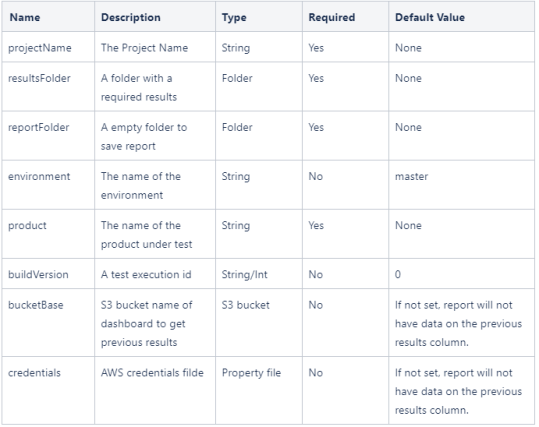
credentials File will be similar to this
AWS_ACCESS_KEY_ID=XXX
AWS_SECRET_ACCESS_KEY=XXX
REGION:us-west-2.ec2.amazonaws.com
Ouput
Upon successful ant task, the “reportFolder” will contain a correctly generated report of the execution based on the results inside the “resultsFolder”.
If the bucketBase & credentials are set, the task will find previous executions (if any) inside Amazon AWS to fill the results column.
Ant Task Example
<taskdef name="Report" classname="com.appvance.ci.functional.FunctionalReport">
<classpath refid="CIPath" />
</taskdef>
<Report
projectName="${projectName}"
resultsFolder="${resultFolder}"
reportFolder="${reportFolder}"
environment="${environment}"
credentials="${awsCredentials}"
product="${product}"
buildVersion="${buildVersion}"
bucketBase="${Bucket}" />
Dashboard Git Support
A sample of targets that are added to your build.xml will enable you to run scenarios and blueprints and upload the results to a GIT repository.
You will need to provide GIT credentials in a credentials JSON file pointed by the gitCredentials property
Terminate Instance
Terminates an ec2 instance using the instance id coming from the console details file.
Input
{
"instanceId": "i-TheInstanceId",
"url": "http://[some domain goes here]:8080/TMServer/ws/TestNode"
}
Cloud File
This XML file can be encrypted by AIQ or visible in plain text, this file is required to establish a connection with AWS
<?xml version="1.0" encoding="UTF-8"?>
<cloud type="EC2" version="1">
<config-param key="AIQProtocol" value="http"/>
<config-param key="AIQPort" value="8080"/>
<config-param key="AccountName" value="XXX"/>
<config-param key="AWSKey" value="XXX"/>
<config-param key="AWSSecretAcessKey" value="XXX//XX"/>
<config-param key="AMI" value="ami-XX"/>
<config-param key="InstanceType" value="t2.xlarge"/>
<config-param key="KeyPair" value="XX"/>
<config-param key="Security" value="sg-XX"/>
<config-param key="AWSRegion" value="http://us-west-2.ec2.amazonaws.com "/>
<config-param key="vpcId" value="vpc-XX"/>
<config-param key="subnetId" value="subnet-XX"/>
</cloud>
Tag Definition
<target name="TerminateInstance" depends="deps">
<taskdef name="TerminateInstance" classname="com.appvance.ci.TerminateInstance">
<classpath refid="RestClientLibPath" />
</taskdef>
<LaunchInstance
testNodeDetails="${testNodeDetails}"
cloudFile="${cloudFile}"/>
</target>
Output
There is no output since the instance is terminated and all processes are completed.
Launch Instance
This tag can create an ec2 instance from an existing AMI.
Note:
The AMI should have everything configured:
-
AIQ running as a service
-
Database fully installed
Inputs:
Cloud File created with AIQ:
AWS Creds
Note:
These three fields are required.
AWS_ACCESS_KEY_ID=AKIAZ******
AWS_SECRET_ACCESS_KEY=eFK*****ojk/7ZCNb1fk*****Lq
REGION=us-west-2.ec2.amazonaws.com
Cloud File
This xml file can be encrypted by AIQ or visible in plain text
<?xml version="1.0" encoding="UTF-8"?>
<cloud type="EC2" version="1">
<config-param key="AIQProtocol" value="http"/>
<config-param key="AIQPort" value="8080"/>
<config-param key="AccountName" value="XXX"/>
<config-param key="AWSKey" value="XXX"/>
<config-param key="AWSSecretAcessKey" value="********"/>
<config-param key="AMI" value="ami-XXX"/>
<config-param key="InstanceType" value="t2.xlarge"/>
<config-param key="KeyPair" value="XXX"/>
<config-param key="Security" value="sg-XXX"/>
<config-param key="AWSRegion" value="http://us-west-2.ec2.amazonaws.com "/>
<config-param key="vpcId" value="vpc-XXX"/>
<config-param key="subnetId" value="subnet-XXX"/>
</cloud>
Tag Definition
<target name="LaunchInstance" depends="deps">
<taskdef name="LaunchInstance" classname="com.appvance.ci.LaunchInstance">
<classpath refid="RestClientLibPath" />
</taskdef>
<LaunchInstance
aiqCreds="${aiqCreds}"
credentials="${awsCredentials}"
testNodeDetails="${testNodeDetails}"
cloudFile="${cloudFile}"/>
</target>
Output
Updates the ConsoleDetails File:
{
"instanceId": "[auto generated instance ID]",
"url": "http://[auto generated domain]:8080/TMServer/ws/TestNode"
}
UploadReportToS3
Description
Creates a Dashboard report based on Junit results. It can handle integrations in the Junit results
Qualified Class Name:
com.appvance.blueprint.UploadReportToS3
Input Params
-
fileConfig="generateRegressionScenario.json"
-
aiqCreds="controller01.json"
-
consoleDetails="consoleDetails.json"
-
logsRemoteFolder="E:/Regression/Logs"
-
projectName="moduleName"
-
outputFolder="Output"
Output
Generates a Scenario and its scripts inside the Output folder
Ant Task Example
<taskdef name="uploadReportToS3" classname="com.appvance.blueprint.UploadReportToS3">
<classpath refid="RestClientLibPath" />
</taskdef>
<uploadReportToS3 buildVersion="${buildVersion}" credentials="${awsCredentials}" bucketBase="${Bucket}" executionType="blueprints"
reportFolder="${blueprintResults}" environment="${environment}" product="${product}" />
Last updated: June 26, 2023
If you have any feedback on this topic, please contact us at documentation@appvance.ai