
Jenkins Configuration
Setup a build in Jenkins: Configuration and pre-requisite:
-
Download Links for the following are available at “CI Jenkins”
-
After installation, Jenkins automatically launches using port 8080. To change the port number, locate Jenkins/jenkins.xml and modify the --httpPort argument.
For example: -Xrs -Xmx256m -Dhudson.lifecycle=hudson.lifecycle.WindowsServiceLifecycle -jar "%BASE%\jenkins.war" --httpPort=8081 -
Install ANT using http://ant.apache.org/bindownload.cgi
-
Download and install the appropriate file on your machine depending on the operating system used
-
Click Manage Jenkins
-
Click Configure System
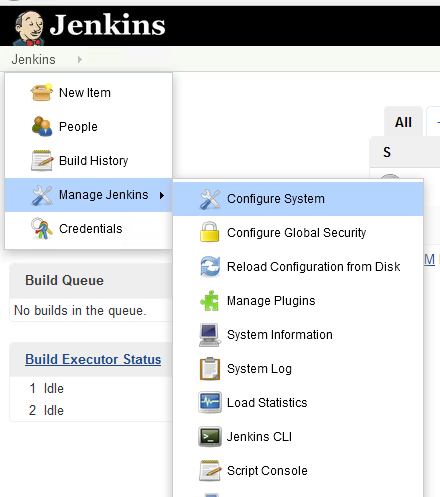
-
Scroll to Global Properties
-
Check Environment variables
-
Enter PATH in the Name box
-
Enter the Java and Ant paths in the Value box as illustrated below
-
Click Save (Changes)
-
Configure Project to Point to Plugin

-
Please make sure to install GIT on the machine where Jenkins is installed, once installed please restart the Jenkins service.
Download git from https://git-scm.com/downloads based on your operating system.
Last updated: April 28, 2023
If you have any feedback on this topic, please contact us at documentation@appvance.ai