
Validating Emails using Service Suite Scripts
Create a Script in Service suite as shown below:
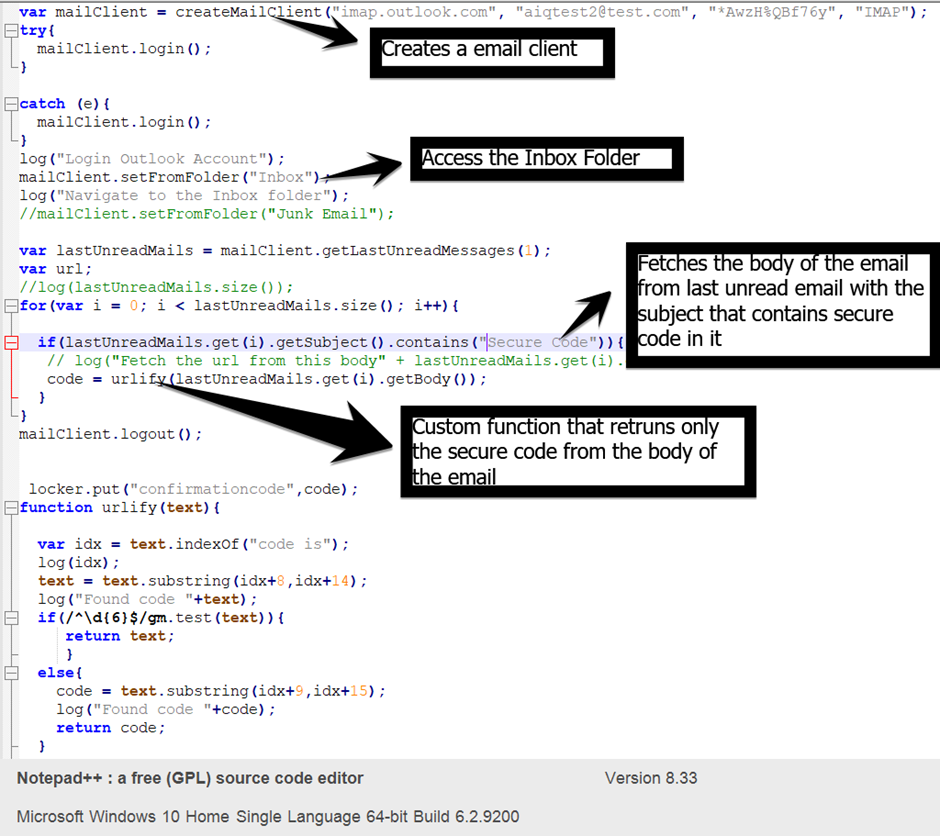
Please refer the below document if the outlook account as 2FA authentication:
href="/books/services-workbench-knowledge-base/page/create-an-app-password-for-an-outlook-account-and-use-in-service-suite-script-to-login-to-account-with-2fa-enabled"How to create an App Password for an Outlook account and use in service suite script to login to account with 2FA enabled.
Note: Below is the spec on AIQ mail client
Mail Client
>createMailClient(String host, String userMail, String password, String protocol)
returns a MailService object.
>MailService object has the following available methods:
login()
setFromFolder(String:folder)
logout()
getLastUnreadMessages(int:quantity)
getAllRecipients();
getFrom();
message.getSentDate();
message.getFolder()
MailMessage byte[] getAttachedFile(String fileName)
· List<String> getAttachments() //You can get a list with all the names of the attachments from a MailMessage and you can get the file (byte[]) using the file name.
Sample code snippet
var mailClient = createMailClient("imap.gmail.com", "myEmail@gmail.com", "App Password", "IMAP");

try{
  mailClient.login();
}
catch (e){
  mailClient.login();
}
log("Login Outlook Account");
mailClient.setFromFolder("Inbox");
log("Navigate to the Inbox folder");
//mailClient.setFromFolder("Junk Email");

var lastUnreadMails = mailClient.getLastUnreadMessages(5);
var url;
var attachments;

//log(lastUnreadMails.size());

for(var i = 0; i < lastUnreadMails.size(); i++){
  if(lastUnreadMails.get(i). getFrom().  contains("Appvance")){
      log("Fetch the url from this subject" + lastUnreadMails.get(i).getSubject());
      log("From "+lastUnreadMails.get(i).getFrom());
      log("Date "+lastUnreadMails.get(i).getSentDate());
      log("Folder "+lastUnreadMails.get(i).getFolder());
      log("getRecipients "+lastUnreadMails.get(i).getRecipients());
      log("Fetch the url from this body" + lastUnreadMails.get(i).getBody());
      attachments = lastUnreadMails.get(i).getAttachments();
      for(var j = 0; j < attachments.size(); j++){
          log("Attachment name: "+attachments.get(j));
          var bytes =  lastUnreadMails.get(i).getAttachedFile(attachments.get(j));
          locker.put("bytes",bytes);
          writeBytes("newBytes.pdf", bytes);
      }
    //code = urlify(lastUnreadMails.get(i).getBody());
  }
 // log("Fetch the url from this body" + lastUnreadMails.get(i).getSubject());
}
mailClient.logout();
Note: Replace the valid Email account to test the above methods.
Outlook Sample
var mailClient = createMailClient("imap.outlook.com", "aiqtest@outlook.com", "password", "IMAP");

mailClient.login();

mailClient.setFromFolder("Inbox");

var lastUnreadMails = mailClient.getLastUnreadMessages(1);

var url = "";

var from=lastUnreadMails.get(0).getFrom().contains("Appvance");

log(from);
Last updated: June 02, 2023
If you have any feedback on this topic, please contact us at documentation@appvance.ai