
Use AIQ Monitors
Use AIQ Monitors
YouUse canAIQ use APCMonitormonitors to monitorobserve yourtarget appbehavior and support execution analysis. Monitors should help explain run health, environment behavior, or otherapplication servers.symptoms without replacing scenario validations.
You
When canmonitors deploy APCMonitor on 'Application Under Test' (AUT) in two ways:help
- Tracking availability or health signals during long executions.
- Comparing
RunapplicationAPCMonitororasenvironmentabehaviorstandaloneagainstservicetestonresults. - Collecting evidence for performance or reliability analysis.
Good practices
- Monitor only signals that support the
AUTtestmachine.objective. - Document thresholds, sampling behavior, and environment assumptions.
- Review monitor data alongside output, reports, and Test Node health.
- Remove
RunmonitorsAPCMonitorthatasnoalongerweb application inside an application server container.
Running APCMonitor as a Standalone Service
The most common implementation of APCMonitor ismap to runmaintained it as standalone service on the AUT machine.
Install java jdk 8 using the following command: sudo apt-get install openjdk-8-jdk
Verify that the latest JRE is installed and verify the version with the following command: java -version
Download the APCMonitor from: https://s3.amazonaws.com/apc-monitor/APC_Monitor_New.zip
Unzip the contents to a folder.
Give full read/write permissions to the folder : sudo chmod -R a+x APCMonitor_New (Linux)
Navigate to the folder with the unzipped contents: cd APCMonitor_New
Run the startup script: startup.bat (Windows)systems or sudouseful sh startup.sh (Linux)
Make sure the Monitor launch script startup.bat/.sh is run even if your servers are rebooted.
In the Scenario builder, navigate to Monitors section.
Click Add Host Monitors.
Add the server name in the name text field and below URL as value: http://<AUT Machine IP Address>:8080/APCMonitorNote: Please make sure there is no "/" in the end of the URL while saving the Scenario, otherwise APCMonitor might not work.Example: http://<AUT Machine IP Address>:8080/APCMonitor will work, while http://<AUT Machine IP Address>:8080/APCMonitor/ will not work.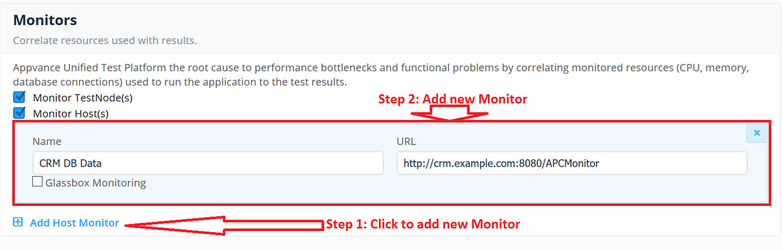
Running APCMonitor as a Web Application
You can implement APCMonitor to run as an web application inside an application server container, such as weblogic, websphere, Tomcat, etc.
When deployed as a web application, APCMonitor will provide system resource metrics such as CPU, RAM; In addition, JVM performance metrics like heap usage can also be gathered in real time.
Download the WAR file of the APCMonitor from: https://s3.amazonaws.com/apc-monitor/APC_Monitor_New.zip
Follow the same steps as above to deploy APCMonitor as a web application.
Last updated: JuneSeptember 26,8, 20232026
If you have any feedback on this topic, please contact us at documentation@appvance.ai