
Tool.jar - APCStepListener class
Tool.jar working with API to create steps and summary steps.
Appvance has four different types of elements in its reports: steps, summary steps, request and details. Steps contain the actual results got from the testing engine (like 1.1.1 and 1.1.2 in below image). Summary steps are containers used to organize steps (like 1, 1.1 and 1.2 in below image). Requests (when present) will be shown as children of steps (like https://www.appvance.com in image). And lastly details will be child of details like the 200 response codes seen in below image.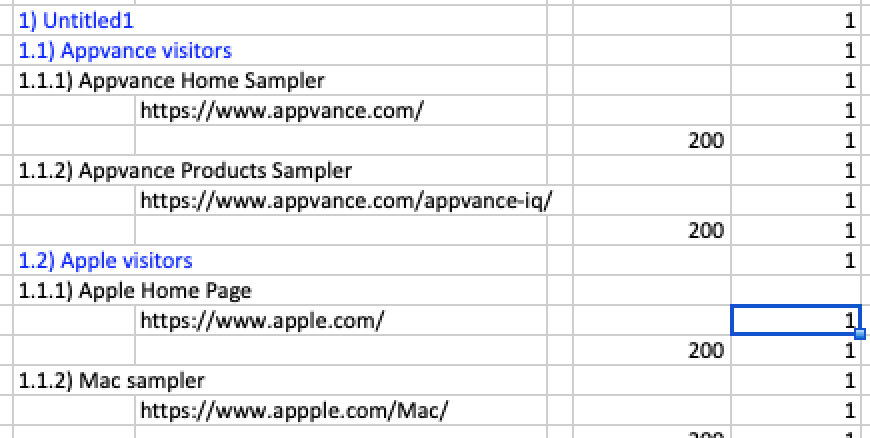
Appvance tool.jar provides an easy way to create steps and summary steps. From a test in Java, TestNG, JMeter, or other java based engines, you can use methods available within the tool.jar to create steps and summary steps that will show in Appvance reports.
The com.appvance.enterprise.tool.APCStepListener class contains 5 methods to work with steps and summary steps.
Step Methods
addStep
public static RuntimeStepInformation addStep(String stepName, long duration)
addStep will add a new step, it requires the duration in milliseconds. Request can be added immediately after the step has been added.
addFailingStep
public static void addFailingStep(String stepName, String theFailure, int duration)
addFailingStep will add a new failing step, it requires the duration in milliseconds and the failure reason. Request can be added immediately after the failing step has been added. A failing step does not mean is summary will fail or the test case will fail.
startStep
public static void startStep(String stepName).
startStep will start a new step. I will end until a new step is started or the scripts finished. The duration will be automatically calculated by Appvance.
endStep
public static void endStep()
endStep method ends a step. It is not required, as starting or adding any type of step will end the previous step automatically.
endFailingStep
public static void endFailingStep(String failure))
endFailingStep will end the current step but marking it as a failure. It requires the duration and the failure reason. A failing step does not mean its summary will fail or the test case will fail.
Summary Step Methods
When working with SummarySteps, 3 methods are available
startSummaryStep
public static void startSummaryStep(String stepName)
startSummaryStep will start a new summary step. For every startSummaryStep called, an endSummaryStep msut be called also.
endSummaryStep
public static void endSummaryStep()
endSummaryStep will end a summary step. Different from endStep this method is always required to end a step, as summary steps can have children. Before calling endSummaryStep(), a startSummaryStep needs to be called.
endFailingSummaryStep
public static void endFailingSummaryStep(String failure)
endFailingSummaryStep ends a summary step and marks it as a failure. A summary step does not mean the whole test case is going to fail. Before calling endFailingSummaryStep (), a startSummaryStep needs to be called.
Failure handling in test cases and steps
Adding a failing step or summary does not mean the whole test case is going to fail. There are some cases when failing a step is expected but the whole test case is expected to succeed. The way to fail a test case is by throwing an exception.
Last updated: June 26, 2023
If you have any feedback on this topic, please contact us at documentation@appvance.ai