
Troubleshoot Database Password Expiration
Troubleshoot Database Password Expiration
MyUse localthis machine'schecklist SQLwhen passwordAIQ gotcannot connect to the database and logs indicate an expired or invalid password.
Recommended guidance
- Confirm the failing account and
Idatabasedidendpointchangebeforeitchangingfromcredentials. - Follow
Workbench,thebutapprovedAIQcredentialstillrotationthinks that it isprocess. - Do not
changed,pasteIpasswordstriedintorestartingdocumentation,bothtickets, or shared output. - Restart or refresh only the affected services after credential updates.
Validation workflow
- Review AIQ and
MYSQLdatabaseservices,logsbut no luck.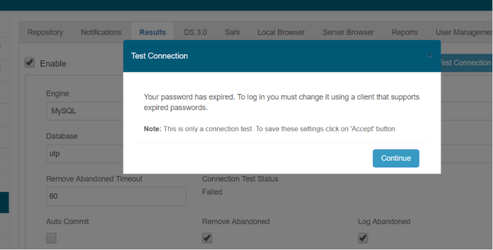
In order to reactivatefor theinstance,exactYouauthenticationmusterror. - Coordinate
gocredentialtoreset with thepromptdatabaseorowner. - Update
MYSQLtheWorkbenchapproved secure configuration location. - Validate AIQ connectivity and
executedocument thebelow.change without exposing secrets.
mysql -u<user> -p<password> --connect-expired-password
then
ALTER USER 'root'@'localhost' PASSWORD EXPIRE NEVER;
and
ALTER USER 'utp'@'localhost' PASSWORD EXPIRE NEVER;
inmy.cnf
It would be necessary to replace
[mysqld]
default_password_lifetime = 180
to
[mysqld]
default_password_lifetime = 0
or
issuingSET GLOBAL default_password_lifetime = 0;
when you are logged in as root in mysql tool, this would set this param for all the schema.
Last updated: JuneSeptember 26,20, 20232026
If you have any feedback on this topic, please contact us at documentation@appvance.ai