
Troubleshoot Database Password Expiration
My local machine's SQL password got expired and I did change it from Workbench, but AIQ still thinks that it is not changed, I tried restarting both AIQ and MYSQL services, but no luck.
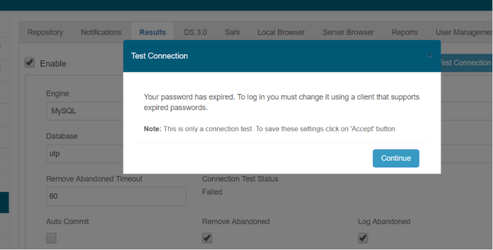
In order to reactivate the instance, You must go to the prompt or MYSQL Workbench and execute the below.
mysql -u<user> -p<password> --connect-expired-password
then
ALTER USER 'root'@'localhost' PASSWORD EXPIRE NEVER;
and
ALTER USER 'utp'@'localhost' PASSWORD EXPIRE NEVER;
inmy.cnf
It would be necessary to replace
[mysqld]
default_password_lifetime = 180
to
[mysqld]
default_password_lifetime = 0
or
issuingSET GLOBAL default_password_lifetime = 0;
when you are logged in as root in mysql tool, this would set this param for all the schema.
If you have any feedback on this topic, please contact us at documentation@appvance.ai
Last updated: October 16, 2026