
Legacy Test Designer Client Icons on macOS
Last reviewed: September 22, 2026
DownloadThis andpage extractis PlaceOnDesktop.zipretained toas youra Desktop
Notice four (4) .command files
The files can be used to easily manage your localolder Test Designer client

ThemacOS. firstCurrent timeAIQ youdocumentation runshould each,prefer supported launch and access methods for the unidentifiedactive developer warning message appearsversion.
Recommended guidance
- Use this only when maintaining an older macOS client workflow.
- Prefer current AIQ access methods over manual icon workarounds.
- Do not treat legacy desktop client setup as current Scenario Editor guidance.
Validation workflow
- Confirm
ClickOK
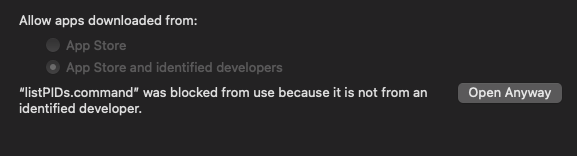
Click Apple > System Preferences and select Security & Privacy
Click Open Anyway in Allow apps downloaded from:
Repeatwhether the stepsenvironment still uses the legacy Test Designer client.
PlaceOnDesktop.zipNote: Legacy Test Designer client references should be consolidated or removed when no longer relevant.
Last updated: JulySeptember 03,22, 20232026
If you have any feedback on this topic, please contact us at documentation@appvance.ai.