
Adding Test Designer client Icons in Mac OS
LastDownload reviewed:and Septemberextract 22,PlaceOnDesktop.zip 2026to your Desktop
ThisNotice pagefour is(4) retained.command asfiles
The forfiles oldercan be used to easily manage your local Test Designer client

The Currentfirst AIQtime documentationyou shouldrun prefereach, supportedthe launchunidentified developer warning message appears
Click OK
Click Apple > System Preferences and accessselect methodsSecurity & Privacy
Click Open Anyway in Allow apps downloaded from:
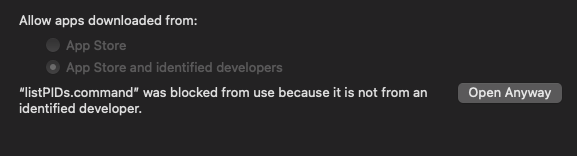
Repeat the steps for theeach active version.
Recommended guidance
Use this only when maintaining an older macOS client workflow.Prefer current AIQ access methods over manual icon workarounds.Do not treat legacy desktop client setup as current Scenario Editor guidance.
Validation workflow
Confirm whetherof theenvironment.commandstillfilesuses(once)the
Note:PlaceOnDesktop.zip
Legacy
Last updated: SeptemberJuly 22,03, 20262023
If you have any feedback on this topic, please contact us at documentation@appvance.ai.