
Check Whether a Machine Is Ready to Run AIQ
Use thethis following informationarticle to determinevalidate whether a host has the statusoperating ofsystem, systembrowser, requirementsruntime, fornetwork, runningand Appvanceresource AIQprerequisites on your machine
The Readiness Check utility requires a few details about the systems where you planneeded to run AIQ components or executions.
What changed in this article
- Shortened the title and replaced “Appvance
IQ.IQ”Uponwording with AIQ. - Converted machine readiness into a concrete preflight checklist for controller, Test Node, browser, and execution needs.
- Added checks for CPU, memory, disk, OS support, browser availability, ports, certificates, proxy, permissions, and log access.
Validation workflow
- Identify whether the host will run the controller, Test Node, browser execution,
theorutilitysupportinggathersservices. - Validate
specificOS,hardwarebrowser/runtime dependencies, network access, ports, certificates, andsoftwareresourcedetailscapacity. - Run
aboutayoursmallmachine(s)AIQ smoke test andgeneratesrecord logs before approving the machine for shared use.
Review note: This page now works as an environment-readiness checklist instead of a compatibility report indicating any missing Appvance IQ prerequisites.
Steps
Sample Output
check.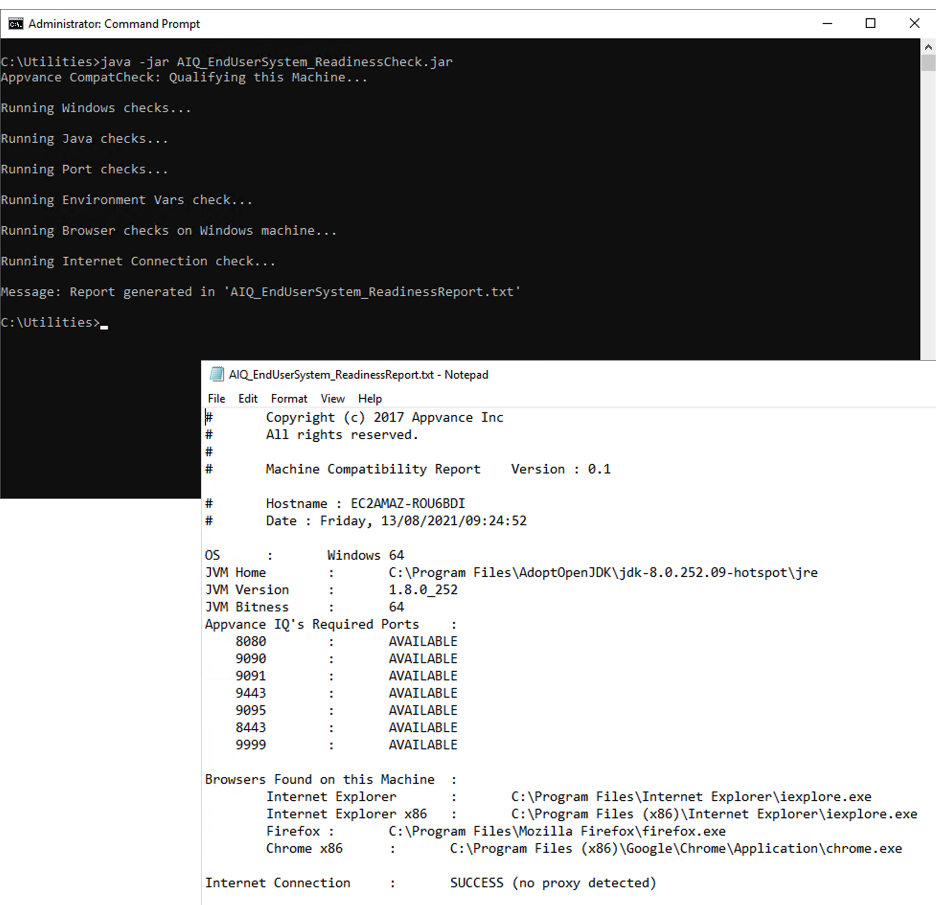
Last updated: October 25,2, 20232026
If you have any feedback on this topic, please contact us at documentation@appvance.ai.