
Validate Color of an Object
This is an example of a script that detects the color of a specific object and then uses conditional statements to compare it to a reference color.
Web Designer Script
This is the AIQ designer test script to accomplish this validation. The script uses the GetCssValue function.
See getCssValue for more information about the function.
The example script uses the Appvance demo site. The object that the script is the comparing color of is a footer which contains the price of an item.
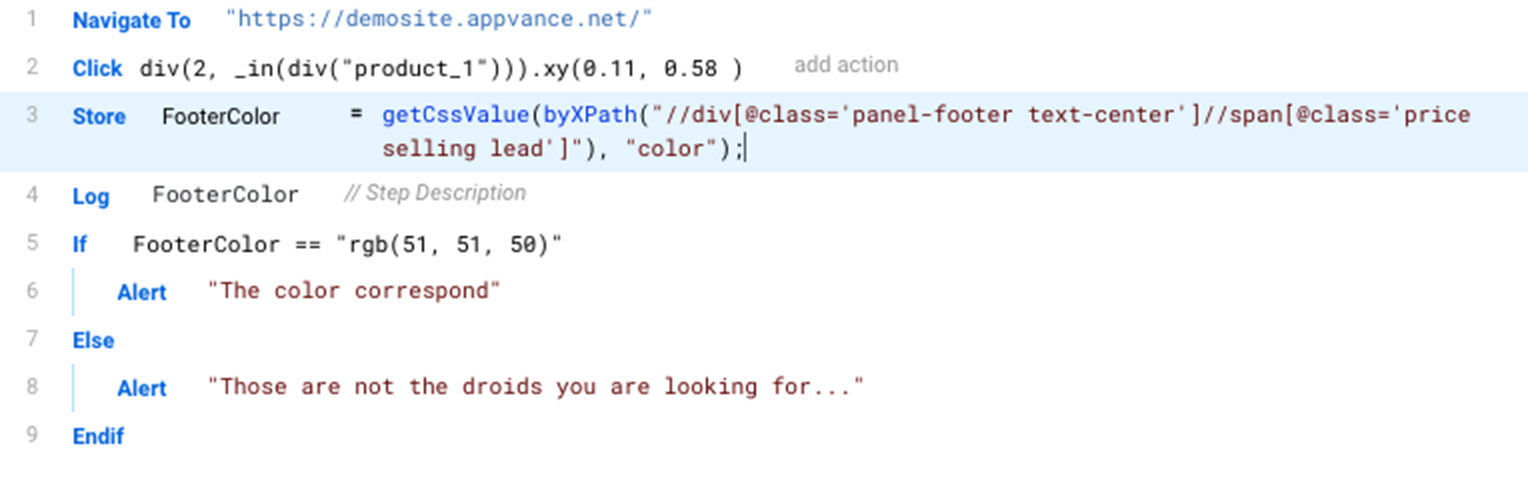
Download a copy of this script from: ColorCheckExample.ds
JS Code
For reference, this is the corresponding java script code for the ColorCheckExample test script.
/**
 * @aiq.webdesigner
 * This script requires AIQ Web Designer
*/
setShadowDOM(true);
navigateTo("https://demosite.appvance.net/");
click(fallback(`div(2, _in(div("product_1"))).xy(0.11, 0.58 )`,
   `div(2, _in(div({'id':'product_1'}))).xy(0.11, 0.58 )`,
   `div("panel-footer text-center").xy(0.11, 0.58 )`,
   `div("$15.99").xy(0.11, 0.58 )`,
   `byXPath("//div[@id='product_1']/div/div[2]").xy(0.11, 0.58 )`,
   `byXPath('//*[@class="panel-footer text-center"]').xy(0.11, 0.58 )`,
   `byXPath('/html/body/div[2]/div/div/div/div[2]/div/div/div[2]').xy(0.11, 0.58 )`,
   `byXPath("id('product_1')/div[@class='panel panel-default']/div[@class='panel-footer text-center']").xy(0.11, 0.58 )`,
   `byJQuery('div[class="row"] > div[class="col-md-3 col-sm-6 col-xs-6 product-list-item"] > div[class="panel panel-default"] > div[class="panel-footer text-center"]').xy(0.11, 0.58 )`,
   `byJQuery('#product_1 > .panel.panel-default > .panel-footer.text-center').xy(0.11, 0.58 )`));
var FooterColor=getCssValue(byXPath("//div[@class='panel-footer text-center']//span[@class='price selling lead']"), "color");
log(FooterColor);
if (FooterColor == "rgb(51, 51, 50)"){
   alert("The color correspond");
}
else {
   alert(“Those are not the droids you are looking for");
}
Last updated: February 25, 2025
If you have any feedback on this topic, please contact us at documentation@appvance.ai