
How to encrypt scenario's ec2 cloud config files using API calls
There are now options in AIQ UX to encrypt different files with sensitive data needed for CICD pipeline jobs as seen in the screenshot below for ec2 cloud config files /AppvanceServer/rest/file/encryptFileContent call. Below you will find examples on how to encrypt ec2 cloud files used in scenario to start and stop ec2 instances using the en. If you need to encrypt the CICD credential file used to upload dashboard to Amazon S3 service can use the same encryptFileContent HTTP call but in this case the payload is not a JSON but the simple text of that file.
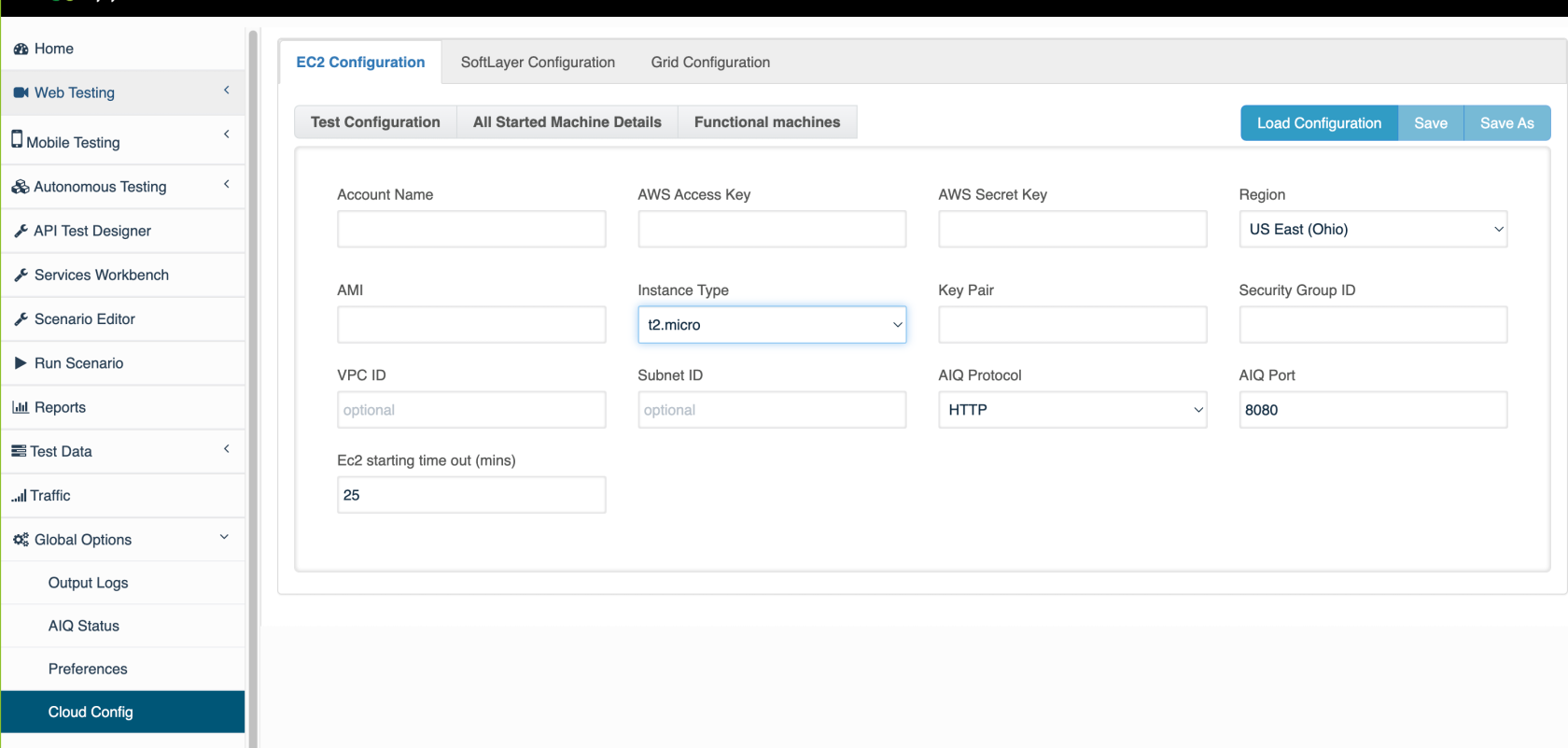
Sometimes you need to be able to encrypt files in an automated way using CURL or service suite files to rotate the AWS credentials. Here we list two ways of achiving the same using AIQ Rest API calls.
EC2 Cloud config sample unencrypted structure
<?xml version="1.0" encoding="UTF-8"?> <cloud type="EC2" version="1"> <config-param key="AIQProtocol" value="http"/> <config-param key="AIQPort" value="8080"/> <config-param key="Ec2Timeout" value="25"/> <config-param key="AccountName" value="appvance"/> <config-param key="AWSKey" value="DUMMYDUMMYDUMMYDUMMY"/> <config-param key="AWSSecretAcessKey" value="dummDUMMYDUMMYDUMMYDUMMYDUMMYDUMMY/> <config-param key="AMI" value="ami-0dfc3da39bb6f571c"/> <config-param key="InstanceType" value="t3a.xlarge"/> <config-param key="KeyPair" value="AppvanceOps"/> <config-param key="Security" value="sg-00d4ef05804c7a117"/> <config-param key="AWSRegion" value="us-west-1.ec2.amazonaws.com"/> <config-param key="vpcId" value=""/> <config-param key="subnetId" value=""/> </cloud>Using CURL
By issuing the following sequence of CURL commands in a Mac/ubuntu terminal you can grab the resulting encrypted from the resulting JSON response.
Please replace the AIQ controller DNS and the AIQ user credentials, as well as the actual XML text that you want to encrypt.
curl -c cookies.txt -X POST -d "username=appvance&password=appvance" http://localhost:8080/AppvanceServer/rest/admin/logginForServices -H "ContentType: application/x-www-form-urlencoded"curl -b cookies.txt -X POST -d "content=Replace here the xml of the ec2 cloud file" http://localhost:8080/AppvanceServer/rest/file/encryptFileContent - H "Content-Type: application/x-www-form-urlencoded"For Windows OS, you must to modify curl to curl.exe in the above code.
The response for the second curl (encryptFileContent) will be similar to
{"data": "pma9QDLKQn1OMlkce6L4AHwwW8d/xS3yZuvdeUTPrnCv4s3kNSGzTGicu4tuCTvusxiUfNSVL7A6Z5Br3/lW248GS3j8WA05EF7w9sWogHyC5L2JLo/rHAJqb6qI/NGq4ZE9hy3sobAKkVq7sadFUH3Fg/Pz+OCD94J/PR5X9CbZ9mJbcctEh73+kqZLf8v2lrgCYibSs957WJUub0sPC3E9XDdgjT53y0GafA8xiIbHbDxaEL4WikoFqglzjLAvkY3h4u/Pcb412XjVNwOUCkx51ML294jJRJs7ZQgFYbunLOxOPhJ2R9xzbaLjqiBXaiic9VvNmbgJX5RBdcWnw4js6/+wDFkTSHgHrht6KxmwUG7ASghNz8pujjf4IOZX2JGPerxqAfD++M5ilKf5f2buwYZiBQBFyNCW9F7H9Rwu+y2q2M73NZ6WIxzCmQfMeL+ZHHWSFTxV1OeSPdeaXCtSDwWrY7eKWS0EvQYtPmKRDwiAnkInTDZSBDHnl2WNnZTAY1x/izUdSlL7BldjV0m9X3jP41zIEiUuo6wXUqx5BhLT7a22lVQiSfIK4DZqENvjMDrnY0dHBLi2mX40kbALfsxrYjj3cm1PI3cVkdUs1skM0qOL8ZsOZnzmqkUTshoPoxjKvmN32KaN9Py6UdaoEOHBIekmR7K2cottKvbyBuPQlWSbU8/W2/bMWxO3UDPtHDvYiVHLQax+XhuNeOOp5Lfai9jWED3WAdFXXy7KpXJXh6dyx0dKTf1SI+F8IR4w4OPJcG2kSSuE0yzbH0bjxXDKiFiozwMYSJrWQobqBHkdX/4V1nw2vUHjI6FASt3c3aWId417LLkZzEFQxiv3bfEAnSwkCTp0raw2jW/O4aHpgpDwv0YqCtnHPZHN0tvkOI8Jd0Prf2fMnRIdzjj+8lWGOd1UtXPgIZPRdxXhippZA8Nejom0cjOsQt+NrW8YE4c6o/39JRW56e9M3Un6Kf/MWq1k4a62HQBChGHAF81+6OWc7HGzN+HSVPWPoRQv8Rgk+ULAcX+2U2mO4w==","success": true}Just grab the data contents in the above JSON and save it as a .cloud file name.
Using ServiceSuite
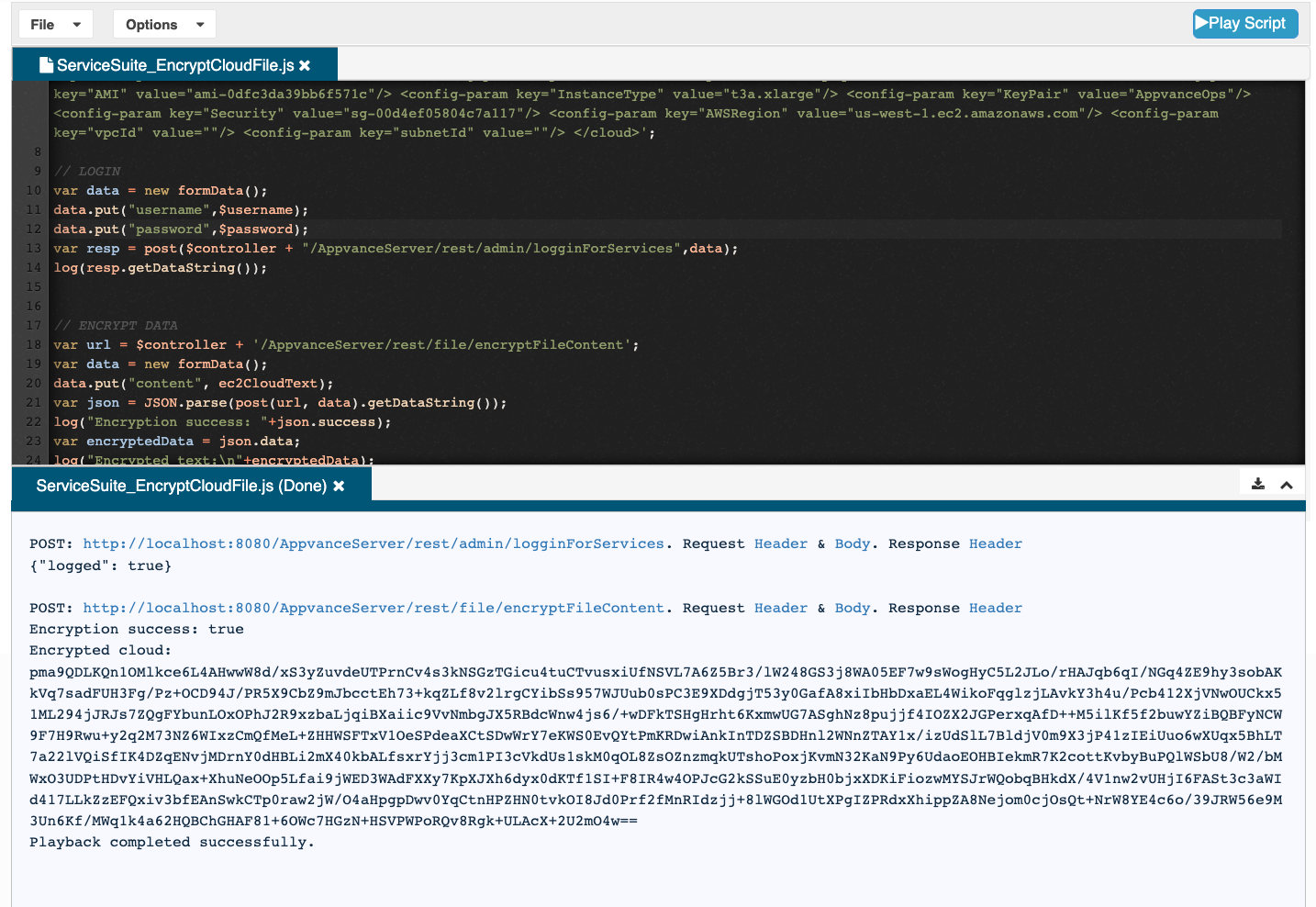
Here is a service suite script that will make the same calls seen above in the CURL example:
// MODIFY THIS TO POINT TO YOUR CONTROLLERvar $controller = "http://localhost:8080"var $username ="appvance";var $password ="appvance"; // THIS VARIABLE CAN BE USED TO CONSTRUCT THE EC2 CLOUD XML AS A STRING. PROVIDED BELOW SAMPLE DATA:var ec2CloudText = '<?xml version="1.0" encoding="UTF-8"?> <cloud type="EC2" version="1"> <config-param key="AIQProtocol" value="http"/> <config-param key="AIQPort" value="8080"/> <config-param key="Ec2Timeout" value="25"/> <config-param key="AccountName" value="appvance"/> <config-param key="AWSKey" value="DUMMYOWGVPHYCUXYASDF"/> <config-param key="AWSSecretAcessKey" value="dummyxqmHB6IFeJ3KAar7zh3l7Id4AeQR8Uasdf"/> <config-param key="AMI" value="ami-0dfc3da39bb6f571c"/> <config-param key="InstanceType" value="t3a.xlarge"/> <config-param key="KeyPair" value="AppvanceOps"/> <config-param key="Security" value="sg-00d4ef05804c7a117"/> <config-param key="AWSRegion" value="us-west-1.ec2.amazonaws.com"/> <config-param key="vpcId" value=""/> <config-param key="subnetId" value=""/> </cloud>';// LOGINvar data = new formData();data.put("username",$username);data.put("password",$password); var resp = post($controller + "/AppvanceServer/rest/admin/logginForServices",data);log(resp.getDataString());// ENCRYPT DATAvar url = $controller + '/AppvanceServer/rest/file/encryptFileContent';var data = new formData();data.put("content", ec2CloudText);var json = JSON.parse(post(url, data).getDataString());log("Encryption success: "+json.success);var encryptedData = json.data;log("Encrypted text:\n"+encryptedData);After executing this script the encrypted contents are in the encryptedData variable. Then you can use writeText service suite command to write it to a file in your repository.
Last updated: April 28, 2025
If you have any feedback on this topic, please contact us at documentation@appvance.ai